ToxicTranceChamber ToxicTranceChamber

OK BRANIAC NOW WHAT??

OK BRANIAC NOW WHAT??

K I downloaded it so now what should I do?
42,072 views 137 replies
Reply #51 Top
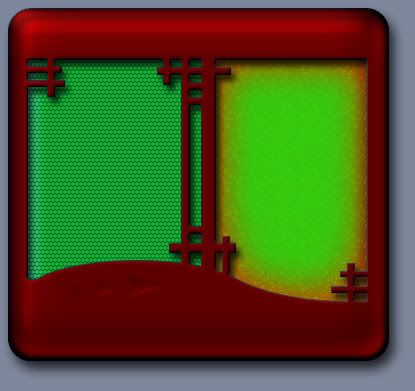
Blood and toxic....hehe,thats gonna look like christmas...    

If you havnt got it yet,I suggest you go get the start menu PS file I uploaded to graphics...you can piddle with the settings and layers...insert you splattersinto the body or layer them on top(with glistening shine,drip,drip)

Toxify another layer...but watch that green and red together...very merry holidays.  
Reply #52 Top
Yes I did waaay back when u said about it I know I already thought about the xmas thing lol. I liked the concept though and I tried it out together with a bunch of other ppls stuff to see if it did or not bc I wanted it to be my desktop theme. Anyway, I guess I'm still a lil confused. So I should do the biggest part of the menu 1st? Is that what ur saying?
Reply #53 Top
Might want to use your splatter image to create a pattern.Then you can use it on any layer you like without it having to be a layer

Once it is a pattern you can use opacity,blend modes and it will be scalable.(sizable)
It can also be dragged around WITHIN the layer.

Define pattern is in edit>define pattern(whatever part of the image that is selected or the whole image...it will tile it for you so you might want to make it a seamless tile...(depends on how large it is)
I think PS help has instructions for making them seamless.

Having fun yet?  
Reply #55 Top
Well I still feel like the lil guy who is bashing his head off the keyboard lol. But I thank you so much for taking the time to help me out! What a sweetie
Reply #56 Top
I'm saying finish your entire Start menu before you start replacing images in Skinstudio,then cut out the sections you need...otherwise it will all just look like individual section stuck together(like XP;))
When I do start menu it is one complete graphic,then sliced up.(bloodless slicing)  
Reply #57 Top
I'm still not comprehending certain things but I guess I'll just have to mess around a lil and learn. Is it the "image for dialog window bgs" where I want to start then?
Reply #58 Top
brushes are more for art but you could use them to paint details on a separate layer...I dont use them...but I do use the custom shapes tool(buttons and stuff) and the style them.

sweetie?,you left out handsome.  
Reply #62 Top
dialog bitmaps,no thats much later...stick to the start menu for now...finish astart menu in photoshop(the whole thing)then we will cut it up and set the margins and text colors.  
Reply #64 Top
you can apply anthing you do at any time...your not going to mess up the skin,you just may not like what you see and have to change it.  
Reply #66 Top
Ok so I don't need to click on anything in ss for now just open a pic of a start menu in ps?
Reply #67 Top
damn edit keeps refusing me,makes our post look out of order...sometimes I'm responding to a post 2 replys back  

yes,do the entire start menu in PS...then cut it up...this is where I need a ss,damn Image shack screwed up my login.

Will see if I can fix.Does image bucket allow full resolution images?
Reply #68 Top
Photobucket u mean really big ones??

your talking to a blond who just started usin a computer last yr lol
Reply #69 Top
HEY! lol I have that lil grimlin thing its in my fish bowl lol


troll


and I hope he has an air supply
Reply #70 Top
Hope this works
Reply #71 Top
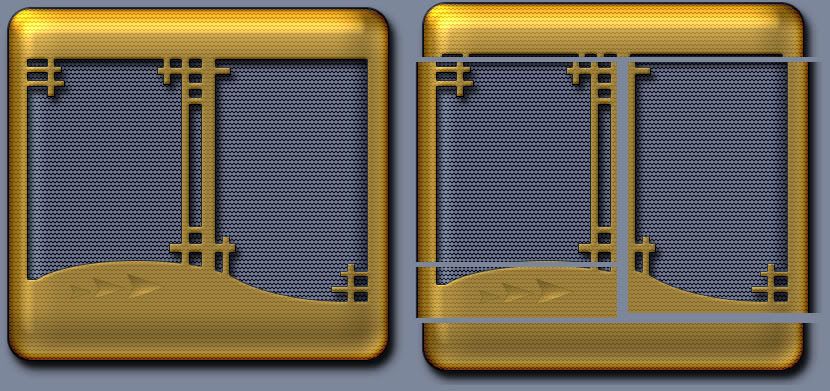
Cooooel! Full start menu image on the left,cutup on tha right.  
Reply #72 Top
2 middle sections can be cut shorter,then tiled...but hopefully that makes things clearer.  
Reply #73 Top
Oh ok, so I make it look all pretty as one big piece and cut it into those sections. But how did u get the pieces that are cut out (like in the 1st pic,not the cutting afterward)so perscise? Do ya know what I mean?
Reply #74 Top


hehe aaaaaaaaaaaaaaaaaaaaaaah!
Reply #75 Top
If you look at the PS file you can see they are just 2 shapes with styles applied(thats how you can make really quick changes to the appearance.They are just solid grey underneath.

Creating shapes is just something you have to play with,Mostly altering them with the selection tool and adding or deleting some of the shape.
The custom shapes tool has alot of ready made shapes and you can download zillions more.