Reply #1 Top
a) Downloaded what?
b) Less caps please
c) IR Braniac?  Or braniacs in general?
Reply #3 Top
hehe,Braniac...BRAINIAC! 
FO,if you want a start menu photoshop file to work with and cut up go here https://www.wincustomize.com/skins.aspx?skinid=878&libid=18
You dont have to use it,but it might give you some photoshop pointers and speed things up.

You can change colors,textures,shape...anything you like.  

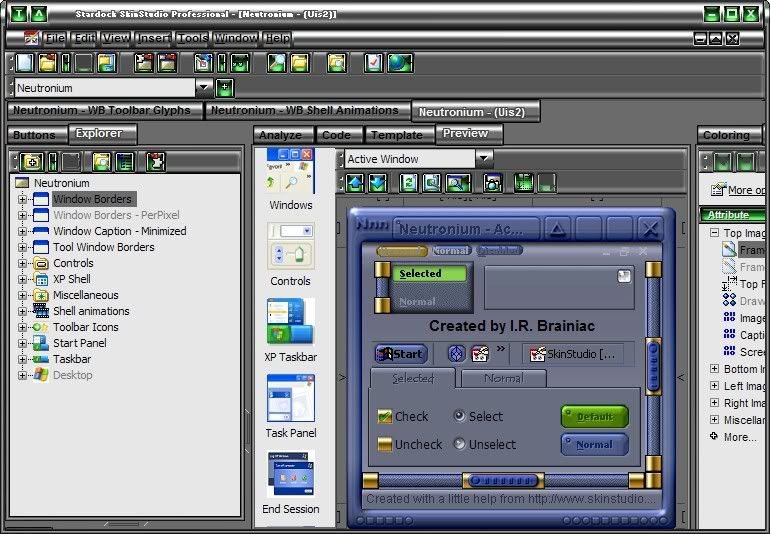
Let me open Neutronium in Skinstudio and I will be right back.
Reply #4 Top
Ok, but just so you know, I really don't know too much about anything,just a little bit of code to make web pages are you sure you really want to get into this? LOL


HEY LOOK HE SPELLED IT WRONG TOO! LOL Ok now I don't feel so stupid
Reply #5 Top
First you need to get Skinstudio setup if you havnt already.
Open Windowblinds config window and go to 'change how my applications look'...delete the default skinstudio exclusion if you see one and add your own exclusion for Skinstudio.exe

The default one dosnt work right and you dont want WB skinning Skinstudio while your working.It will show you your current classic colors tho so thats cool.

Next go to Skinstudio's menubar and drop down the tools menu and open the preferences dialog.Set your name and email etc...
Put photoshop as the first image editor.

Open Neutronium and go to file>save as>...enter the name you want for your WB.

Open your new WB and look at the info panel to the right.(section attributes)...if the author information etc... is wrong,put in your info and then save the skin.(file>save)

Now its YOUR skin  

Go to tools again and windowblinds>normalize image file names.Apply the skin and see if it is still working.(apply button next to import)

You should be ready to start making your start menu.  
Reply #6 Top
I have to go setup an image shack account in case I need to insert images here.BRB  
Reply #7 Top
Braaaaains! BRAAAAAAAINSS!
Reply #9 Top
Wb config(where you change skins)...'change the look of a particular application'
delete the default Skinstudio exclusion. Add it back manually.
Reply #10 Top
Ok I opened Neutronium, but when I click on file there is no save as in the drop down menu it has open and import and I opened window blinds but what should I delete? I had already deleted a few skins when I 1st got it...
Reply #12 Top
In that same wb config window...'add per application setting' a navigator window will open,go to the Skinstudio application folder and click on sknstdio.exe...check the box that says 'ignore this app and do not skin it'(first checkbox)

This way WB dosnt try to skin Skinstudio  
Reply #13 Top
Skinstudio menubar(top left)...file>save as...just above zip for distibution  

Just curious,what version of SS do you have?
should say at least 5.0.1 build 1112
Reply #14 Top
Ok I checked ignore this app...
And I see the save but no save as but its not highlighted So what did'nt I do now LOL

And yes thats which ss it is...
Reply #16 Top
Maybe because its got my info in the attributes section.try changing the author info and email then see if save as works...I will try it with someone elses wb.    
Reply #17 Top
File>save as...works here when I open Ares...(Mike B314)
Close and reopen Skinstudio,reopen Neutronium and try again.    
Reply #19 Top
      Just saw your image...Skinstudio should not be skinned.Who is hosting your images?
Try using the hotkeys ctrl shft s
Reply #20 Top
Yeaaaa! Ok I got it, when I put in the email and name I did'nt click each apply button under each line just the one at the bottom


Reply #22 Top
May want to bump your resolution up as far as you can stand it,gives you more room to work(1360x1080 here,hehe)

So it is saved now as a new name?Reopen it and do the normalise image filenames I mentioned above,apply and see how its working.
Reply #23 Top
After you normalise,hit the browse button on the toolbar,it will open that skins folder and you can see all the file names have been changed.

Here is a neat plugin so you can see thumbnails of .tga's http://greggman.com/pages/thumbplug_tga.htm

typing the new name for the image files is wierd,it dosnt like spaces,and you kinda have to get clever with the typing...you will see...  

My new name for this skin Neutroniumgrey.Wouldnt allow for a space,probably for the best.  
Reply #24 Top
oK THE SKIN STILL WORKS AND i DOWNLOADED THE PLUG IN... OOps caps

by the way I &hearts your brain guy, lol I seen him be4 I joined I thought he was cute
Reply #25 Top
THATS GREAT oops  That plugin helps a lot when browsing for a .tga image.Skinstudio will take .png's that you make and auto convert them to .tga's and viceversa when you click edit in skinstudio(thats also why you set photoshop as the default editor,so images open directly in PS)

As you edit .tga files you will see in the skin folder you have 2 of some images...1 .tga and 1 .png...Skinstudio only uses the .png and I think when you finally finish,it only zips the files it needs...if not,when you get thru,just select all .png's and delelete,then zip for distibution(we have a ways to go for that yet   

You can see the difference between a .tga thumbnail and a .png.
