ToxicTranceChamber ToxicTranceChamber

OK BRANIAC NOW WHAT??

OK BRANIAC NOW WHAT??

K I downloaded it so now what should I do?
42,073 views 137 replies
Reply #26 Top
When my 30 days is up and if I decide not to purchase photoshop can I use the others that I have? What filters and things are a must have when making skins?
Reply #27 Top
the avatar?Yeah he's a real lady killer...Mutant of Metaluna from This Island Earth.    

Sometime before you publish the WB,you gotta make sure any info relating to me is changed to your stuff.(the exception being the toolbar icons,they may be used by anyone...feel free to make your own if you want,theres only about 100.  )
Reply #29 Top
Gaaaah!I've got post lag.    
other editors can open PS files but they will never do it perfectly.
I'm using PS7,upgrading is out of the question for now.
Some people swear by Paintshop pro,its probably the closest to PS and cheaper.

If you dl'd the start menu file you will see its not filters...its all layers and styles.  
Reply #30 Top
You open photoshop and design your start menu.  You can see how I do them,a single image that gets cut into 5 sections(more on that later)

This gives your graphics an integrated look instead of parts stacked all together.

So...got any ideas for a theme?A well designed Start menu will give you all the image ideas you need for the rest of the skin.(and make it look professional and consistent as a whole)

OH,what did you name your new skin?  
Reply #31 Top
You can do amazing things with just a few simple shapes and styles.  

Keep in mind,the middle part of the programs and places graphics will stretched or tiled depending on how many programs someone has in their start menu.If you get too crazy in the middle it aint gonna look good.  
Reply #35 Top
If you mean the layer style dialog(double clicking the layer)you can do a color overlay...play with the opacity and blend modes...many neat effects are available with blend modes.  Plus you make as many changes as you like while there and even save them as a new style.AND you can always go back and edit them later.  
Reply #36 Top
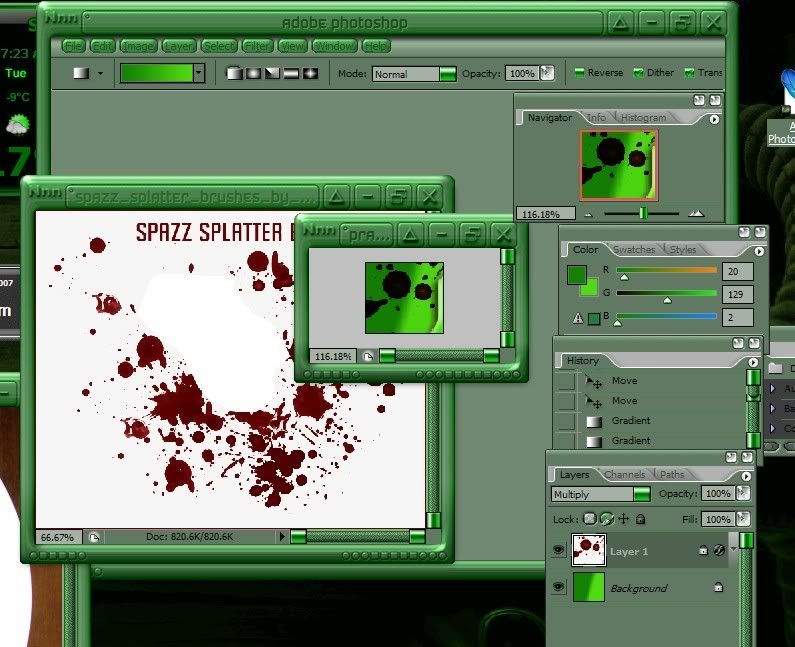
Ok so is this what I do then....

I just basically click on what part I wanna change in skin studio, then once it open in ps, do whatever with it? I'm a little confused, what if I wanns use a certain piece of a picture in one area but something else in another? Not sure what yet lol, but I think I got some splatter going lol
Reply #37 Top
While that dialog is open,no matter how many changes you try,your history section dosnt fill up with extra states.  
Reply #39 Top
So I took a part of a pic removed the bg and added it to the piece of wb how do I change the color of just the splatter?
Reply #40 Top
That depends,are you just replacing the individual pieces or do you have an entire start menu to cut up(the best way)

Once you have a whole start menu,your gonna slice it into the sections you want.User pane,Programs,Places More Programs and Logoff area.

Easiest way to slice a graphic is to make new image with all layers from the start menu merged.

ctrl a(select all),edit>copy merged>ctrl n(new document),ctrl v(paste)

Now you have a single layer...Use the select tool to select the User pane area of your image,right click and choose layer by cut.Repeat for all 5 sections and you have your pieces.(once cut you can turn on and off each section easily to copy to the image you opened from Skinstudio)

Image size of the original must be changed to the size of your new graphic first.  
Reply #41 Top
Post 35 do the color overlay bit,or just do a hue and saturation adjust with that layer active.That is permanent,the color ovelay trick can be adjusted at anytime because the graphic hasnt actually been altered.
You need to turn off skin colorisation,or did you recolor the skin?  
Reply #42 Top
All I did was click on a piece and once it opened in ps I cut the blood from the pic added it to the pic from wb removed the white bgf then after that I just started to try and change the color of the blood but ended up changing all of it, I did'nt save anything though
Reply #43 Top
Ok now I'm gonna sound real stupid but how do I get to post 35? I see we are towards the top of the list but I guess theres another I'm not seeing. LOL I'm trying to do 3 things that are all new to me! WB, PS and navigating wc...
Reply #44 Top
I'm sorry...reply 35...in our thread DOH!  

I meant why is the whole WB green...its normally bluish,did you already recolor the whole wb or is colorisation turned on in WB config?
If its on,turn it off...your not getting the real colors of your work after you apply the skin...  
Reply #45 Top
hehe,Braniac...BRAINIAC!


I've always thought of you as a regular guy
Reply #46 Top
Oh no it's still blue in the ss,(like in the 1st pic I posted) I have mine set to green yes, but the piece I was messing with I changed to green somehow in ps
Reply #47 Top
Dont worry about screwing up,we all did many times in the beginning...you can always start fresh.  
Reply #49 Top
a regular guy


Groannnnnnnnn