ToxicTranceChamber ToxicTranceChamber

OK BRANIAC NOW WHAT??

OK BRANIAC NOW WHAT??

K I downloaded it so now what should I do?
42,074 views 137 replies
Reply #101 Top
And thank you Skinned Alive I was using paint shop, but I downloaded that free program to try it out too!
Reply #102 Top
Sorry I took so long ,I was busy skinning.  

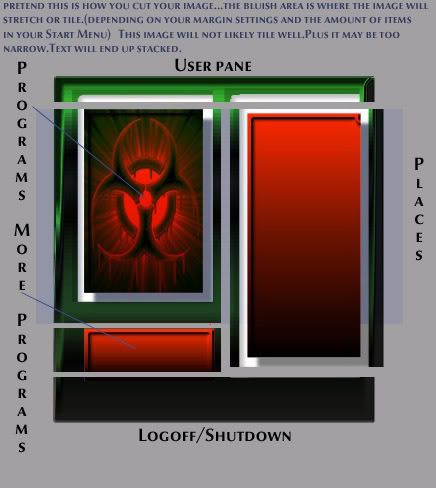
You could use what you have,but I dont think your gonna like how the 2 middle sections look after you set your margins for tiling or stretching.

Middle areas should (in a perfect world)have some portion that looks the same no matter how large or small the start menu gets.
Stretching some images that have detail distorts them badly...tiling just repeats whatever is between the margins.

Your making progress...cut the image and try it...you will see what I mean...you can always change it if you dont like it.  
Reply #103 Top
If you want to use the radioactive symbol in your start menu,move it to the lower portion of the places section and set your margins above the top edge of the symbol...that way it wont get distorted.  
Reply #104 Top
The picture is worth a thousand words....the blue area in reply 102 is the part I have been fighting with...the left programs side and the top left edge are close but no cigar...Thanks IR for taking the time to do this...there are others watching
Reply #105 Top
And thank you Skinned Alive I was using paint shop, but I downloaded that free program to try it out too!


Anytime Alicia  

The picture is worth a thousand words....the blue area in reply 102 is the part I have been fighting with...the left programs side and the top left edge are close but no cigar...Thanks IR for taking the time to do this...there are others watching


Ah heck TA, it's finally getting to the point of having to use reference numbers.
Next we'll be using articles, sections, and paragraphs.
Uhh look at Reply 1215, Article 7, Section 2, 3rd paragraph, and you'll see herein...  

Reply #108 Top
Ok now I'm gonna sound real stupid, but how do I cut it up??


I have been waiting patiently for you to ask that so I wouldn't have to
Reply #109 Top
Copy the image as a whole to a new image.(no extra layers,just the entire menu as a single image)(select all,copy merged)
On your new image Use the selection tool and select the part of the image you want to use for the User Pane and right click ans goto new layer via cut.
Repeat with all the pieces you need and you have each section on a separate layer

Open SS and hit edit for the piece you want to change...place the appropriate layer from your cut document into the section you are working on and delete the original image layer.That leaves only your new layer.
You will have to resize the image you are replacing to the new images size first.
Save it,but leave it open in case you want to change it.

Go back to SS and set your margins for tiling or stretching.

Do all the others and you will be ready to do the More programs arrow,Item mouseover and logoff buttons.  

git 'r' done   
Reply #111 Top
I forgot to say,while setting the margins also set the size parameters to match your graphic size...or the size you need it to be.Margins really come into play then.  

me waves back a tawoods...hehe   
Reply #112 Top
>>>(tripping in)...ok, who left the *$&#*& sehlat laying there???

Thanks for your help on the cutting job
Reply #113 Top
  
Reply #116 Top


On your new image Use the selection tool and select the part of the image you want to use for the User Pane and right click ans goto new layer via cut.
Repeat with all the pieces you need and you have each section on a separate layer


Ok I'm lost, what do u mean user plane and right click, I know what right click it but I'm confused of what it has to do with the start menu...
Reply #117 Top
you two get a room   


JK..its great to see more female skinners

Reply #120 Top
you cut it fine...load the pieces into SKS...Where your gonna have trouble is with the image stretching on the programs image and the places image...it will work but you may not like the results.  

It all depends on how many programs you have in your start menu.
Reply #122 Top
I had also made another one with rounded corners, well how do I cut it up w/o having some of the white background in it? The other one was easy b/c it did'nt have rounded corners...
Reply #123 Top
save the individual pieces somewhere as separate images and open whatever skin you are working on and import your graphics for each section by browsing to them.

Rounded corners have to be magic pink for regular windows and translucent .tga's or .png.s for per pixel.(your pieces have to be on a transparent background...not white.  
Reply #124 Top
You can drop your image on a magic pink background and the corners will be pink.

Watch for antialiased corners on magic pink...you will get partially pink edges.
Reply #125 Top
You should always start any graphic on a transparent background...a layer by itself on the bottom...if you dont have one...add a new blank layer and drag it to the bottom of the layer list.