

Frogboy Frogboy

WindowBlinds 5 Preview Guide

WindowBlinds 5 Preview Guide

Skin your Windows GUI in all new ways..

Version 5

Preview Guide

Our story so far..

WindowBlinds is a program that can completely customize the Windows user interface (title bars, star bar, push buttons, scrollbars, etc.).

Since its initial release in 1999, 4 versions of WindowBlinds have been released.  When Stardock began working on WindowBlinds, no one else had ever attempted to do something like it.  Getting it to work on the various versions of Windows was a real challenge and in early versions, performance was sacrificed to attempt to gain some level of stability on those older operating systems.

In 2001, Microsoft implemented a new look into Windows XP and used a GUI architecture that worked similarly to how WindowBlinds worked.  Stardock was able to make use of that architecture with WindowBlinds 4. At the same time, video card vendors were starting to optimize their drivers for Windows XP.  As a result, by WindowBlinds 4.5, the program not only could make Windows look terrific, it could make Windows run faster.  By caching drawing via the card's video memory, WindowBlinds could substantially increase the rate in which window resizing and repainting occurred. 

Users continued to request new features. Two features were at the top of the list: First, alpha blended title bars and borders.  That is, title bars and borders that could blend in to whatever was behind them to eliminate jaggies and allow skins to be semi-transparent like a piece of glass.  Secondly, user requested the elimination of wbload.exe, the process required to manage the WindowBlinds skins. 

After two-years of effort, Stardock is about ready to deliver WindowBlinds 5 which can produce glass/alpha blended effects on Windows XP with virtually no slow-down (on a modern video card) and now makes use of some built in system APIs to manage WindowBlinds visual styles which allows for the elimination of wbload.exe.  WindowBlinds 5 is effectively a native part of Windows XP.

Glass Effects
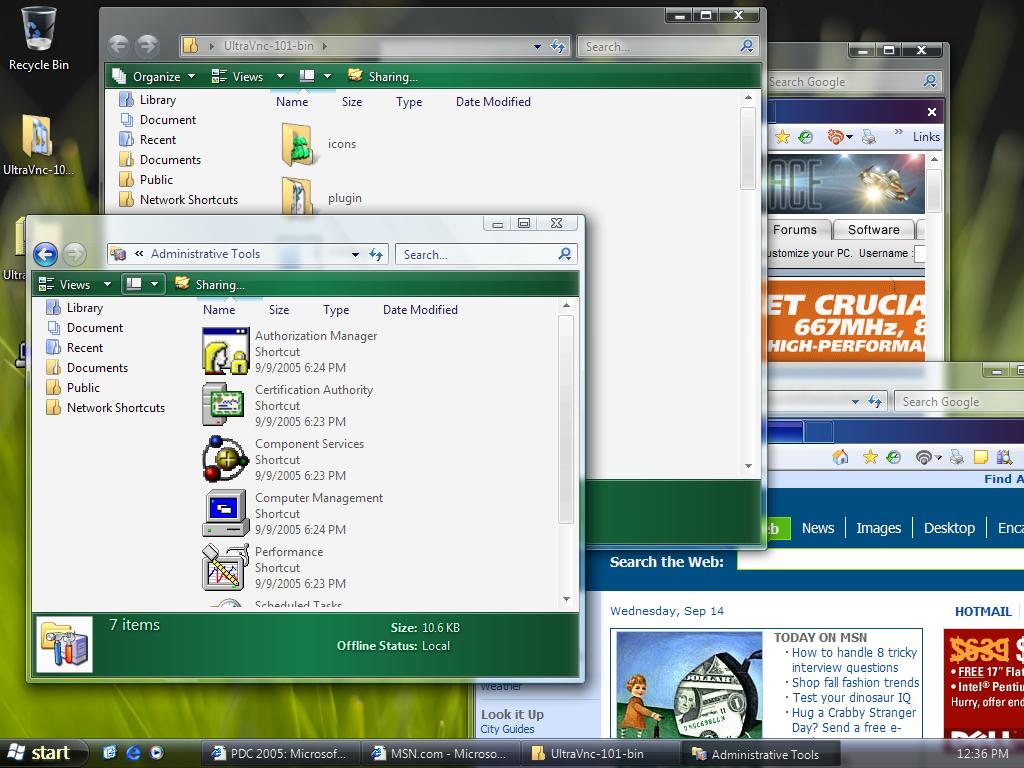
 
Left: Windows Vista, Right: Windows XP with WindowBlinds 5 Beta.

When user first began seeing screenshots of Microsoft's cool new Windows Vista with its cool glassy effects, many wondered if the same thing could be done on Windows.  Most technical people (including many at Stardock) believed that having glass effects on Windows XP was essentially impossible to do with any kind of decent performance.  On Windows Vista, the entire desktop is composited as a single 3D surface (like you'd see in a modern PC game).  That means on Windows Vista, effects get the full benefit of your modern 3D graphics card.  On Windows XP, that isn't the case.  What makes WindowBlinds 5 so special is that Stardock managed to find a way to bring glass effects to Windows XP yet still have a high level of graphics performance (i.e. moving and resizing windows).  A video card with 64 MB of video memory from ATI or nVidia should be more than enough to get good performance.

More than Glass

While making Windows XP look like Windows Vista is nice, it's not the reason why the alpha blending effects were developed.  Skinning, as an artform, really relies on giving artist as much freedom as possible.  Today, alpha channels (different levels of visibility) are a basic part of virtually any graphical element. So to force tile bars and borders to be either totally visible or totally transparent was very limiting.  For one thing, it means that there's jaggies on the edges of skins.

Consider Windows XP's UI:

See the jaggies?


Look very closely at the edges and you see that they try to blend in.  It's a subtle effect but overall allows the operating system to look more smooth, more polished. Combine glass effects and anti-aliasing and you can get some really neat stuff:

Screenshots

This is Stardock's Aura Skin.  If Stardock were making an operating system, this is the design it would go for.  It comes with WindowBlinds 5.


This is StealthOS.  It too comes with WindowBlinds 5.


This is 5imple - Alpha edition.  As you can see, WindowBlinds 5 can still change colors of your GUI, even on glass.

Getting WindowBlinds 5

WindowBlinds 5 is in beta and will only be available on Object Desktop until it nears release.  User who purchase WindowBlinds 4.x from September 1, 2005 on will receive WindowBlinds 5 for free when it is released.  Other owners of WindowBlinds 4 will be able to upgrade to WindowBlinds 5 at a reduced cost.

To get Object Desktop, which is Stardock's premiere suite of Windows enhancement software, go to www.objectdesktop.com

97,841 views 150 replies
Reply #76 Top
5imple-alpha was a little wonky but Aura is teh shiney.

[wonky is defined as being able to click buttons behind the title bar under the title text. YMMV]

StealthOS is beautiful but crashed explorer.exe. unable to run taskman.exe to end tasks.
Reply #78 Top
Aaaaaahhh its up! Downloading now! You kept your promise! In gratitude I subscribed to Wincustomize today! And that after years of OD subscription...........this is a milestone!
Reply #79 Top
Thanks, Guys! Beautiful and absolutely no complaints!
Reply #80 Top
I just wrote a message on the forum. Mine doesn't work. Read up about it on the forum. I have Windows XP x64 and feel that that might be the cause of the problem.
Reply #81 Top
Hmm.. After playing with it for over an hour... Me likes. Didn't have any errors at all during install and seems to work quicker than WB 4.6.


Posted via WinCustomize Browser/Stardock Central
Reply #82 Top
Wow, they weren't kidding when they said "beta!"

Check out the title bars. Also in the title bar area, when you click and drag on the text, you can move the window (this is good) but when you click and drag on the empty right area of the title bar, it selects whatever's behind the window (not good).

Reply #83 Top
downloading even as we speak. Listed as 4.90[b].011 at 11.02 MB FWIW. Restart required. Patience now, no shoving. Ladies and Gentlemen, start your engines!
Reply #84 Top

Alladin: Did you read the readme notes? You probably have an nVidia Geforce FX 5x or 4x card.  There are problems right now with it.

It only works on Windows XP 32bit right now also.

Reply #85 Top
ITS OUT ITS OUT ITS OUT

-----

but - unusable for me

Loaded, rebooted, tried to pick a skin (which takes 10 times longer than before)- YIKES! all kinds of problems (black taskbar, startpanel)
Rebooted - ok, things look ok.
Started an applicaition (Visual Studio) YIKES - unusable - cant see any text - nothing.

Understood this is a BETA release - but I cant use it - at all. Guess I will wait until polished version is available
Reply #87 Top
- oh , I have a nVidia Quadro FX3400 - Dual Monitor (forgot to mention)
Reply #88 Top
i guess i have to wait wont let me download it ohhh well
Reply #89 Top
i have a ati 9600 mobility graphic card in my laptop, and everything so far is fantastic...a little jerky when dragging large windows around, but hardly noticable...it does seems to be faster generally though..when listing all programs from the start menu it is ALOT faster than before, and also with RightClick, when displaying a large folder list, it display the list much faster...so far so good...
Reply #90 Top
Alladin: Did you read the readme notes? You probably have an nVidia Geforce FX 5x or 4x card. There are problems right now with it.

It only works on Windows XP 32bit right now also.


Oh, right! Yeah, I have an nVidia Quadro FX 500/600 card.

I'm rereading the readme.txt file and I still don't know what is meant by "per-pixel"?

I am using the Arrow skin that comes with WB5 beta.
Reply #92 Top
I'm rereading the readme.txt file and I still don't know what is meant by "per-pixel"?

Per-pixel blending is essentially when each pixel of an image is capable of having its own transparency/alpha value. This lets the "aero" effect be possible, as well as just regular anti-aliasing of corners, removing the whole problem of "jaggies" that some skins have. Of course, not all skins will be able to take advantage of this feature without an update, but it gives great opportunity to all new skins being made.
Reply #93 Top
I also wanted to point out that whenever I open the WindowBlinds dialog window, it always displays an block in the background...then I drag the window over the block and it goes away.
Reply #94 Top

If you have a nvidia card then please hold off on downloading WB5 for the next 15 mins or so.  We believe we have a fix for the nvidia corruption problems which is currently being tested.

Reply #95 Top
When a program starts with an Error Mesage ( "Auto Archive Error" ) , i probably
shouldnt try to run the install. Will wait for some fixes.
Reply #96 Top
I don't think the auto archive error is not something you should be worried about.
Reply #97 Top
If you have a nvidia card then please hold off on downloading WB5 for the next 15 mins or so. We believe we have a fix for the nvidia corruption problems which is currently being tested.


I'm eagerly awaiting the fix. If it's possible, can you tell me what Forceware driver version you're testing it on? 77.77 on my 5900XT really messes things up...
Reply #98 Top
I have the Nvida FX5700ultra can i run the fixed WB5 on it? When it's fixed
Reply #100 Top
DarkPhoeniX: We are testing on the very latest, however the fix will probably help with the problem on all driver versions.