

Frogboy Frogboy

WindowBlinds 5 Preview Guide

WindowBlinds 5 Preview Guide

Skin your Windows GUI in all new ways..

Version 5

Preview Guide

Our story so far..

WindowBlinds is a program that can completely customize the Windows user interface (title bars, star bar, push buttons, scrollbars, etc.).

Since its initial release in 1999, 4 versions of WindowBlinds have been released.  When Stardock began working on WindowBlinds, no one else had ever attempted to do something like it.  Getting it to work on the various versions of Windows was a real challenge and in early versions, performance was sacrificed to attempt to gain some level of stability on those older operating systems.

In 2001, Microsoft implemented a new look into Windows XP and used a GUI architecture that worked similarly to how WindowBlinds worked.  Stardock was able to make use of that architecture with WindowBlinds 4. At the same time, video card vendors were starting to optimize their drivers for Windows XP.  As a result, by WindowBlinds 4.5, the program not only could make Windows look terrific, it could make Windows run faster.  By caching drawing via the card's video memory, WindowBlinds could substantially increase the rate in which window resizing and repainting occurred. 

Users continued to request new features. Two features were at the top of the list: First, alpha blended title bars and borders.  That is, title bars and borders that could blend in to whatever was behind them to eliminate jaggies and allow skins to be semi-transparent like a piece of glass.  Secondly, user requested the elimination of wbload.exe, the process required to manage the WindowBlinds skins. 

After two-years of effort, Stardock is about ready to deliver WindowBlinds 5 which can produce glass/alpha blended effects on Windows XP with virtually no slow-down (on a modern video card) and now makes use of some built in system APIs to manage WindowBlinds visual styles which allows for the elimination of wbload.exe.  WindowBlinds 5 is effectively a native part of Windows XP.

Glass Effects
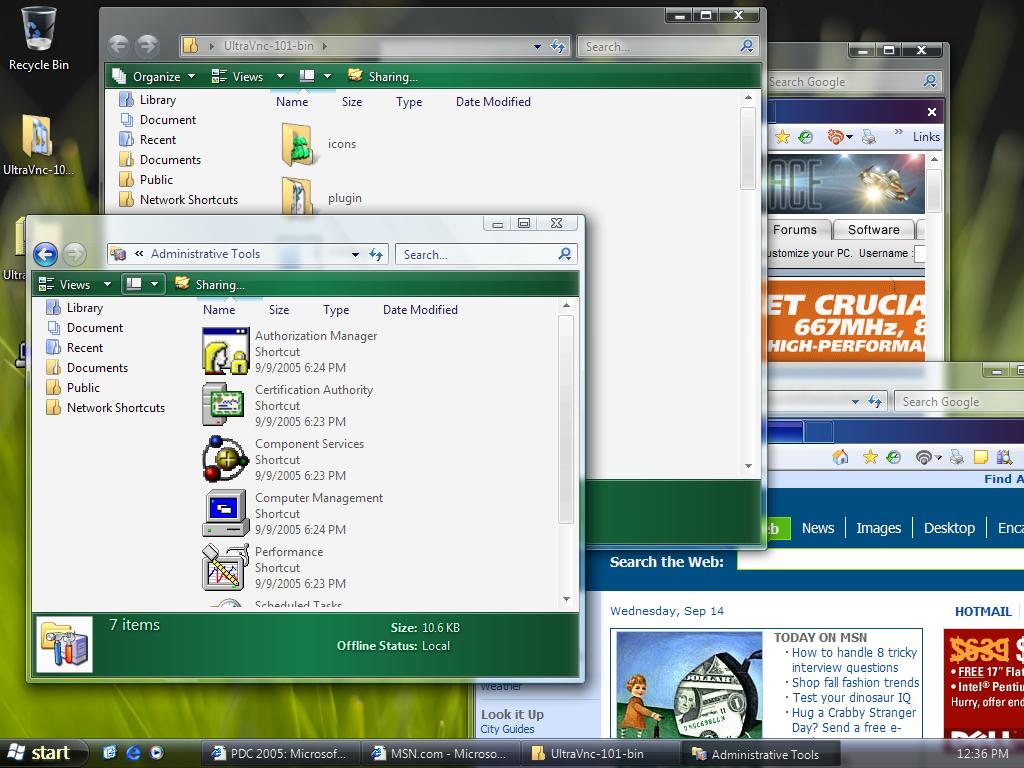
 
Left: Windows Vista, Right: Windows XP with WindowBlinds 5 Beta.

When user first began seeing screenshots of Microsoft's cool new Windows Vista with its cool glassy effects, many wondered if the same thing could be done on Windows.  Most technical people (including many at Stardock) believed that having glass effects on Windows XP was essentially impossible to do with any kind of decent performance.  On Windows Vista, the entire desktop is composited as a single 3D surface (like you'd see in a modern PC game).  That means on Windows Vista, effects get the full benefit of your modern 3D graphics card.  On Windows XP, that isn't the case.  What makes WindowBlinds 5 so special is that Stardock managed to find a way to bring glass effects to Windows XP yet still have a high level of graphics performance (i.e. moving and resizing windows).  A video card with 64 MB of video memory from ATI or nVidia should be more than enough to get good performance.

More than Glass

While making Windows XP look like Windows Vista is nice, it's not the reason why the alpha blending effects were developed.  Skinning, as an artform, really relies on giving artist as much freedom as possible.  Today, alpha channels (different levels of visibility) are a basic part of virtually any graphical element. So to force tile bars and borders to be either totally visible or totally transparent was very limiting.  For one thing, it means that there's jaggies on the edges of skins.

Consider Windows XP's UI:

See the jaggies?


Look very closely at the edges and you see that they try to blend in.  It's a subtle effect but overall allows the operating system to look more smooth, more polished. Combine glass effects and anti-aliasing and you can get some really neat stuff:

Screenshots

This is Stardock's Aura Skin.  If Stardock were making an operating system, this is the design it would go for.  It comes with WindowBlinds 5.


This is StealthOS.  It too comes with WindowBlinds 5.


This is 5imple - Alpha edition.  As you can see, WindowBlinds 5 can still change colors of your GUI, even on glass.

Getting WindowBlinds 5

WindowBlinds 5 is in beta and will only be available on Object Desktop until it nears release.  User who purchase WindowBlinds 4.x from September 1, 2005 on will receive WindowBlinds 5 for free when it is released.  Other owners of WindowBlinds 4 will be able to upgrade to WindowBlinds 5 at a reduced cost.

To get Object Desktop, which is Stardock's premiere suite of Windows enhancement software, go to www.objectdesktop.com


97,838 views 150 replies
Reply #126 Top
You will never get per pixel frames on Virtual PC as the graphics driver does not report per pixel support.
Reply #128 Top
still can't get it to work, i've updated the drivers and everything any idears????
this is all i get wbconfig.exe has encountered a problem and has to close


Ok guys i have managed to get it to load ok now, but it will not load the skins any idears???
Reply #129 Top
Well, it didn't work on my laptop at all. Darnit. The troubleshooting info all said it should be working, and it didn't actually crash and the utility came up, it just wouldn't skin the UI. Dropping back to 4 worked fine.
Reply #130 Top
#93 by Aladdin610
I also wanted to point out that whenever I open the WindowBlinds dialog window, it always displays an block in the background...then I drag the window over the block and it goes away.

I saw that artifact on the WB4.x series, but it went away with WB5 for me.
Reply #131 Top
Well, I tried it on my machine at work. Utterly different from my laptop, with the same result - Windows goes to classic mode and stays there. My laptop is a Gateway tablet, completely up to date on updates, my personal machine. My desktop is a Dell, with an Office load and some developer tools but otherwise stock. The only thing they have in common is Object Desktop.
Reply #132 Top
No joy here, classic mode only, colors will change but skins wont load and explorer crashes when I try to open a window. 4.6 works flawlessly on this PC.

XPPro 32 bit
9800 pro 5.8 catalyst drivers
3200 x64 athlon
MSI k8t neo mainboard
Reply #133 Top
well i went back to useing WB4.6 and it's working great, cos we don't seem to be getting any help from stardock on how to right the wrongs on Windowblinds 5 (will have to wait i suppose)
Reply #134 Top
well i went back to useing WB4.6 and it's working great, cos we don't seem to be getting any help from stardock on how to right the wrongs on Windowblinds 5 (will have to wait i suppose)

Well, it's only been out for a few hours... they must have a large amount of feedback to go through...
Reply #135 Top
So fine ... think the glass is a bit broken

Should someone tell about when it won't break different things as mentionned by different people on different forum and newsgroups (seem LogonStudio crashes also ...)
Reply #136 Top
Just curious, it states that people that purchase WB 4 after Sept 1 will get to upgrade to WB5 for free, what about us OD subscribers? Am I going to have to buy WB 5 separately??
Reply #137 Top
Am I going to have to buy WB 5 separately??


No, if your OD subscription is active when WB5 is released you will of course have access to it. The statement made about people who buy WB4 after Sept. 1 is for the folks who have bought or might buy just WB. Fear not, you'll be able to get it as long as your OD subscription doesn't run out in the near future.
Reply #138 Top
I upgraded from WB 4 to full OD last night to try this out. Have to say I'm very impressed indeed. I've had no problems with any corruption, no incorrect screen draw issues, or even a single crash at all. Very much looking forward to some new themes for it to try now.

Nick
Reply #139 Top
Had to reload 4.60. WB5 generally seemed ok but of course it's a beta release and is still a bit clunky. Crashes Adobe Acrobat 6.0 when you click on the file menu. The small Acrobat icon in the top left hand corner of the menu bar dissapears and the menu titles have shifted to the left, suspect I'm actually not clicking on the File menu at all, but some other function. Didn't see this occur in any other program. The logon problem was fixed very quickly. Looking forward to a full release when the beta testing is complete. Well done guys.
Reply #140 Top
Please let me know when a stable version is out
Reply #141 Top
The adobe menu issue should be fixed in the latest build on OD
Reply #144 Top
I uninstalled WB4 and installed WB5 and the lower part of my applications as well as the Windows Taskbar DO NOT appear skinned like they did with WB4.
Well, back to 4.60...

WindowBlinds 5 BETA Troubleshooting Report:

STATUS : WB+ SRV+ HLP+ UI+

WindowBlinds is installed correctly on this PC.

WindowBlinds appears to be activated on this PC

Your machine supports per pixel borders on WindowBlinds skins.

You have one monitor in total.

(Plug and Play Monitor) 1 is attached to Intel(R) 82915G/GV/910GL Express Chipset Family
'Intel(R) 82915G/GV/910GL Express Chipset Family' also exists as device '\\.\DISPLAY2', but is not attached to the desktop.
'NetMeeting driver' also exists as device '\\.\DISPLAYV1', but is not attached to the desktop and is a mirror driver.
'RDPDD Chained DD' also exists as device '\\.\DISPLAYV2', but is not attached to the desktop and is a mirror driver.
Reply #145 Top
Don't have it and I don't want it until the "Official release". I couldn't get it anyway because I am not an Object Desktop guy. I would rather add things a little at a time, partly a money issue and partly because it makes more sense to me. Even after an "Official release" I am gonna wait. Can't wait for the final stable time tested build because I have been following all this with my mouth a watering. I bought IP3 in late June and didn't get it working until early September. I don't wanna go through that again. Having said all that I live and die with Stardock. I love it when everything is working and I love/hate it when it's not. When you think of all the different brands of computers people are using and what they have done to them, well it must be a daunting task to create programs that skin a complicated OS. I think Brad and his team have done a hell of a job!
Reply #146 Top
Am I going to have to buy WB 5 separately??


No, if your OD subscription is active when WB5 is released you will of course have access to it. The statement made about people who buy WB4 after Sept. 1 is for the folks who have bought or might buy just WB. Fear not, you'll be able to get it as long as your OD subscription doesn't run out in the near future.


Thanks for the info, I appreciate it.
Reply #147 Top
WindowBlinds 5 BETA Troubleshooting Report:

STATUS : WB+ SRV+ HLP+ UI+

WindowBlinds is installed correctly on this PC.

WindowBlinds appears to be activated on this PC

Your machine supports per pixel borders on WindowBlinds skins.

You have one monitor in total.

(Monitor Plug and Play) 1 is attached to RADEON X600/X550 Series
'RADEON X600/X550 Series' also exists as device '\\.\DISPLAY2', but is not attached to the desktop.
'NetMeeting driver' also exists as device '\\.\DISPLAYV1', but is not attached to the desktop and is a mirror driver.
'RDPDD Chained DD' also exists as device '\\.\DISPLAYV2', but is not attached to the desktop and is a mirror driver.

Problems to the start with the wallpaper that appears before LogonStudio.
Problems with the window of loading of the Parenteral Controls of Symantec (it doesn't disappear).
Problems With the visualization of the descriptions of the icons on the bar of the start (they are hidden).
If it goes on so it is a problem behind the other.
I don't absolutely satisfy any progress.
Slow start!
I don't renew the signature, because cannot use the skins anymore!
A disappointment!
Reply #148 Top
Well.....After years of moving onward and upward with Stardock and Company...I have to say this is one new feature/program I'm not tickled pink with... LOL!!

I'm going back to WB's 4...

I guess I'm just a Thicked Skinned Kinda Fella...Not big on the translucent factors..I've had it on since it came out, and just removed it.It works exactly the way it's supposed to, all the functions are right on, no problems at all with the operational aspect..Just doesn't do anything for me to see half my GUI missing in action..

Although, one of the main points I like about Stardock, is they always leave plenty of room for Personal Preference..So if the one particular package is not your cup of tea...There's always another to suit your fancy..
Reply #149 Top
this sucked for me i downloaded and installed windowblinds and it worked fine. then the next day i start my computer and its running 100% computer usage and my computer can barly function.. so i uninstalled. is this a characteristic of just certain skin? did anyone else have this problem?

( i really liked this program tilll it did this and i want to figure out how to fix it)
Reply #150 Top
I have a strange problem. I can't use menu backgrounds coz when i do i get totally black menu's. Does anyone have the same problem? And ik also have to manually apply the skin when i start windows, windowblinds doesn't apply a skin when i start windows.