

Frogboy Frogboy

WindowBlinds 5 Preview Guide

WindowBlinds 5 Preview Guide

Skin your Windows GUI in all new ways..

Version 5

Preview Guide

Our story so far..

WindowBlinds is a program that can completely customize the Windows user interface (title bars, star bar, push buttons, scrollbars, etc.).

Since its initial release in 1999, 4 versions of WindowBlinds have been released.  When Stardock began working on WindowBlinds, no one else had ever attempted to do something like it.  Getting it to work on the various versions of Windows was a real challenge and in early versions, performance was sacrificed to attempt to gain some level of stability on those older operating systems.

In 2001, Microsoft implemented a new look into Windows XP and used a GUI architecture that worked similarly to how WindowBlinds worked.  Stardock was able to make use of that architecture with WindowBlinds 4. At the same time, video card vendors were starting to optimize their drivers for Windows XP.  As a result, by WindowBlinds 4.5, the program not only could make Windows look terrific, it could make Windows run faster.  By caching drawing via the card's video memory, WindowBlinds could substantially increase the rate in which window resizing and repainting occurred. 

Users continued to request new features. Two features were at the top of the list: First, alpha blended title bars and borders.  That is, title bars and borders that could blend in to whatever was behind them to eliminate jaggies and allow skins to be semi-transparent like a piece of glass.  Secondly, user requested the elimination of wbload.exe, the process required to manage the WindowBlinds skins. 

After two-years of effort, Stardock is about ready to deliver WindowBlinds 5 which can produce glass/alpha blended effects on Windows XP with virtually no slow-down (on a modern video card) and now makes use of some built in system APIs to manage WindowBlinds visual styles which allows for the elimination of wbload.exe.  WindowBlinds 5 is effectively a native part of Windows XP.

Glass Effects
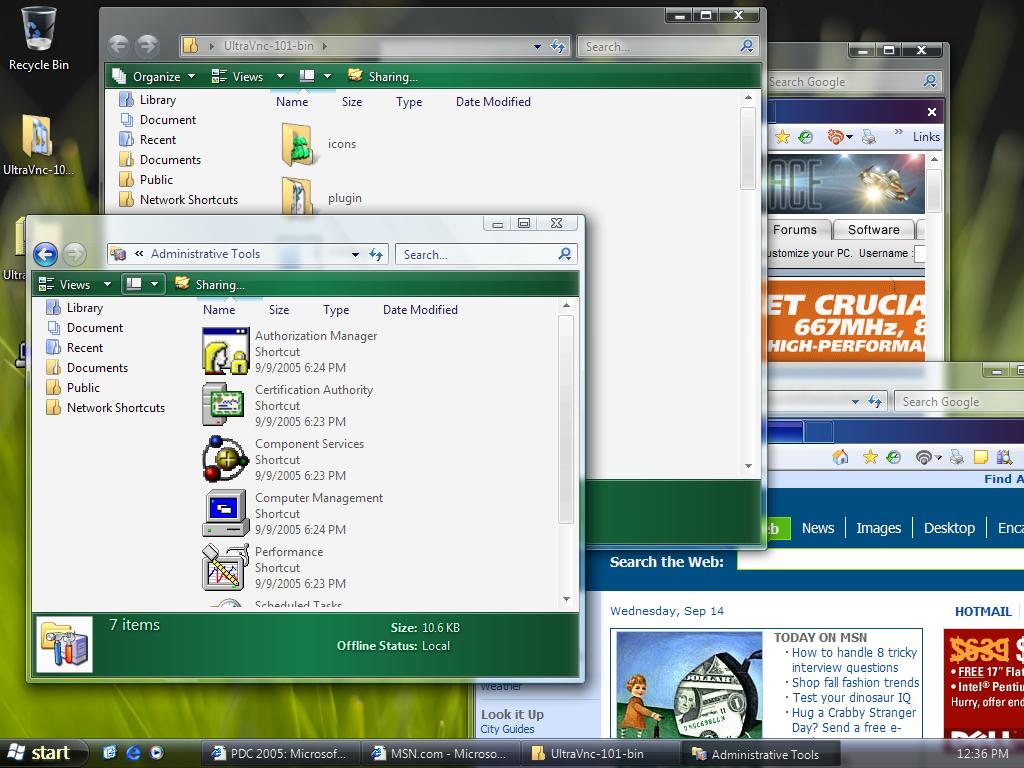
 
Left: Windows Vista, Right: Windows XP with WindowBlinds 5 Beta.

When user first began seeing screenshots of Microsoft's cool new Windows Vista with its cool glassy effects, many wondered if the same thing could be done on Windows.  Most technical people (including many at Stardock) believed that having glass effects on Windows XP was essentially impossible to do with any kind of decent performance.  On Windows Vista, the entire desktop is composited as a single 3D surface (like you'd see in a modern PC game).  That means on Windows Vista, effects get the full benefit of your modern 3D graphics card.  On Windows XP, that isn't the case.  What makes WindowBlinds 5 so special is that Stardock managed to find a way to bring glass effects to Windows XP yet still have a high level of graphics performance (i.e. moving and resizing windows).  A video card with 64 MB of video memory from ATI or nVidia should be more than enough to get good performance.

More than Glass

While making Windows XP look like Windows Vista is nice, it's not the reason why the alpha blending effects were developed.  Skinning, as an artform, really relies on giving artist as much freedom as possible.  Today, alpha channels (different levels of visibility) are a basic part of virtually any graphical element. So to force tile bars and borders to be either totally visible or totally transparent was very limiting.  For one thing, it means that there's jaggies on the edges of skins.

Consider Windows XP's UI:

See the jaggies?


Look very closely at the edges and you see that they try to blend in.  It's a subtle effect but overall allows the operating system to look more smooth, more polished. Combine glass effects and anti-aliasing and you can get some really neat stuff:

Screenshots

This is Stardock's Aura Skin.  If Stardock were making an operating system, this is the design it would go for.  It comes with WindowBlinds 5.


This is StealthOS.  It too comes with WindowBlinds 5.


This is 5imple - Alpha edition.  As you can see, WindowBlinds 5 can still change colors of your GUI, even on glass.

Getting WindowBlinds 5

WindowBlinds 5 is in beta and will only be available on Object Desktop until it nears release.  User who purchase WindowBlinds 4.x from September 1, 2005 on will receive WindowBlinds 5 for free when it is released.  Other owners of WindowBlinds 4 will be able to upgrade to WindowBlinds 5 at a reduced cost.

To get Object Desktop, which is Stardock's premiere suite of Windows enhancement software, go to www.objectdesktop.com

97,846 views 150 replies
Reply #101 Top
Well, first of all I must say it looks great! Good job

Strange thing though, my 'bookmarks toolbar' in firefox is blank when I use the "Arrow" skin. and yeah, It's jerky when I drag big windows (big = over roughly 600x600 px).. and I don't know if it's just me, but the skin doesn't completely change unless I restart my machine after applying it. But, I understand this is beta and all, so naturally it's not going to be perfect.

I love it though, You guys are true pioneers, Kudos!
Reply #104 Top
Ooops, I should have read the comments BEFORE I downloaded. My 5900XT no liken dis one!

Try downloading again, the fix works great on my 5900XT...
Reply #105 Top
Latest upload seems to have fixed the nvidia corruption problems for me
Reply #108 Top
Now all we need is the updated SKS so that I can come up with my follow up to MozillaXP (I noticed that I'm still credited under "Dark Phoenix" - old nic)
Reply #109 Top
first messages i got when i rebooted were two error messages, one from logonuiX.exe, the other from RunDll32.exe. when i tried later (after viewing the troubleshooting report) to get to my display window (desktop/right click/propreties or through the control panel) it gave me the same rundll32 error message...
WindowBlinds 5 BETA Troubleshooting Report:
WindowBlinds is installed correctly on this PC.
Your machine does not support per pixel borders on WindowBlinds skins.
This is because :
Your computer graphics hardware does not support acceleration of per pixel alpha. WindowBlinds requires this for per pixel alphablended borders as without it performance would be poor. Please see if you can obtain new drivers for your graphics hardware. Recent ATI & NVIDIA boards should support this feature. Onboard graphics tend not to.
Video Information
You have one monitor in total.
(Écran Plug-and-Play) 1 is attached to SAPPHIRE RADEON 9200SE ATLANTIS
Reply #110 Top
iseekserendipity: You must have Service Pack 2 or later installed with this beta of WindowBlinds.
Reply #111 Top
how do I download again without uninstalling/losing everything? No new version shown.

Tools/Check for application updates. It should show a 4.90a.

iseekserendipity, try the latest Catalyst drivers (you just need the "With Control Panel" option): https://support.ati.com/ics/support/default.asp?deptID=894&task=knowledge&folderID=27
Reply #113 Top
sorry. was going to edit, but it refused. just saw that there is an update already (! ) going to reboot and test again. (this is so exciting, it's the first time in my life that i dare try a beta!)
Reply #114 Top
Neil: I posted this in another thread, but since you seem to be checking this one:

I've installed the latest WB5 (4.90a) build and most everything is working fine, except:

1. On shutdown and startup I'm getting a message about logonUIx.exe, apparently trying to write through a null pointer (0000:0000). This is the first I've seen this and it just started since the install. Happened with the earlier WB5 version too.

2. I tried setting a User Over-ride for right-click on the titlebar to do rollup/rolldown, and there was no change - using 5imple Alpha skin.


WindowBlinds 5 BETA Troubleshooting Report:


WindowBlinds is installed correctly on this PC.

Your machine supports per pixel borders on WindowBlinds skins.

If you suffer visible corruption (overbright) on the frames and have a NVIDIA board then please be aware this is a NVIDIA bug. It has been seen on GeForce 4 cards and some FX series cards.

Video Information

You have one monitor in total.

(Plug and Play Monitor) 1 is attached to NVIDIA GeForce FX 5700LE

'WebDialogs Mirror Driver' also exists as device '\\.\DISPLAYV1', but is a mirror driver.

'NetMeeting driver' also exists as device '\\.\DISPLAYV2', but is not attached to the desktop and is a mirror driver.

'RDPDD Chained DD' also exists as device '\\.\DISPLAYV3', but is not attached to the desktop and is a mirror driver.
Reply #115 Top
ah! i had previously downloaded the driver, just didn't bother the with panel option thing though! it's a big download! (but for windowblinds, it's all worth it!)
Reply #116 Top
Oh . . . well, the driver on its own should be enough, I was trying to save you from the even larger .NET Control Center download.
Reply #117 Top

2. I tried setting a User Over-ride for right-click on the titlebar to do rollup/rolldown, and there was no change - using 5imple Alpha skin


i have the same problem, and have tried it with all the new windowblind 5 skins...

WindowBlinds 5 BETA Troubleshooting Report:


WindowBlinds is installed correctly on this PC.

Your machine supports per pixel borders on WindowBlinds skins.

If you suffer visible corruption (overbright) on the frames and have a NVIDIA board then please be aware this is a NVIDIA bug. It has been seen on GeForce 4 cards and some FX series cards.

Video Information

You have one monitor in total.

(Default Monitor) 1 is attached to MOBILITY RADEON 9600

'MOBILITY RADEON 9600' also exists as device '\\.\DISPLAY2', but is not attached to the desktop.

'NetMeeting driver' also exists as device '\\.\DISPLAYV1', but is not attached to the desktop and is a mirror driver.

'RDPDD Chained DD' also exists as device '\\.\DISPLAYV2', but is not attached to the desktop and is a mirror driver.

PLEASE report all this information when submitting a problem report, especially anything related to per-pixel skinning. We don't know what's in that Dell you bought last July or the notebook the office gave you. Per-pixel skinning requires your drivers to at least claim to support the functions needed for it.

apart from that i am completey happy, it has definately made my computer run faster when displaying menu items, so thank you very much.....sorry for all you guys having problems, but it will be worth it when they have sorted out the bugs in this beta version
Reply #118 Top
It appears to have installed correctly, but will not apply any WB skins. When I try to apply a skin through display properties it brings up the Please Wait dialog, but reverts to classic. When I try to apply through WB Config Window, nothing at all happens. Updated my driver, even switched back to my onboard video card, but had identical results.

WindowBlinds 5 BETA Troubleshooting Report:


WindowBlinds is installed correctly on this PC.

Your machine supports per pixel borders on WindowBlinds skins.

If you suffer visible corruption (overbright) on the frames and have a NVIDIA board then please be aware this is a NVIDIA bug. It has been seen on GeForce 4 cards and some FX series cards.

Video Information

You have one monitor in total.

(Plug and Play Monitor) 1 is attached to NVIDIA GeForce FX 5200

'Intel(R) 82845G/GL/GE/PE/GV Graphics Controller' also exists as device '\\.\DISPLAY2', but is not attached to the desktop.

'NetMeeting driver' also exists as device '\\.\DISPLAYV1', but is not attached to the desktop and is a mirror driver.

'RDPDD Chained DD' also exists as device '\\.\DISPLAYV2', but is not attached to the desktop and is a mirror driver.


Posted via WinCustomize Browser/Stardock Central
Reply #119 Top
Oh . . . well, the driver on its own should be enough, I was trying to save you from the even larger .NET Control Center download


well i did discover that i have Catalyst 5.7 (just the driver) and the new version is Catalyst 5.9.... i'm trying to download it but am getting all kind of certificate errors which of course isn't stardock's fault. but it may mean i should put this up for tomorrow night (it's 3:37 a.m. already here)
just a question: does anyone know how i can make sure that ati's radeon 9200 supports per-pixel borders? just to know if i should just give up until i upgrade my video card or if it is a driver issue...
Reply #120 Top
i just keep getting an error when trying to start WB5 ????
Reply #121 Top
PCI-E nvidia 6600 GT .....

WindowBlinds is installed correctly on this PC.

Your machine supports per pixel borders on WindowBlinds skins.

If you suffer visible corruption (overbright) on the frames and have a NVIDIA board then please be aware this is a NVIDIA bug. It has been seen on GeForce 4 cards and some FX series cards.

Video Information

You have one monitor in total.

(IBM 6558 P202 ) 1 is attached to NVIDIA GeForce 6600 GT

'NetMeeting driver' also exists as device '\\.\DISPLAYV1', but is not attached to the desktop and is a mirror driver.

'RDPDD Chained DD' also exists as device '\\.\DISPLAYV2', but is not attached to the desktop and is a mirror driver.

Reply #122 Top
still can't get it to work, i've updated the drivers and everything any idears????
this is all i get wbconfig.exe has encountered a problem and has to close

please help i payed $50.00 to get this WB5 and now it don't work!!!
Reply #124 Top
Yeah......WindowBlinds 5 beta on Virtual PC doesn't do that much...No cool see-thru-ness, no smooth corners, and it causes some of the programs to crash. See, I was planning to work on a kick-arse WB5 theme but I have a Mac at home. I got a PC (with WindowBlinds) at work. No, I'm not gonna buy a PC.
Reply #125 Top
This image is of WindowBlinds 5 beta on Virtual PC7 for the Mac. It's like nothing changed. The good thing is that almost nobody uses WB with Virtual PC on the Mac...but I do