





WindowBlinds 5 Preview Guide
Skin your Windows GUI in all new ways..
 WinCustomize Forums

Version 5
Preview Guide
Our story so far..
WindowBlinds is a program that can completely customize the Windows user interface (title bars, star bar, push buttons, scrollbars, etc.).
Since its initial release in 1999, 4 versions of WindowBlinds have been released. When Stardock began working on WindowBlinds, no one else had ever attempted to do something like it. Getting it to work on the various versions of Windows was a real challenge and in early versions, performance was sacrificed to attempt to gain some level of stability on those older operating systems.
In 2001, Microsoft implemented a new look into Windows XP and used a GUI architecture that worked similarly to how WindowBlinds worked. Stardock was able to make use of that architecture with WindowBlinds 4. At the same time, video card vendors were starting to optimize their drivers for Windows XP. As a result, by WindowBlinds 4.5, the program not only could make Windows look terrific, it could make Windows run faster. By caching drawing via the card's video memory, WindowBlinds could substantially increase the rate in which window resizing and repainting occurred.
Users continued to request new features. Two features were at the top of the list: First, alpha blended title bars and borders. That is, title bars and borders that could blend in to whatever was behind them to eliminate jaggies and allow skins to be semi-transparent like a piece of glass. Secondly, user requested the elimination of wbload.exe, the process required to manage the WindowBlinds skins.
After two-years of effort, Stardock is about ready to deliver WindowBlinds 5 which can produce glass/alpha blended effects on Windows XP with virtually no slow-down (on a modern video card) and now makes use of some built in system APIs to manage WindowBlinds visual styles which allows for the elimination of wbload.exe. WindowBlinds 5 is effectively a native part of Windows XP.
Glass Effects
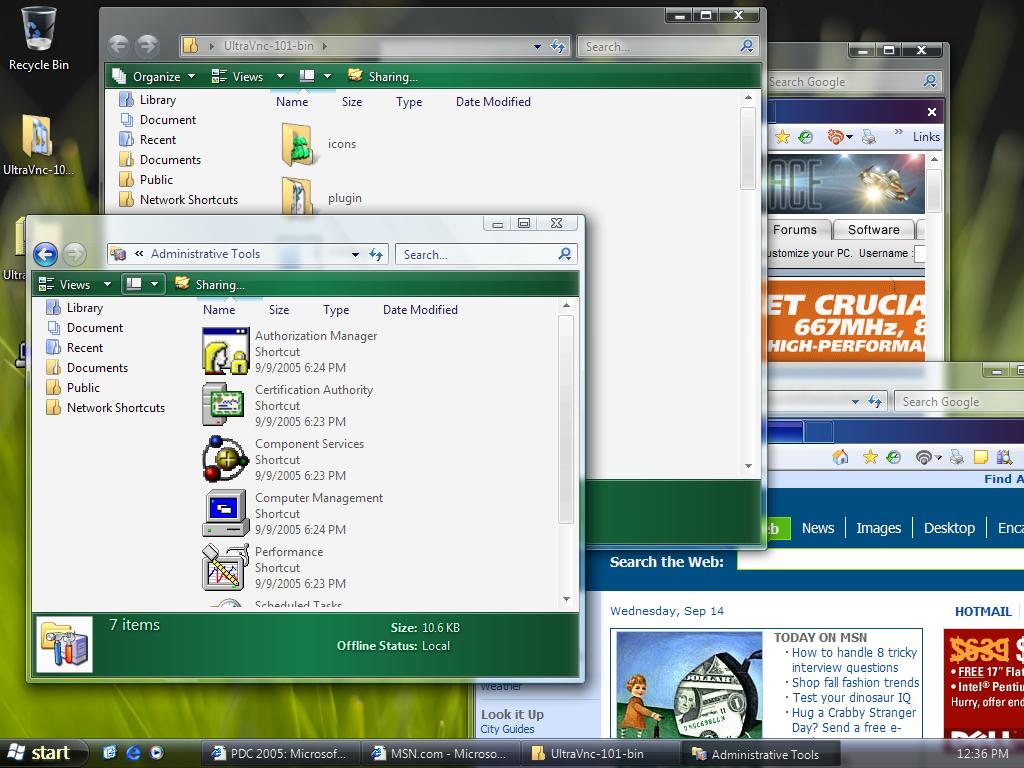

Left: Windows Vista, Right: Windows XP with WindowBlinds 5 Beta.
When user first began seeing screenshots of Microsoft's cool new Windows Vista with its cool glassy effects, many wondered if the same thing could be done on Windows. Most technical people (including many at Stardock) believed that having glass effects on Windows XP was essentially impossible to do with any kind of decent performance. On Windows Vista, the entire desktop is composited as a single 3D surface (like you'd see in a modern PC game). That means on Windows Vista, effects get the full benefit of your modern 3D graphics card. On Windows XP, that isn't the case. What makes WindowBlinds 5 so special is that Stardock managed to find a way to bring glass effects to Windows XP yet still have a high level of graphics performance (i.e. moving and resizing windows). A video card with 64 MB of video memory from ATI or nVidia should be more than enough to get good performance.
More than Glass
While making Windows XP look like Windows Vista is nice, it's not the reason why the alpha blending effects were developed. Skinning, as an artform, really relies on giving artist as much freedom as possible. Today, alpha channels (different levels of visibility) are a basic part of virtually any graphical element. So to force tile bars and borders to be either totally visible or totally transparent was very limiting. For one thing, it means that there's jaggies on the edges of skins.
Consider Windows XP's UI:

See the jaggies?

Look very closely at the edges and you see that they try to blend in. It's a subtle effect but overall allows the operating system to look more smooth, more polished. Combine glass effects and anti-aliasing and you can get some really neat stuff:
Screenshots

This is Stardock's Aura Skin. If Stardock were making an operating system, this is the design it would go for. It comes with WindowBlinds 5.

This is StealthOS. It too comes with WindowBlinds 5.

This is 5imple - Alpha edition. As you can see, WindowBlinds 5 can still change colors of your GUI, even on glass.
Getting WindowBlinds 5
WindowBlinds 5 is in beta and will only be available on Object Desktop until it nears release. User who purchase WindowBlinds 4.x from September 1, 2005 on will receive WindowBlinds 5 for free when it is released. Other owners of WindowBlinds 4 will be able to upgrade to WindowBlinds 5 at a reduced cost.
To get Object Desktop, which is Stardock's premiere suite of Windows enhancement software, go to www.objectdesktop.com



 JoeUser Forums
 ).
).


