lost something off of desktop

I was setting everything up and I accidentally slide a huge folder off of the desktop.  I can't find it.  I was on the far left and I remember reading something somewhere about sliding things on and off the desktop?  HELP!!!!! Major file!
3,681 views 9 replies
Reply #1 Top

From the looks of your problem, it seems to me maybe you are using Fences and Desktop pages. Open fences config and learn how it works and how you can configure it.

Reply #2 Top

I haven't done anything with "desktop pages" yet that I know of.  I was only setting up my Fences and putting files in them.  Whatever I did, I didn't do it on purpose and now can't fine a very important HUGE file.  I can't even find it in file explorer.  Very concerned. And I honestly don't know what to look for to find it in all the instructions.


Reply #3 Top

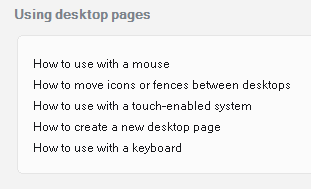
Click on these shortcuts:

... and boxes will pop up and explain how to navigate between desktops.

Reply #5 Top

You can always browse what's on your desktop using explorer. There, all files, folders and shortcuts will show, regardless of Fences. Maybe you accidently dropped the file on a folder on your desktop?

Reply #6 Top

Hey, I found it.  It was in another folder.  I just started going through all of them.  So, thank you so much for the help.  I was panicked, I guess.  Thank you!!!!!!

Reply #7 Top

No problem. Great to hear it worked out for you!

Reply #8 Top

Hey, need help again.  Now, everything...........EVERYTHING is off my desktop.  And gone.  Kind of like where you can go  back and double quick and the fences show back up.  No, everything is gone.  Help, please?


Reply #9 Top

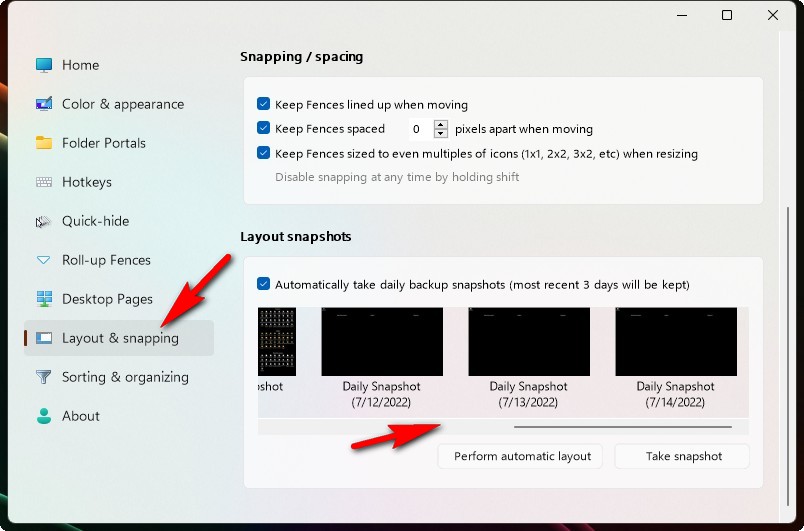
Try restoring a snapshot to bring them back .