Dock in the middle of my screen

Hello , 


since the last update, my dock is now on the left of my screen. 


How can I setup it to the middle ? 


Regards.

2,822 views 6 replies
Reply #1 Top

Hello,
Sorry to hear you are having issues. It is best if you can mention which Stardock Software you having issue with? ObjectDock? Start11? etc. A screenshot might help too.

Thanks
Basj,
Stardock Community Assistant.

Reply #2 Top

Hello, 


i just want the dock in the middle of the downbar (as W11 ) and not into the down left corner. It was working before the 2 last update. 


Regards . 

Reply #3 Top

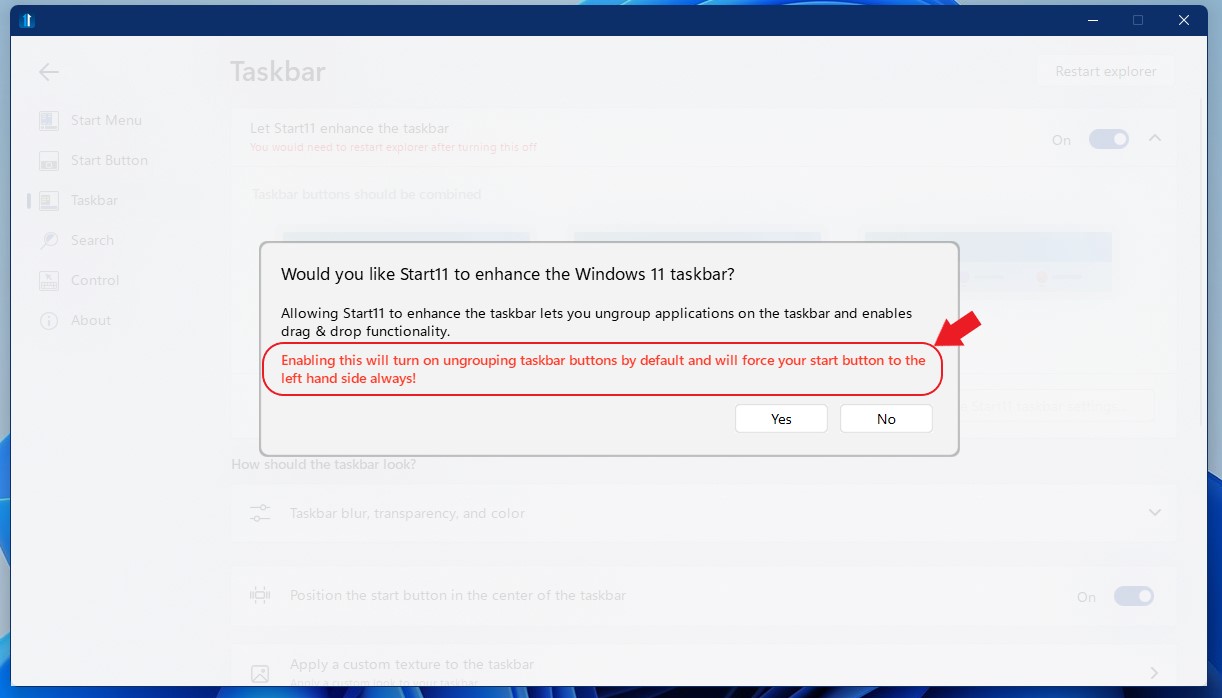
Oh, you mean your Start button and taskbar pinned items? From your screenshot it shows you have turn on enhance taskbar. If you turned that on. Than as mention in the screenshot below your startbutton will always be on the left side.

Thank you,

Basj,
Stardock Community Assistant

Reply #5 Top

Quoting Iceheart31, reply 4

Oh ! I tought it will be updated ... really sad . 

 
End of Iceheart31's quote

What is really sad? The option that basj is showing you just turns off some of the features (like the ungrouping of the task bar) then you can put your start button back in the middle. Having the start button in the middle with ungrouping available would just likely turn into a mess.

Paul Scroggins
Associate Technical Support Analyst

Reply #6 Top

I understand that this is probably a very positive point for many users, and you are probably right, but I find it unfortunate that customization software "removes" customization possibilities when they were present on the previous version .... I may be wrong but you have chosen for me to limit the possibility of personalization and thus weakened the personalization capacity of this very good software. Nothing serious in itself... but it remains to be seen what will be the next possibility that will be removed...

Thank you for your attention and your time.