Fences folder portal

opening all folders in new windows

Hi, I have reinstalled my whole system and installed Fences again. I'm sure that if I opened folder in folder portal before it'd open in that portal. Now every folder opens as new native window. How can I fix it?
21,771 views 31 replies
Reply #1 Top

Hello,
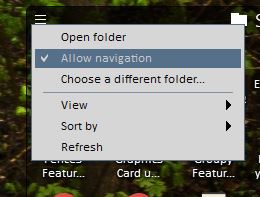
Sorry to hear you are having issues. Please check if you have set folder portal to "allow navigation"

Thanks
Basj,
Stardock Community Assistant.

Reply #2 Top

Thx for reply. Problem occurs with AND without "Allow navigation checked. It was my 1st shot as it's kind of self explanatory.

Reply #3 Top

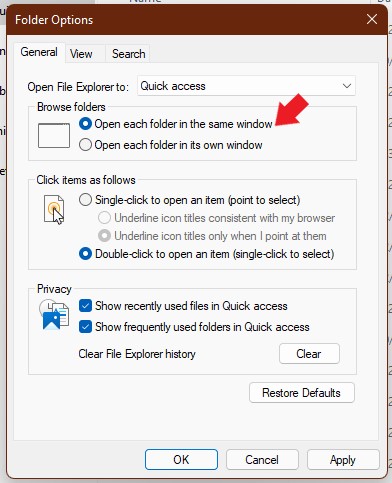
Check your folder options.

Thank you,

Basj,
Stardock Community Assistant

Reply #4 Top

Has this issue been resolved?

I have the same issue and have followed the above suggestions both yesterday and today, same results.

OS is Windows 11

On another PC (Windows 10) Fences 3, no issues at all

Reply #5 Top

Quoting mszanyi, reply 4

Has this issue been resolved?

I have the same issue and have followed the above suggestions both yesterday and today, same results.

OS is Windows 11

On another PC (Windows 10) Fences 3, no issues at all
End of mszanyi's quote

If you have tried both and still have same issue. First, would like to suggest try purge and reinstall steps as mentioned here: [link]. Just make sure to redownload the latest version from your account. Reboot after the purged. Reinstall, and Reboot again after the installation. Retest it. Report back here.

Thank you,

Basj,
Stardock Community Assistant

Reply #7 Top

I have removed fences, rebooted and re-installed previously but i did not use the tool.

I will try with the tool later but would like to confirm if this is a known issue and if this is a known solution to the issue.

Just dont want to waste my time if this is just a standard support reply, I am sure you understand ;)

Thanks

Reply #8 Top
Quoting basj, reply 5

If you have tried both and still have same issue. First, would like to suggest try purge and reinstall steps as mentioned here: [link]. Just make sure to redownload the latest version from your account. Reboot after the purged. Reinstall, and Reboot again after the installation. Retest it. Report back here.

End of basj's quote

quite invasive tool - since when reinstall is not enough?
and yes, I have tried both.

Quoting mszanyi, reply 7

I will try with the tool later but would like to confirm if this is a known issue and if this is a known solution to the issue.
End of mszanyi's quote

I did - waste of time indeed. Just mess on my desktop


Reply #9 Top

I followed instructions and it did not work!

below are the 2 tests i did (same as before)

Test 1:  Create New Fence containing Folders

Action:  Double Click Folder à Opens Folder in New File Explorer window

Result:  FAIL

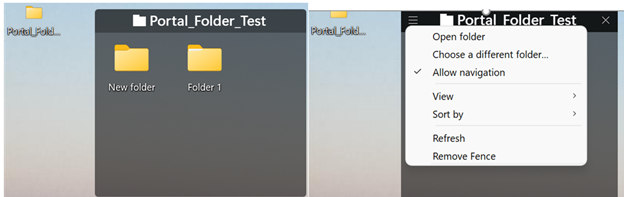
Test 2:  Created Folder Portal called “Portal_Folder_Test” with sub folders

Action: Double Click on “Folder 1” à Opens Folder in New File Explorer window


Result:  Fail

Below shows screen shot if Test 2 folders and also Portal Folder settings showing "Allow navigation" selected 

Portal Folder Settings - allow navigation

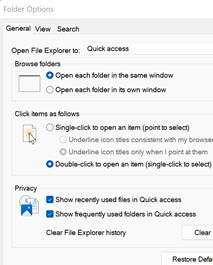
File Explorer Options shown here


I See many ppl have same issue & doing internet search see that the standard suggestion we are receiving has little sucess.

Please Confirm that Stardock recognizes this issue exists & if a verified solution is being worked on


Thank you

Mitch


Reply #11 Top

Hello,

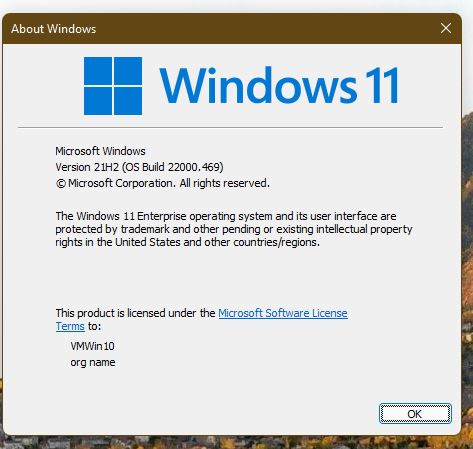
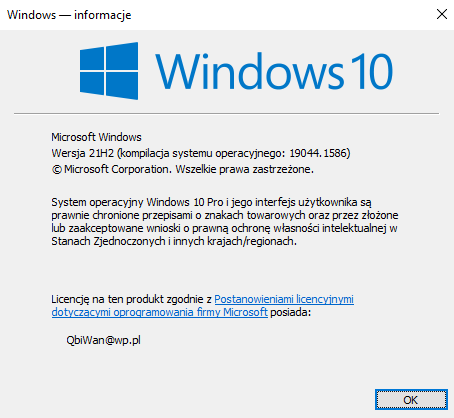
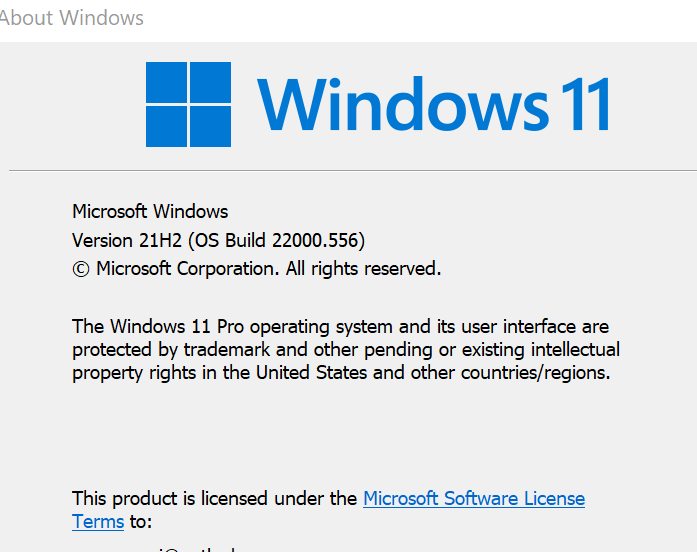
Can you all post a full Windows version numbers please. Use Windows "Winver.exe"

something like below.


Thank you,

Basj,
Stardock Community Assistant

Reply #12 Top

I made a video on what I see on my system.

Thank you,

Basj,
Stardock Community Assistant

Reply #13 Top

Quoting basj, reply 12

I made a video on what I see on my system.
End of basj's quote

I wish it worked on my device that way :(  

my W10 ver above

Reply #14 Top

Quoting Qbi, reply 8

I did - waste of time indeed. Just mess on my desktop
End of Qbi's quote

If you did do the purge and reinstall, what happened? How is your desktop get messed up?

Thank you,

Basj,
Stardock Community Assistant

Reply #15 Top

Quoting basj, reply 14


Quoting Qbi Wan2851,

I did - waste of time indeed. Just mess on my desktop


If you did do the purge and reinstall, what happened? How is your desktop get messed up?

Thank you,

Basj,
Stardock Community Assistant

End of basj's quote

-_-

What happened? Nothing? Like... in every way? Like you know - some things happened and some did not - this time it's the latter. Always you can google for "nothing" word.

How is my desktop get messed up? Fences was holding my desktop icons in order - when I purged it and reinstalled several times all icons run out of fences to cover all wallpaper - I called it "The Mess".

Also I don't know if that can be the case, but I'm using Steam version, so generally I have no other choice but to download the latest version.

Reply #17 Top

hello

My question to the programmers is whether it might be possible to store a separate background image in individual fences (e.g. as PNG, because of the possible transparent background) similar to the desktop, which can also be moved with the fence?

thanks

Reply #18 Top

Quoting einstein4fs, reply 17

hello

My question to the programmers is whether it might be possible to store a separate background image in individual fences (e.g. as PNG, because of the possible transparent background) similar to the desktop, which can also be moved with the fence?

thanks
End of einstein4fs's quote

Hello,
Should be in a stand alone thread, but, since you already asked. I have forward your request to the Stardock Support Team for their review and recommendations. We really do appreciate your feedback, Thanks

Thanks
Basj,
Stardock Community Assistant.

Reply #20 Top

Quoting einstein4fs, reply 19

thanks

I'm looking forward to it if it works
End of einstein4fs's quote

Do know that, I can only send in the request, I can not tell if or when it get implement.

Thank you,

Basj,
Stardock Community Assistant

Reply #22 Top

Quoting mszanyi, reply 21

Here is Win version as requested.
End of mszanyi's quote

Have you try the suggested Cleanboot? Reply #16

Thank you,

Basj,
Stardock Community Assistant

Reply #24 Top

Quoting mszanyi, reply 23

Same issue
End of mszanyi's quote

I reviewed your screenshot above. Your Portal folder is name with underscore, yes? Can you try with a normal name folder without any underscore or any other symbol. Use normal alphabet for name. Also try using portal fence that link to a folder not inside your Desktop area. Please post a video of that so we can see what actually happening on your system.

Thank you,

Basj,
Stardock Community Assistant