Start 11 Recently installed
from  Stardock Forums
Stardock Forums
Is ther a way of not displaying recently installed apps in the Start 11 start menu?

 Stardock Forums
Is ther a way of not displaying recently installed apps in the Start 11 start menu?
That is a Windows setting. Go to Settings and search for start and uncheck this:
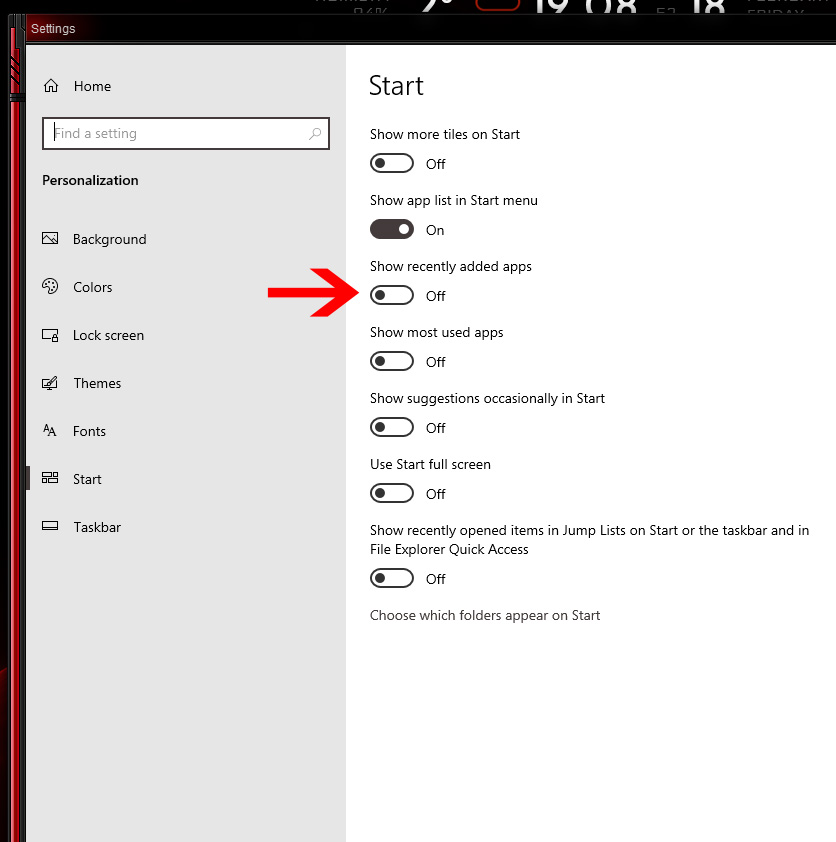
Figured it out, need to access win sys settings from within Start 11 settings to turn it off in addition to being turned off directly in win sys settings. That setting is turned off in my windows setting and still seeing recently installed apps.

In Start11 1.2 the new label will only appear on apps on the Win10/11 style menu there is a setting for the menu called "Show recently added apps" This will disable them showing and the 'new' label.
Welcome Guest! Please take the time to register with us.
Select a reason for giving karma:
You're about to visit an external site:
Sign up here to get the latest news, updates, and special offers delivered directly to your inbox.