

Acoustic Bridge Trial
I would like to test the product, but the trial is not working, and the computers are on the same network!
How can I do it?
https://drive.google.com/file/d/1_YffOqXepvPJQ58qmwoKswc_PALxpQ6v/view?usp=sharing
Stardock will be closed for the week starting on Monday, June 29th and we will be returning on Monday, July 6th. We will be monitoring support tickets and forums during this time but expect delays in responses during this time.
I would like to test the product, but the trial is not working, and the computers are on the same network!
How can I do it?
https://drive.google.com/file/d/1_YffOqXepvPJQ58qmwoKswc_PALxpQ6v/view?usp=sharing
Hello,
Sorry to hear you are having issues. I believe Acoustic Bridge is very similar to multiplicity. Maybe you can look through these guide and see if it can help you out. Let us know if you still need our assistance.
Thanks
Basj,
Stardock Community Assistant.
can't find my other computer and they are on the same network!
Hello,
I have forward your problem/question to Stardock Support Team for their assistance. Please keep an eye on this thread for any updates. We appreciate your feedback and patience.
Basj,
Stardock Community Assistant
can't find my other computer and they are on the same network!
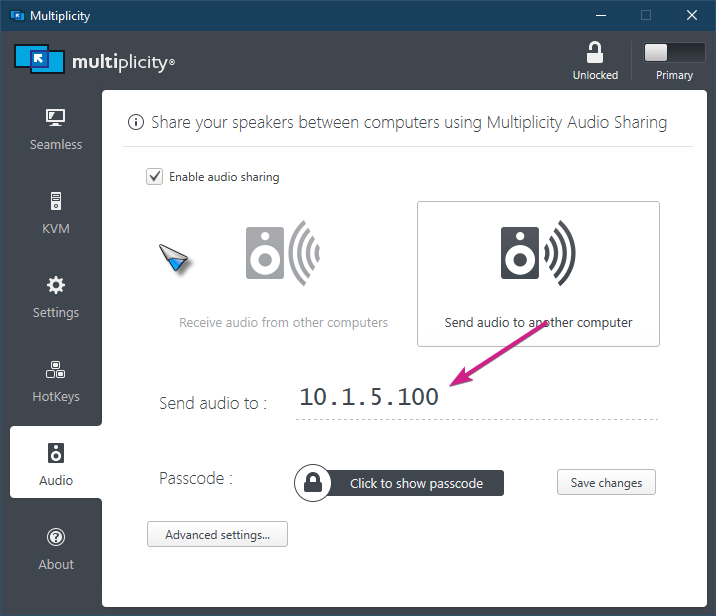
Try adding it by IP instead of Host Name. This is the Multiplicity UI for it as I don't have (can't have) AB installed at the same time:

Sean Drohan
Stardock Support Manager
But I just want to use Acoustic Bridge, but it doesn't find my my other pc!
But did you add it by IP?
Sean Drohan
Stardock Support Manager
yes but AcousticBridge keeps giving the same error as in the 1st post!
Can you ping the Secondary PC from the Primary?
Sean Drohan
Stardock Support Manager
on the Acoustic Bridge it connects with the other computer and Multiplicity does not find the other computer
Accustic Bridge and Multiplicity should not be used on the same PCs. Also, this question remains:
Sean Drohan
Stardock Support Manager
If you're talking about, Open the CMD and type ping plus the ip of the secondary computer, yes I already did that and it didn't find the secondary computer
If you mean that it timed out, that problem needs to be solved prior to MP working - the primary PC needs to be able to talk to the Secondary PC on this same network.
Sean Drohan
Stardock Support Manager
Welcome Guest! Please take the time to register with us.