

Start 11 - Remote Desktop -> Shutdown Issue

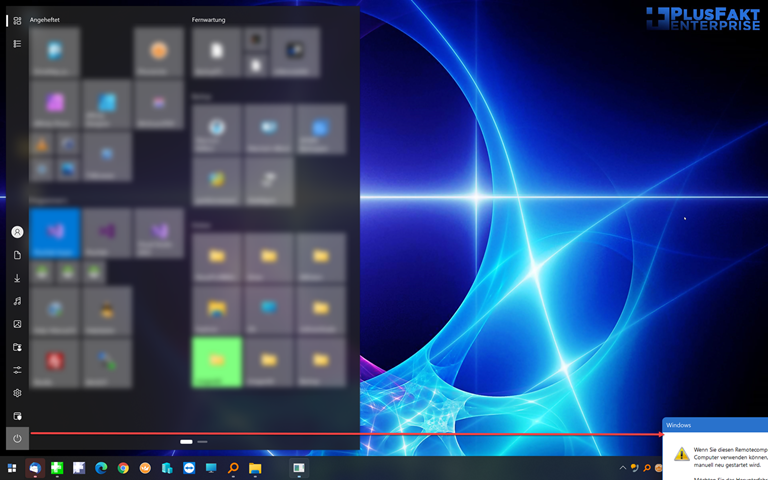
There is a issue when you're logged in via Remote Desktop and then you shutdown the PC.

The messagebox is shown wrong.
3,293 views 7 replies
Reply #1 Top

Hello,
I have forward your problem/question to Stardock Support Team for their assistance. Please keep an eye on this thread for any updates. We appreciate your feedback and patience.

Basj,
Stardock Community Assistant

Reply #2 Top

Hello,

Sorry to hear you are having trouble.

The image is too small I am afraid... Can you post an image that shows it clearly and what you did to get it - perhaps a shared link (DropBox, GoogleDrive, OneDrive) of a video of the whole process?

Sean Drohan
Stardock Support Manager

Reply #4 Top

I am afraid the position of that prompt would be entirely under the control of Microsoft.

Start11 simply asks the computer to shutdown, it cannot specify a position of the window (if any) that might pop up. 

Are you running any other software which might alter window positions as I would have expected that to appear in the middle of the screen?

Reply #5 Top

so if it is so, you can't do anything (an option to show the message or not was a nice thing).
I have no other software for screen pos.

It's ok for me, i can make me a separate button to shutdown with no question's

Reply #6 Top

Quoting joXjo, reply 3

Take a look at:

https://plusfakt.com/tmp/start11/start11.html

i am logged in with remote desktop and want to shut down -> The messagebox appears outside the screen.
End of joXjo's quote

You can click the title bar and move it, yes? Suspecting so, does it retain the position you moved it to on subsequent efforts?

Sean Drohan
Stardock Support Manager

Reply #7 Top

Sorry for the late reply... holidays...
Yes i can click the bar and move it, and no it doesn't retain the position.