Windows 11 Fences 4 Setup file quarantined

Free trial - Trojan.GenAgent.I

Setup file quarantined by Acronis Cyber Protect Home Office.  What to do?  Haven't used Fences before - thought I would get organized with new Dell Windows 11 desktop XPS 8940.  

3,221 views 7 replies
Reply #2 Top

Hello,

Sorry to hear you are having issues.

Acronis is reading it wrong there is no Trojan agent ,

Shut down AV then reinstall .


AzDude
Stardock Community Assistant

Reply #3 Top

1. Was your Fences 4 program in contact with other infected programs in the last 2 weeks?

2. Was your Fences 4 program installed at least 6 folders away from all other programs?

3. What was your CPU's temperature when you downloaded Fences 4, was it running hot?

4. Sometimes when dealing with Virus's we error on the side of caution. Fences 4 is a safe program, this sounds like a false positive reading to me.


False Positives can be tricky. It is always good to do some research on your own, i.e. the BBB or other trusted sites to check the credibility. That way you know if you have a serious virus or just allergies going on. With False positives, just add them to the exception list on your antivirus. Sometimes you also need to restore the file as well to take it out of quarantine.

Reply #4 Top

Answers 1. No, 2. Don't know what that means, 3. No idea, but highly doubt it - brand new computer - wasn't running anything but Edge at the time AND 4. Decided to assume it was false positive so restored and created exceptions (BTW - decided to buy Fences 4 rather than trial just in case there was something in trial program that wasn't in purchased version - but both were put into quarantine).

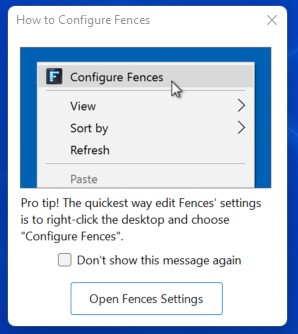
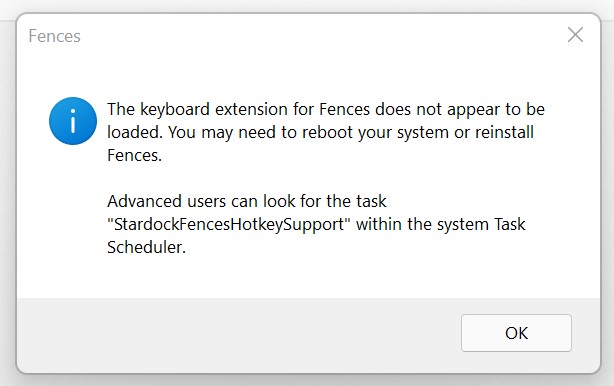
Have run into 3 other issues: 1) right clicking desktop - no Configure Fences option (see screenshot), 2)  Hot Keys don't work - Keyboard extension for Fences does not appear to be loaded message (see second screenshot).  Have rebooted and the mentioned task is not in the Task Scheduler.  Not inclined to reinstall since don't want to go through quarantine process again when will probably get same outcome.  HotKey not that important.  AND 3)  Hide/Unhide often doesn't work because mouse pointer is so sensitive that movement undectable to me must be happening.  Any ideas on how to configure mouse to avoid this issue? (Logitech M590)

Although I would rather not reinstall, it would be useful to get your opinions on whether any of the issues above could indicate something more serious. 

Thanks very much.


Reply #5 Top

Sorry, I was trying to compare a computer virus with a real life virus like covid there in an analogy of false positives. I am not sure I was very clear on that

At first glance it seems like it may be a driver issue since you say it is a brand new computer. Have you tried from windows setting menu in the windows update options....

clicking yes on additional Microsoft products

And then update from the optional updates. This usually will get you the current mouse and keyboard drivers

Edit - it seems this may be a problem effecting certain pcs as I seen another post stating the same issue. It may take until the next update to resolve

Reply #6 Top

Updated everything as you suggested, no change in the issues.  Also, not clear which of problems 1-3 you thought a driver update might fix?  Thanks.

Reply #7 Top

Hi

So there has been a report of a similar issue you are experiencing here

https://forums.stardock.com/508778/page/2/#3829509

I would wait for a response from the developer in regards to this issue.

The good news is that this means that nothing dangerous is going on and is rather just a bug that needs sorted out