Won't Recognize Password
Just bought software and trying to connect two pcs. It keeps telling me that the password is incorrect even when it has been copied.
Hello,
Sorry to hear you are having issues. Please try this guide to get to your product and keys : https://forums.stardock.com/484254/getting-your-products-and-keys. Try those and report back if you still need assistance.
Thanks
Basj,
Stardock Community Assistant.
My purchase is through Steam. It is already linked to my Steam credentials?
Maybe I misunderstand you issue. I think you was thinking about Multiplicity Passcode, yes? Maybe this guide can help you : https://forums.stardock.com/486104/multiplicity-support-faq#passcodeerrors.
Thank you,
Basj,
Stardock Community Assistant
Those aren't the problem. When you try to connect to a computer, you need a PC name and the passcode generated by the KVM software. When you connect, you need to find the PC name and have the KVM consol search for the computer and then connect via the computer name and then enter the passcode for the connection. It refuses to recognize that password.
Hello,
I have forward your problem/question to Stardock Support Team for their assistance. Please keep an eye on this thread for any updates. We appreciate your feedback and patience.
Basj,
Stardock Community Assistant
Actually, what was sent to you:
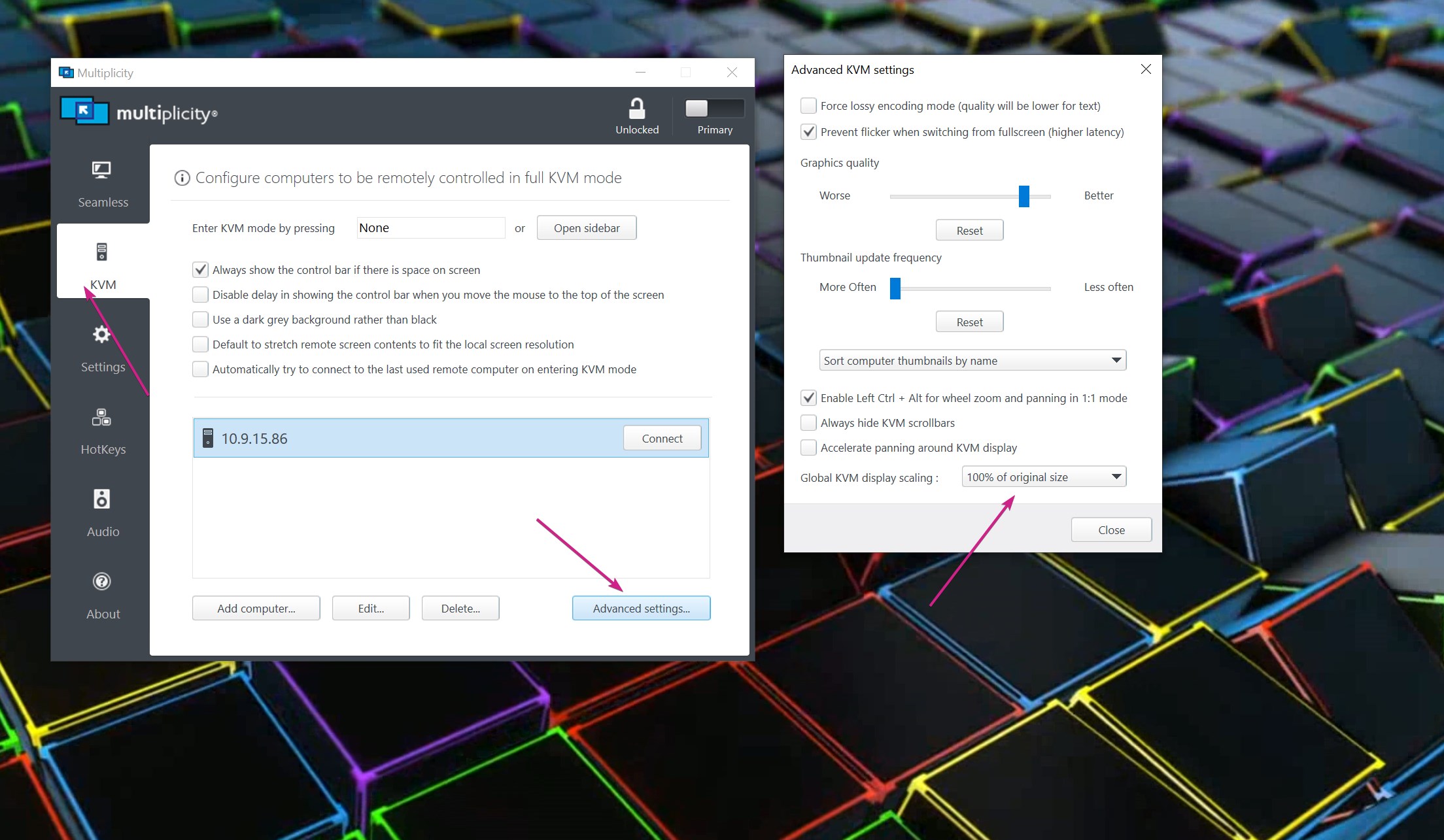
Is what you would need to review as it has tips on things to try for the exact problem you are having. If you still have issues after, please say so in a reply here.
Sean Drohan
Stardock Support Manager
I fixed the connection issue. Now when I run the KMV mode, the monitors are not synced correctly. The primary computer resizes the secondary system, and it looks fine on the primary system when I move the cursor. However, on the secondary system the cursor is way off target.
Are you on the current version, 3.57 (About tab)?
Meaning, when you click something in the Primary's connection window, an icon (for example) on the Secondary, it does not open it? In other words, regardless of how it actually looks on the Secondary PC, does the connection window to it on the Primary properly interact with the items in it... or no... the clicks in the connection window do not match what is displayed in said window?
If the clicks are not correct, do you have any 3rd party monitor software on the Secondary (DisplayFusion or Wallpaper Engine for example)? If so, turn them off and try again.
Sean Drohan
Stardock Support Manager

"no... the clicks in the connection window do not match what is displayed in said window"
and there is no third party software.
In an open KVM connection window, if you try to open an icon from the desktop, does it work?
Sean Drohan
Stardock Support Manager
yes
Then I remain confused as to what the problem is. Could you post a shared link to a video of it to better illustrate?
Are there other PCs you are connecting to that do \ do not have this issue?
Also, I need the version you are using (About tab).
Sean Drohan
Stardock Support Manager
I can't seem to upload anything properly through your chat system. So here is the thing. Let us say that the cursor is hovering over an icon on the main pc. If you click on it, you would expect it to activate that GUI becasue it is in the same location on the remote pc. It does not because on the remote pc the cursor is in a different position.
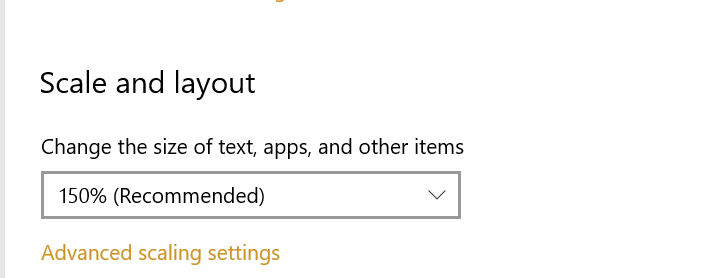
What is the DPI of each PC?
Sean Drohan
Stardock Support Manager
PC Remote: 7680X4320
PC Main 1920X1080
Not the resolution, the DPI \ Scale, example:

And what is it for each, specifically.
Sean Drohan
Stardock Support Manager
PC Remote 300%
PC Host 150%
And if you scale that back considerably, does it work then?
Sean Drohan
Stardock Support Manager
Nope.
So you scaled it to match, 150% each, and it still failed?
Sean Drohan
Stardock Support Manager
yes
Did you reboot after changing or just change and instantly check? (it makes a difference to how windows scales things)
Now the cursor size is oversized on the host computer and it still is in the wrong places
What do you have for this?

Does any change \ reconnect alter your results?
Sean Drohan
Stardock Support Manager
Copied the specifications shown. The mouse is still large.
Welcome Guest! Please take the time to register with us.