

Stardock 10 Menu

Office Icons are very small even when I pin to taskbar

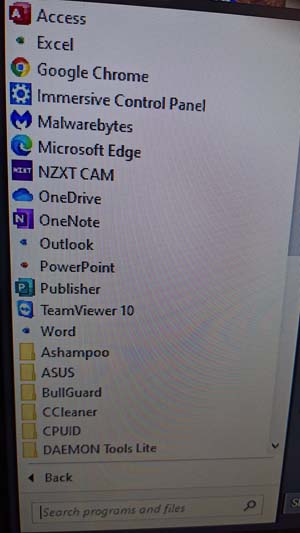
I just built a new computer and bought another copy of Stardock 10. I had just installed Office and for some reason the Office Icons are very small in the Stardock 10 menu. When I pinned them to the task bar, they are also small and you can not tell what they are. Any ideas how to fix this?
 

2,648 views 5 replies
Reply #1 Top

Hello,
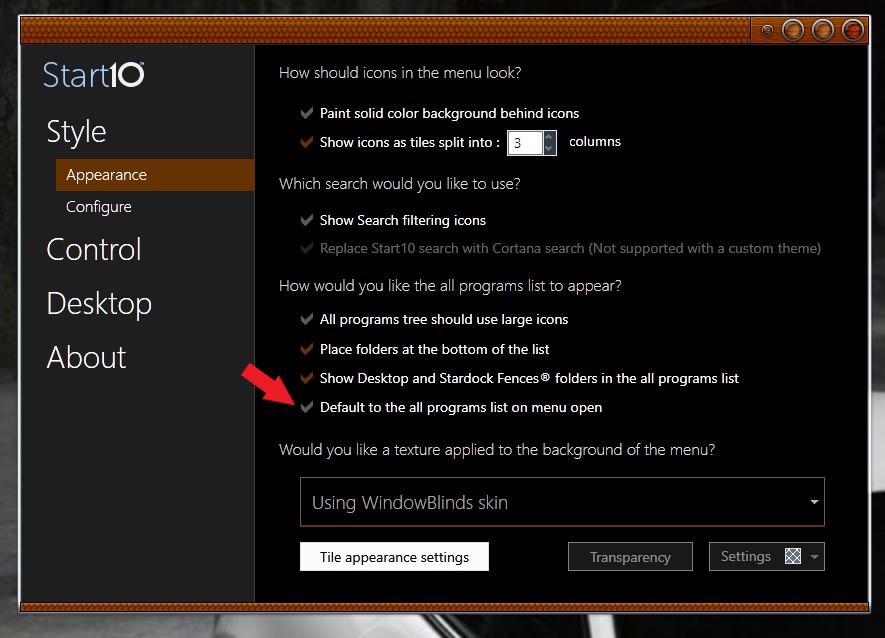
Sorry to hear you are having issues. If you set Start10 to default to the all program, the icons will be that small. But if you choose not to, it will be bigger.


Basj,
Stardock Community Assistant.

Reply #2 Top

Thanks for the tip but it did not work. As you can see in my original screen shot, only the Office icons (Excel, Word, Outlook & PowerPoint) are small. Unchecking the "Default to all the programs lists on the menu open" shows only large icons but no Office Icons. If I select All programs, the office icons appear but are still small.

Not sure if this is a Start 10 issue or whether I need to download Office 365 again.

Any ideas? Thanks.

Jim

Reply #3 Top

Hello,

Once you disable that part, than you can do the "pin to start10" to make which ever application appear on that left panel. You can try the short steps to do so.

HOW TO ADD FOLDER/ICON TO THE LEFT PANEL

1) Right Click on the folder/icon you wanted to appear on the left panel of Start10. (In Windows Explorer)

2) Select/Click "Pin to Start"

3) On Start10 click "All Programs"

4) That folder you "pin to start", will appear here. Right click on it.

5) Select/Click "Pin to Start Menu (Start10)

And that should do it. To have it listed out on the Left panel of Start10.

Thank you,

Basj,
Stardock Community Assistant

Reply #4 Top

Hi Basj,

I fixed it myself. I looked in the Windows 10 Menu and discovered that those 4 office programs had 2 shortcut icons, one large and one small. once I deleted the small icon, everything works fine now.

I have no idea how the small icons were created, but now that they are gone, I really don't care. :andrew:  

Many thanks for your great support. Happy Holidays and stay safe.

Jim


Reply #5 Top

Great, glad you fixed it.

Thank you,

Basj,
Stardock Community Assistant