Accidentally deleted icons

I recently accidentally deleted most of the icons in my numerous  fences. Control Z did not work to re-instate 

Does anyone know if there's a way to re-instate them, apart from copying all the icons from the desk top record on the screen and re-sorting all over again? 

One can keep a screen shot of one's frame contents. But is there a way to record and use any one set of arrangements please.?

A.L.

2,033 views 5 replies
Reply #1 Top

Hello,
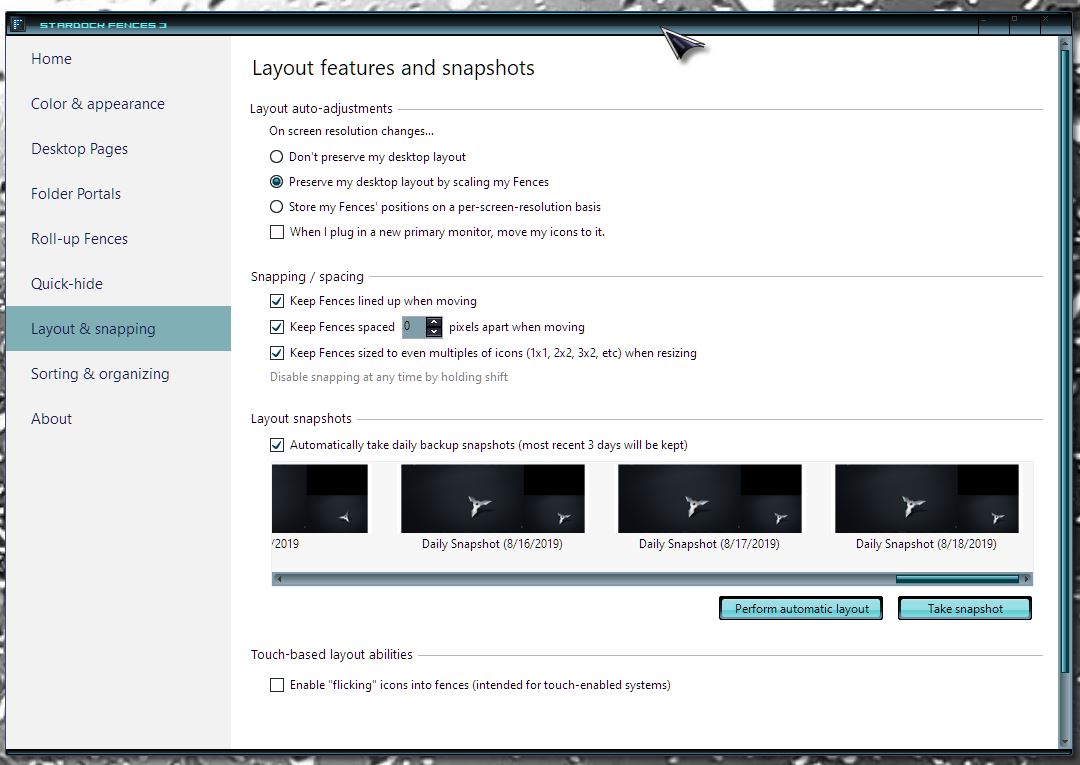
Sorry to hear you are having issues. I believe, if you have deleted it and it does not appear inside your Desktop (in Windows File Explorer).  You can check it still there in your recycle bin. If not there, than, for short-cuts icons, you can recreate it manually on others, such as programs, documents file etc, you can use those recovery programs to recover them. Once you have it back. You can use Fences Layout snapshot to restore them into its respective fences.


Basj,
Stardock Community Assistant.

Reply #2 Top

Thanks for this helpful reply. 

The original icons are preserved as a list in the folder for Desk Top contents.

The issue is putting all these icons back on the desk top in the original frames!

It seemed like there should be some way to preserve the original frame contents other than a screen shot, so one could re-create the arrangement that I mistakenly deleted!

Reply #3 Top

Have you tried the Fences layout snapshot restore?

Thank you,

Basj,
Stardock Community Assistant


Reply #4 Top

Terrific, not sure how I  missed this facility!
Solves my problem. Many thanks indeed.

Reply #5 Top

Great, glad it get solved.

Thank you,

Basj,
Stardock Community Assistant