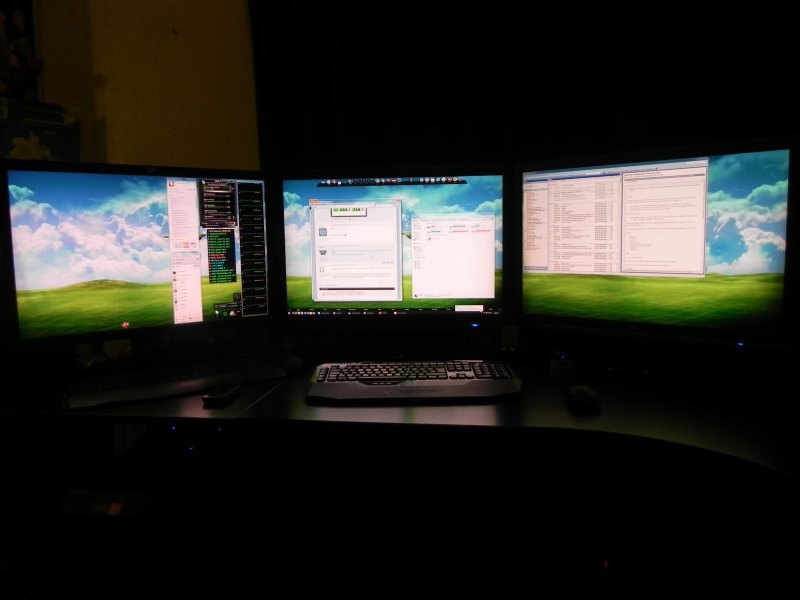
1: iiyama pro lite 27"
2: HP 20"
I'm using three monitors. An HP w2338h 23" in the center, and an HP S2031 20" on either side.

Win7 rig:
22 inch Acer @ 1650x1080
15 inch eMachines because it was there.
Vista rig:
20" HP
XP rig:
32" Emerson TV
This XP Gateway laptop:
A frickin' Etch-A-Sketch would do better
4 monitors, 2 systems XP (1 monitor)/Windows 7 (connected via MP2)
(See image for sizes)

Wow..... The latest changes to the forum code sure has fucked things up....
Large images are not 'thumbnailed' anymore.
Hmm.... Now they do....
25 inch Hanns.G
1920 x 1080
Primary is a 47in Samsung LED TV and a secondary 24in Samsung LED Monitor run in clone mode. Computer is hooked into a home theather system, this allows me to watch movies and also see what happening on the computer. I can switch the signal souces for the 47in from Satellite, to over the air TV and DVD player and other HDMI connected devices.
three 20" flat screens at 4800x1200
2 Samsung 27" LED @ 1920x1080 hooked up to the beast...........
1 Samsung SyncMaster 997DF 18" CRT. Ya I know you're all jealous. At 1600x1200. Did have 2 of them but 1 croaked.
A 32" WS LCD telly
I had a 21" CRT some year ago. Biggest and heaviest mothereffin screen I've ever had the pleasure of dragging up to a third floor apartment - twice....
Office computer - Two 24" Dell IPS monitors with 1920x1200 resolution.
Gaming computer - One 27" Dell IPS and one 24" Dell IPS.
![]()
Asus MW221u [22 inch] 1680x1050 ....just the one.
Yesterday I picked up a freebie for Terry.... BenQ DV3250-SA ....32 inch [it's a Teev] ... resolution set at 1280x720 [she has poor eyesight] ...;)
I can't remember the CRT displays I had(they were small though), but I can recall the LCDs.
First one came with my Dell Dimension, 15" at 1024x768. It flatlined last year, so or a while I had to use my TV as a monitor, set at 1366x768.
Now I have a single Acer 20", at 1600x900. I look forward to a bigger display at some point, but for now this one's excellent.
2 x 23" LG LED monitors at 1920x1080 resolution
2 x 30" LG W3000H + 1 x 30" HP ZR30w, at 2560x1600 resolution (each). ![]()

That's too many, Jorge....you will just have to give me one ....;)
Eheh. Actually, it is too much, I agree. The initial idea was to play games in Eyefinity (which requires same resolution monitors, and I needed the largest one I could find for work too), but I ended up not doing that for several reasons (to start with, 7680x1600 was too much resolution even for an ATI 5970 + 5870 tri-crossfire combo).
Now I have a nVidia 690 GTX, but I haven't tried Surround yet.
Ah, men and their toys. ![]()
Needless to say my 590 doesn't raise a sweat pushing a 22 incher ...;)
A 24" 1920 x 1200 Dell monitor (IPS of course). Really don't need anything more.
A 24" Dell monitor at 1920 x 1200, lack of real estate prevents me from adding another!
Large images are not 'thumbnailed' anymore.
Hmm.... Now they do....
They appear to be fitting in the forumn window now. however when they are to large you have to scroll to see it all which I don't enjoy to be honest. There is one above that you must scroll to see it all. I reduce all mine to 1280x800 or smaller and they always fit correctly.
Mine: Dell 26" 1900x1200 Res. -- Some really nice setups above I might add.
32inch Toshiba HDTV.
Welcome Guest! Please take the time to register with us.
- Richer content, access to many features that are disabled for guests like commenting and posting on the forums.
- Access to a great community, with a massive database of many, many areas of interest.
- Access to contests & subscription offers like exclusive emails.
- It's simple, and FREE!