

Please Help: Are these bugs, or is it just me?
from  WinCustomize Forums
WinCustomize Forums
Hi,
I´m new to the skinning thing, but have some experience in designing with several programs. Now I wanted to start skinning, but I found several problems. I hope somebody can help me.
At the moment I am evaluating SkinStudio Free to be sure if this is working for me.
Here are my observations:
First:
I draw a bmp or a tar file in Photoshop and import it into skin studio.
If I use "Selection" - "Select all" the values for the selection are at least 1px larger than the original file. If I use "Cut Image" I get an adittional white line on at least one side.
If I try to enter the proper values, it does some sort of auto-correction and again I get the wrong values. Only if I use the arrow-tool I can achieve the right selection. But as you can imagine, that takes a lot of time.
Is this a bug, or am I doing something wrong?
Second:
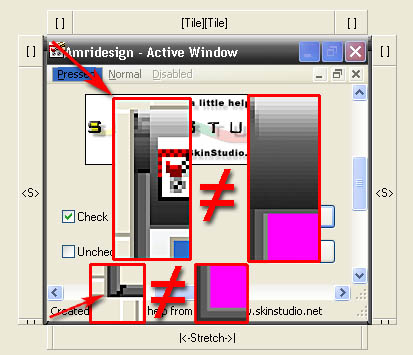
After I achieved to cut the image the right way, I again don´t get the desired results. Somehow The margins don´t work as I want them to. Please see the example.
I try to add a picture here, if you can´t see it, please use the link beyond:
http://www.amridesign.com/bilder/Bugs.jpg
The Image that SkinStudio calls "WindowFrameTop" is exactly 27 px high. If I enter this as the top margin of the image "WindowFrameLeft", I get the results seen in the picture (upper left red square), which is not what I expected. The same thing in the left bottm corner (margin bottom: 4px). I don´t know why, but it adds several pixels, that haven´t been in any of the bmp(the black "s" in the picture).
Please Help. Has anyone else experienced these problems?
Thanks
I´m new to the skinning thing, but have some experience in designing with several programs. Now I wanted to start skinning, but I found several problems. I hope somebody can help me.
At the moment I am evaluating SkinStudio Free to be sure if this is working for me.
Here are my observations:
First:
I draw a bmp or a tar file in Photoshop and import it into skin studio.
If I use "Selection" - "Select all" the values for the selection are at least 1px larger than the original file. If I use "Cut Image" I get an adittional white line on at least one side.
If I try to enter the proper values, it does some sort of auto-correction and again I get the wrong values. Only if I use the arrow-tool I can achieve the right selection. But as you can imagine, that takes a lot of time.
Is this a bug, or am I doing something wrong?
Second:
After I achieved to cut the image the right way, I again don´t get the desired results. Somehow The margins don´t work as I want them to. Please see the example.
I try to add a picture here, if you can´t see it, please use the link beyond:
http://www.amridesign.com/bilder/Bugs.jpg
The Image that SkinStudio calls "WindowFrameTop" is exactly 27 px high. If I enter this as the top margin of the image "WindowFrameLeft", I get the results seen in the picture (upper left red square), which is not what I expected. The same thing in the left bottm corner (margin bottom: 4px). I don´t know why, but it adds several pixels, that haven´t been in any of the bmp(the black "s" in the picture).
Please Help. Has anyone else experienced these problems?
Thanks


