

Themes and Start Menu
How to Apply to the classic Start Menu
from  Stardock Forums
Stardock Forums
Hi, I downloaded a lot of themes, which also change the skin of the START menu, but it does it only if the Start Menu is in the "XP" mode (where it has got two columns), and not if it is in the classic mode (only one column). How can i apply the style (background color/image, ...) to the classic Start Menu?
Here there are two images to better explain: in the first the theme correctly applies with the purple background, ...; the second image shows the menu in che classic mode (only one column), without any kind of style applied: I usually use the start menu in the classic style, but i would like to have the purple background (in the example): any ideas??? Thx a lot
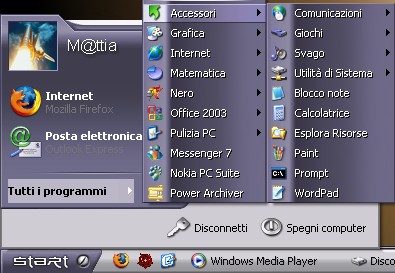
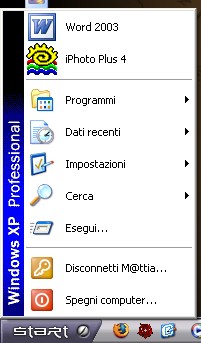
Here there are two images to better explain: in the first the theme correctly applies with the purple background, ...; the second image shows the menu in che classic mode (only one column), without any kind of style applied: I usually use the start menu in the classic style, but i would like to have the purple background (in the example): any ideas??? Thx a lot
 WinCustomize Forums

 ).
).