Fences 4.2.3 – Recently, after a restart, all Fences with icons move to the main screen

The problem is new and arose recently due to a Windows update and Display Port to HDMI adapter on the second monitor

I use Fences virtual desktops.
Icons migrate after a restart from the third to the first monitor

The standard desktop is ok
The second (virtual Fences desktop) – either everything from the second monitor ends up on the third monitor OR everything ends up on the main screen and overlays everything.
Working is no longer possible with it.

Dear Stardock support team,
The problem:
After every Windows restart, all icons that were placed on the third monitor are suddenly on top of each other on the main screen. Fences does not remember the monitors at all or sometimes incorrectly. As I have researched, you cannot manually assign the monitors even in versions 5 and 6, and I ask myself why there is no such fundamentally sensible setting?

When did it occur:
The problem began either after a Windows update and since I have been using an adapter from DisplayPort to HDMI, it became even worse.

My question:
Why does Fences 4.2.3 move all icons from the second monitor to the first after every restart?
Why does Fences, in certain constellations, move the icons from the second monitor to the third monitor when I use restoring of the snapshots?

Settings tested:
"Store my Fence group position on a per-screen-resolution basis"
"Preserve my desktop layout by scaling my Fences group" – (without activated checkbox – "When I plug in a new primary monitor…")

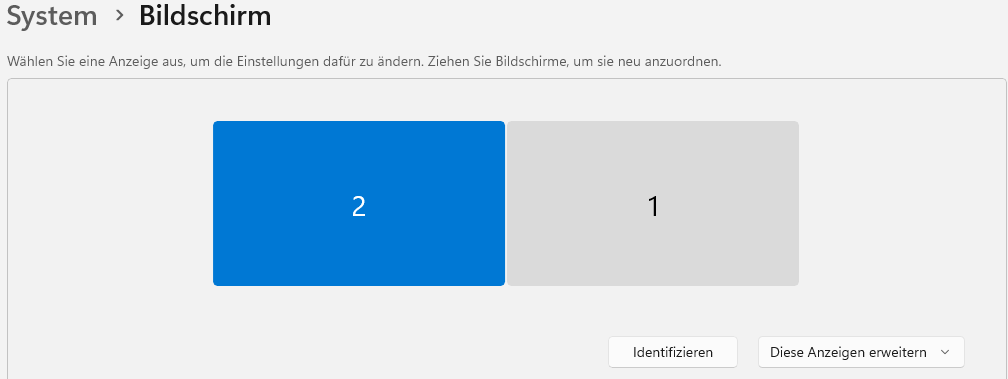
All three monitors have the same resolution.

Sensible working is simply no longer possible like this.
Even the restoring sometimes fails completely.


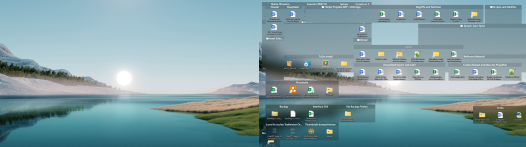
This is how it should look:

 

This is what I get now every restart. 


(Win11)
I hope for a remedy
With kind regards


It's really extremely frustrating that there's no real technical support—neither via email nor through the form on the website. No one on Discord is offering help, and I guess we can't expect any real technical support from the company here either? 

1,453 views 7 replies
Reply #1 Top

Hello,

Sorry to hear you are having issues. If you're on Windows 11 with latest updates. I believe it is best to move on to Fences v6. Fences v6 come with better layout engine and best support for all current Windows changes. What you can do is try the 30 days free trial on Fences v6

Thank you,

Basj,

Stardock Community  Assistant.

Reply #2 Top

Thx for your answer.
As I mentioned earlier, according to my research, even Version 6 doesn't offer a way to permanently set up monitors in Fences, which is simply a fundamental oversight. Why should I spend money again on something that's essentially a bug and should be fixed in the first place (it's the same operating system where I purchased my version, and this option is simply missing in all versions, including the new ones)?


I’m not going to buy new software every year just because it has bugs or because an operating system changes—if everyone did that, the world would be in total chaos. And then I’d pay money again, only for it to break again in a year—that makes absolutely no sense.


As I said, I’m a software developer myself, and I really hope the EU finally implements the planned laws soon that force software manufacturers to keep the software running for a certain number of years. That’s just not how you treat customers. That’s how you turn a great product into a terrible experience.


I mean, there are free open-source clones available now, but I tell myself, “No, I’m buying the software to show my appreciation for someone’s work”—and then they just trample all over it.


It can’t be that complicated to add a setting that says, “This desktop is assigned to monitor xy.” That would be relatively easy to implement technically. So the question is, why aren’t they doing it? I hope a developer reads this.


Translated with DeepL.com (free version)


Reply #3 Top

Hello,

From what I understand, the layout issues were largely addressed with the new Layout Engine introduced in Fences 5, and further fine‑tuned in Fences 6 as Windows itself evolved. The development team has been actively working to improve layout management, though I realize it may not yet cover every scenario users would like.

Here are some current threads discussing layout behavior and solutions, which may help provide context:

Moving forward with your concern, I still believe it’s worth trying the 30‑day free trial of Fences 6 to see how the new Layout Engine works for your setup. Fences v4 has not received major development for quite some time, and as Windows continues to evolve, Fences also needs to evolve alongside it. That evolution requires ongoing development resources, which is why new versions come with a price tag — it’s not about charging for “bugs,” but about sustaining compatibility and adding improvements over time.

I completely understand your point about wanting a permanent “bind desktop to monitor” option. Technically, this is more complex than it seems because Windows can change monitor IDs when hardware or drivers are updated, which makes persistence tricky. Still, your feedback is valuable, and posts like yours help highlight where users feel the product could evolve.

Thank you again for taking the time to share your perspective — it’s clear you care about the product, and that kind of input is exactly what helps guide future improvements.

Thank you, Basj, Stardock Community Assistant

Reply #4 Top

Thank you very much for writing to me. The cases you mentioned have nothing to do with the issues I’ve described; I don’t have any incorrect sizes or individually moved windows.... My monitors are getting completely jumbled up. And according to my research, this hasn’t been fixed—a very simple and practical way for users to fix this would be to provide a setting option. Desktop 1 is Monitor 1, and so on—so that you can assign a specific monitor to each desktop. (The fact that you’re sending me links to completely different problem descriptions shows me that you didn’t even read my message properly.)


It makes no sense to spend that much money again on a version that will cause problems again with the next Windows update, especially since the team no longer provides support because they’d rather be developing Version 7. I’m not a cash cow who can afford to buy the same software again every two years, even though no worthwhile features have been added.


Since I’m a software developer myself, I find this absurd. But there are free open-source clones whose code I can customize myself and adapt and expand exactly to my needs. Since I’m not going to get any help here, that will probably have to be my path.


Translated with DeepL.com (free version)


Reply #5 Top

Hello,

I have forwarded your problem/question to Stardock Support Team for their assistance. Please keep an eye on this thread for any updates. We appreciate your feedback and patience. Thank you.

Basj,

Stardock Community  Assistant

Reply #6 Top

We're continuing to update Version 5 with all back-ported bug fixes, and just released a new major update to it last month. So, I'm not sure I follow.

We encourage you to find something that works for you if ours does not, but of course are always hoping to do a good job such that you're feeling our software is worth $10 per 12 months of usage, so that we can continue to reliably fund development.

This issue is a complex topic, with a complex solution. It might not seem like it! As you know in computer science, different problems can look different from the outside verses inside. Monitor-change handling works very well for the vast majority of our users, and mainly, it just sounds like you're not willing to give it a shot. We have occasional users who have issues due to varying complexities, which we work 1-1 to resolve.

Again if you'd prefer to go with another solution, this is ok, but we put great care into maintaining our product, both current and previous editions.

Thank you.

Reply #7 Top

If only they would realize how useful a feature it would be to simply map the virtual desktop to the physical desktop in the Fences settings (that way, for example, it would be possible to move everything over completely—or even solve technical problems). I understand that you don’t want to think about it and want customers to ditch the paid Lifetime versions and switch to new subscription models—understandable; you want to make money. I will never be willing to rent software. I reject this model, and I also reject the fact that software paid for once as a lifetime license (within the same operating system) can cause such problems.


It’s a matter of attitude—how a developer chooses to handle this. I wouldn’t treat my customers this way, but every company has its own policies and values.


And as long as problems can still arise at any time with Fences purchased as a lifetime license (within Windows 11), no thanks.


But I do wonder why people here are so desperately avoiding the issue. As you can see, I don’t have Version 5, and Version 6 is currently the latest. But whatever. You’re wasting my time. I’ve given you constructive feedback multiple times. You don’t want to hear any of it, so we’ve said all there is to say, and any further words are completely unnecessary.


I don't know how accurate the translation generated by DeepL is; I mean, I'm being respectful, but I just have a very nuanced view of how well software works within the same operating system.

That aside, my suggestion would make a lot of sense for Version 6—that would truly be a worthwhile improvement that might prompt customers to consider a new purchase. But you're not interested, and that's fine. To each his own.


Translated with DeepL.com (free version)