
darkMatterSound darkMatterSound

Start 11 - Tray Icons Non-Responsive

Start 11 - Tray Icons Non-Responsive

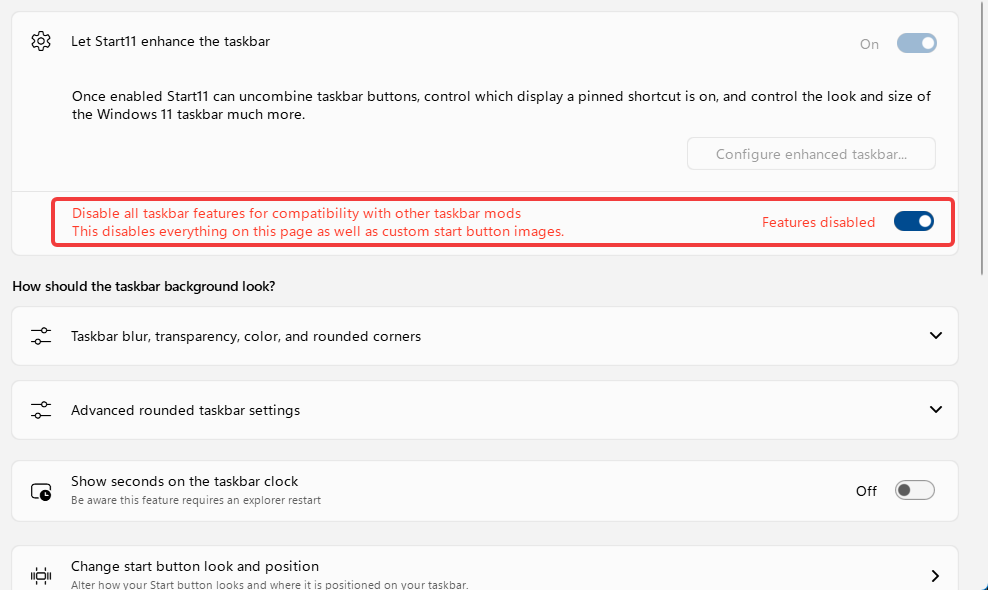
Up until a few days ago, Start 11 v2 was working fine.  However, now, none of my tray icon s will respond to any clicks.  They still show up, but nothing happens when I left-click, right-click, or hover over any of them.  The only way I can make them respond again is by flipping the "Disable Enhanced Taskbar" switch.  This, of course, wrecks my nice taskbar I've set up with Start11.  Everything on the main taskbar responds perfectly fine, it's just the tray I'm having issues with.  I haven't installed anything new, definitely no other taskbar mod apps.  I've uninstalled & reinstalled Start11, and still no resolution.  Any idea how to fix?
1,536 views 29 replies
Reply #26 Top

I am currently having this exact issue in version 2.73

Disabling the task bar features makes it work, but I want the Start11 taskbar, so that's not really a viable solution.

To my knowledge I don't have any other modifications for taskbar.

Here's a short mp4 of the issue.

Reply #27 Top
Quoting mrpeters, reply 3995712

I am currently having this exact issue in version 2.73

Disabling the task bar features makes it work, but I want the Start11 taskbar, so that's not really a viable solution.

To my knowledge I don't have any other modifications for taskbar.

Here's a short mp4 of the issue.

End of mrpeters's quote

Hello,

Sorry to hear you are having issues. Please try, uninstall Start11, reboot immediately (important), download latest version available in your account product download page: https://store.stardock.com/myaccount/products. Install it, reboot immediately again. Retest it and report back.

If the issue still appear, please let us know your Windows full version and OS Build number. Use Winver.exe to get these numbers.

Thank you,

Basj,

Stardock Community  Assistant.

+1 Loading…
Reply #28 Top
Quoting basj, reply 3995724
Quoting mrpeters, reply 3995712

I am currently having this exact issue in version 2.73

Disabling the task bar features makes it work, but I want the Start11 taskbar, so that's not really a viable solution.

To my knowledge I don't have any other modifications for taskbar.

Here's a short mp4 of the issue.

End of mrpeters's quote

Hello,

Sorry to hear you are having issues. Please try, uninstall Start11, reboot immediately (important), download latest version available in your account product download page: https://store.stardock.com/myaccount/products. Install it, reboot immediately again. Retest it and report back.

If the issue still appear, please let us know your Windows full version and OS Build number. Use Winver.exe to get these numbers.

Thank you,

Basj,

Stardock Community  Assistant.

End of basj's quote

You get an early Thank you as it seems to be working as of uninstall + remove settings -> Restart -> Install.

I'll let you know if it stops working and if I can find a correlation to it.


Cheers

Reply #29 Top
Quoting mrpeters, reply 3995735

You get an early Thank you as it seems to be working as of uninstall + remove settings -> Restart -> Install.

I'll let you know if it stops working and if I can find a correlation to it.

Cheers

End of mrpeters's quote

Great, glad to hear that.

Thank you,

Basj,

Stardock Community  Assistant