
Show my most used application with Recent History

Recent History

On my Win10 PC, I have Start10 and for example when I open a file in Notepad++, it's displayed as Recent History on the Start menu.

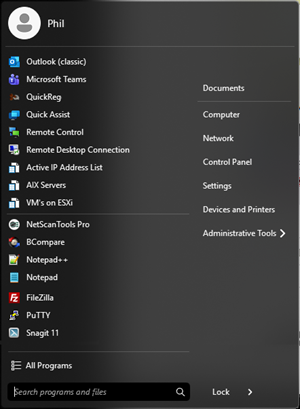
On my Win11 PC using Start11 v2, I'm seeing the most used application but I'm not seeing the Recent History items and not sure if it's a setting or just not being shown.
580 views 7 replies
Reply #1 Top

Hello,
Sorry to hear you are having issues. Need to know which Start Menu style you're currently using and post a screenshot showing your start menu.

Thank you,
Basj,
Stardock Community Assistant.

Reply #3 Top

If you hover your mouse over notepad++, it should open up your recent file. Something similar my screenshot below. 

Thank you,

Basj,
Stardock Community Assistant

Reply #4 Top

I have used Start10 for years and have used this feature for a very long time.

I you look at my screen shot, you will see that is isn't showing the arrow > sign like your screen shot is showing and that's my problem.

Reply #5 Top

Please check if you have turn on your jump lists setting in Windows. Once that is turn on, open up some files via Notepad++ and see if the arrow appear. Report back.

Thank you,

Basj,
Stardock Community Assistant

Reply #7 Top

Great, glad to help.

Thank you,

Basj,
Stardock Community Assistant