Start Menu & Taskbar don't popup via the mouse.

Windows keys necessary to access both

This is in regard to Start11.

I cannot access my Start Menu or my Taskbar via the mouse like I did under Win10.

But if all programs are minimized and only the Desktop is visible, then I can use my mouse to pop-up the Start Menu and the Taskbar.

Aside from that, the only ways I can access my Start Menu or my Taskbar is via the Windows keys or from the WinKey & Tab combination.

I've installed and rebooted after each update so all should be good.

Does anyone have any idea how to correct this? It's cumbersome and driving me crazy. Lol

Btw, I thought there was some support for this program but if I remember correctly, it was for a mere 30 days or something. I purchased licenses for 3 computers so I would expect some sort of support other than this forum. smh

Thanks.

Moved to Start Menu Products Area


1,097 views 11 replies
Reply #1 Top

Hello,
Sorry to hear you are having issues. First, I know you might have done it, but just to be sure, please try, uninstall Start11, reboot immediately (important), download latest version available in your account product download page: https://store.stardock.com/myaccount/products. Install it, reboot immediately again. Retest it and report back.

If the issue still there, we need more information.

  1. Windows 11 full version and OS Build numbers.
  2. Start11 full version number installed.
  3. Do you have any other 3rd party application that you have installed previously, still running or uninstalled, that also changed your taskbar and explorer behavior?  Application such as StartAllBack, Displayfusion, Windhawk, ExplorerPatcher etc.

Thank you,
Basj,
Stardock Community Assistant.

Reply #2 Top

Hi Basj,

Thanks for the instructions. I followed them precisely but the problem remains.

Here are the answers to your questions:

Windows 11 Version 24H2 (OS Build 26 100.7019)

Start11 full version number installed: 2.5.6.3

No other 3rd party applications.

I'll wait for your reply. Thanks!

Reply #3 Top

Next, please try Clean boot. Refer here for Clean boot Steps: https://support.stardock.com/space/SHC/1334935592/Start11+Clean+Boot. Do note that Clean boot need to be done with care. Please try it and report back.

Thank you,

Basj,
Stardock Community Assistant

Reply #4 Top

Have you accidentally set the taskbar to autohide?

Reply #6 Top

Hey Neil. I purposely set my Task Bar to autohide to free up screen space. Always have. I don't see a reason why Win11 would be any different. Unless you have some insights.

But I'm going to try Basj's suggestion first.

Reply #7 Top

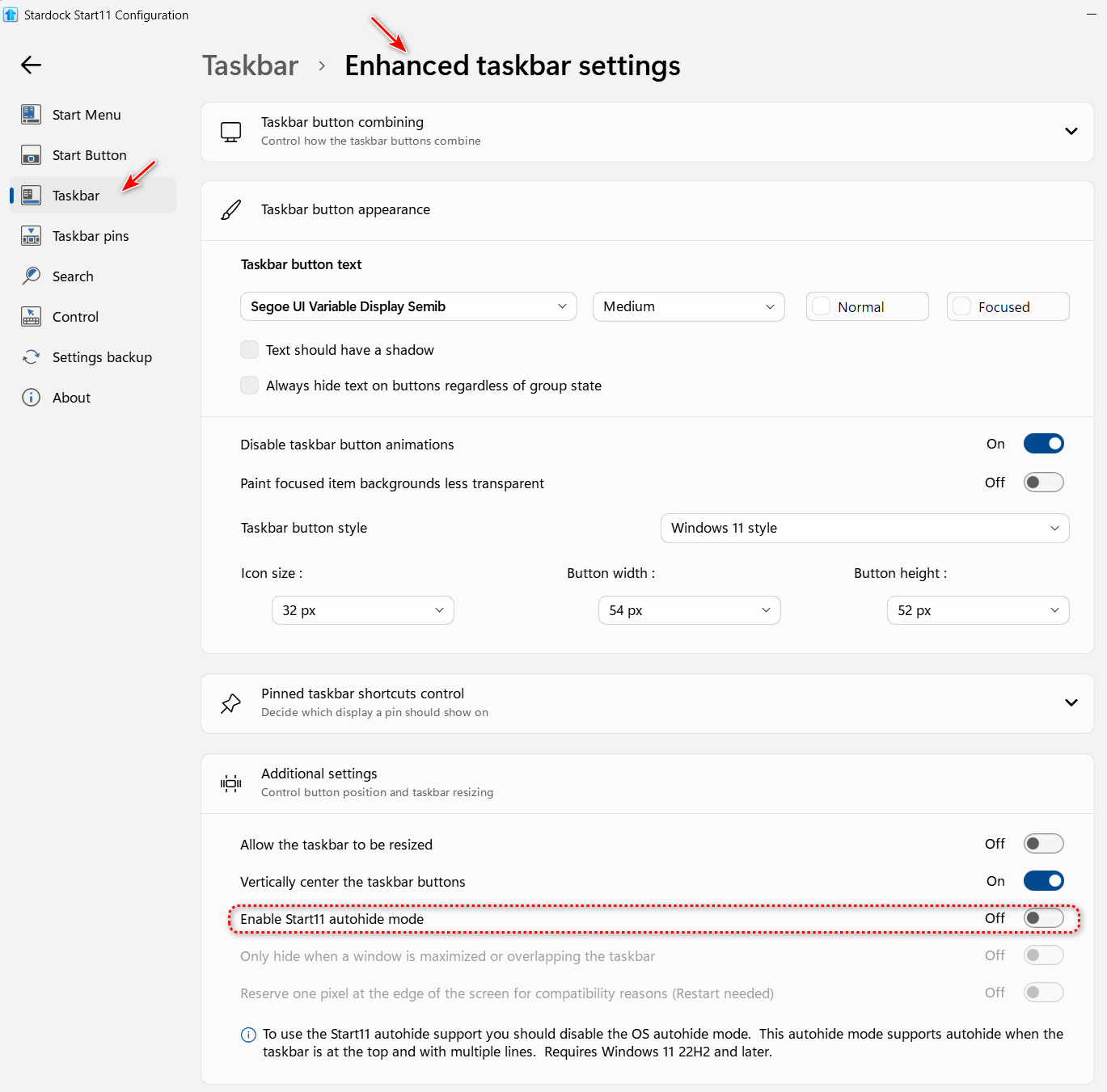
Just to be sure, when you're using autohide, did you actually turn off Windows autohide setting and use the Start11 autohide instead. This should solve the conflict issue.

Thank you,

Basj,
Stardock Community Assistant

Reply #8 Top

Hi Basj, 

I followed your instructions from November 9, 2025 but it not only didn’t fix the autohide issue but it actually just made things worse. Here are the new issues:


My PC has been running slow since applying your previous fix. Have been reluctant to try the other one fearing that things will only get worse.


In order to Snip using Win-Shift-S, I have to hold the mouse at the starting point for a second or two before commencing to highlight the area I want to snip. This has never happened before.


I have to reload some websites as they come up blank.


Alt Tab has to be pressed twice in order to work.


PDFs don’t load unless I close then open the program a 2nd time.


Lag time just trying to scroll down Windows Explorer.


Sometimes Alt-Tab doesn’t even work the first time around.


Reply #9 Top

Regarding using the Start11 autohide instead, I couldn’t find it. Not with Start11 or Windows Menu icon in the Startup group nor in the Advanced Taskbar Settings. Please advise. Thanks.


Reply #11 Top

Quoting MelvinAttorney, reply 8

Hi Basj,

I followed your instructions from November 9, 2025 but it not only didn’t fix the autohide issue but it actually just made things worse. Here are the new issues:
End of MelvinAttorney's quote

Those are indeed strange. Perhaps, you're having conflicting software which preventing Start11 from running properly. Have you actually try my Nov 10th suggestion? Clean Boot?

Thank you,

Basj,
Stardock Community Assistant