
Vertical taskbar not showing any text

I am using Start 11 for the purpose of having a vertical task bar on the right in Windows 11. I have gotten the taskbar on the right, but the icons no longer show any text. No matter how wide the taskbar is. I realize they may not show the full text unless the taskbar is made very wide, but at least some text in addition to the icons is needed. I've looked in the Start11 options and settings and there are options for text display. But I can't get any text. Is this possible? I sure hope so!! 

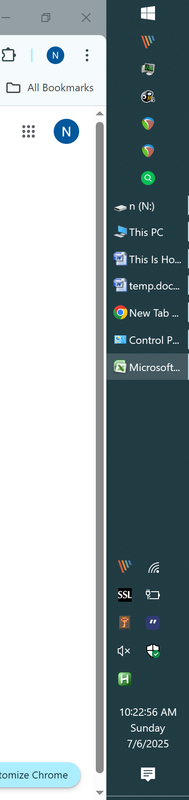
Here's an example of my Windows 10 taskbar. This is what I want in Windows 11. 
 

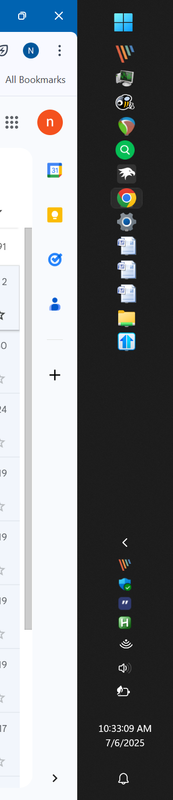
This is what I'm seeing in Windows 11 with Start11.
1,221 views 5 replies
Reply #1 Top

Nevermind. I found it! 

Under enhanced taskbar settings, disable the option to "always hide text on buttons regardless of group state."

Reply #2 Top

Hello,
Sorry to hear you are having issues. And, yes, great to know you found the solution yourself.

Thank you,
Basj,
Stardock Community Assistant.

Reply #3 Top

Hi,

Do you know if icons can be made smaller also? I found how to get the text like you did above, but only get a few letters without going silly with taskbar width because the icons are larger.

Then we just have to address that single column of tray icons and not showing the day of the week, and our superior vertical taskbars are fully operational! :)

Reply #4 Top

Quoting Liam, reply 3

Hi,

Do you know if icons can be made smaller also? I found how to get the text like you did above, but only get a few letters without going silly with taskbar width because the icons are larger.

Then we just have to address that single column of tray icons and not showing the day of the week, and our superior vertical taskbars are fully operational! :)
End of Liam's quote

Hello,
To have small taskbar icons please try this setting.

Thank you,
Basj,
Stardock Community Assistant.