
Left Side Start Menu Icons

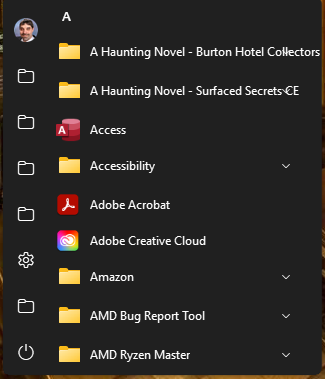
I installed Stardock V2 on my PC and my Laptop.  When I configure my Documents, Downloads, etc. on the left side of the menu, using the Windows 10 menu style, The icons only show folders instead of the normal icons from Windows 10/11.  When I was running Stardock 1.x it was no issue.  The icons remained as they are in Windows 10/11.  How do I configure the icons so that they show the Windows 10/11 bitmap?

Moved to Start Menu Products area
953 views 5 replies
Reply #1 Top

Hello,
Sorry to hear you are having issues. Need more informations.

  1. You on Windows 10 or 11? Also need its full version and OS Build number. Please use Winver.exe.
  2. Start11v2 full version number.
  3. Post some screenshot showing us your issue.

Thank you,
Basj,
Stardock Community Assistant.

Reply #2 Top

PC:

  1. Windows 11 Pro, Insider Preview OS Build 27842.1000.
  2. Start11v2 version 2.51.
  3. Screenshot of icons at the left side of menu.


Laptop:

  1. Windows 11 Pro, OS Build 26100.3915.
  2. Start11 version 2.51.
  3. Screenshot of icons at the left of menu is the same as PC above.
Reply #3 Top

It should look something like this.

Please try, uninstall Start11, reboot immediately (important), download latest version available in your account product download page: https://store.stardock.com/myaccount/products . Install it, reboot immediately again. Retest it and report back.

Thank you,

Basj,
Stardock Community Assistant


Reply #4 Top

This all started because after installing Start11V2 the left-side links were pointing to my Onedrive folders not my local folders.

This is what I had to do.

  1. Uninstalled Start11V2.
  2. Unlinked Onedrive.
  3. Shut down Onedrive.
  4. Rebooted
  5. Verified my Documents, Downloads, etc. were pointing to my PC locations, not Onedrive.
  6. Reinstalled Start11V2.
  7. Verified that the links in the icons to the left were pointing to my PC locations, not Onedrive.
  8. All icons are correct now.

Thank you for your quick responses.

Reply #5 Top

Great, glad you figured it out.

Thank you,

Basj,
Stardock Community Assistant