
Highlight active window in taskbar

Hi, is it possible to change the highlight effect of an active app in the taskbar? I'm on Win11 and Start11 2.51. Currently, the background of the app in the taskbar does change when the window is active, but only slightly, so it's hard to find in the taskbar when you have a ton open! I looked around, and it seems this is not configurable anywhere in the Windows Personalize dialog. Can Start11 do this? If not, this would be a great feature to add to Start11!!
1,420 views 3 replies
Reply #1 Top

Hello,
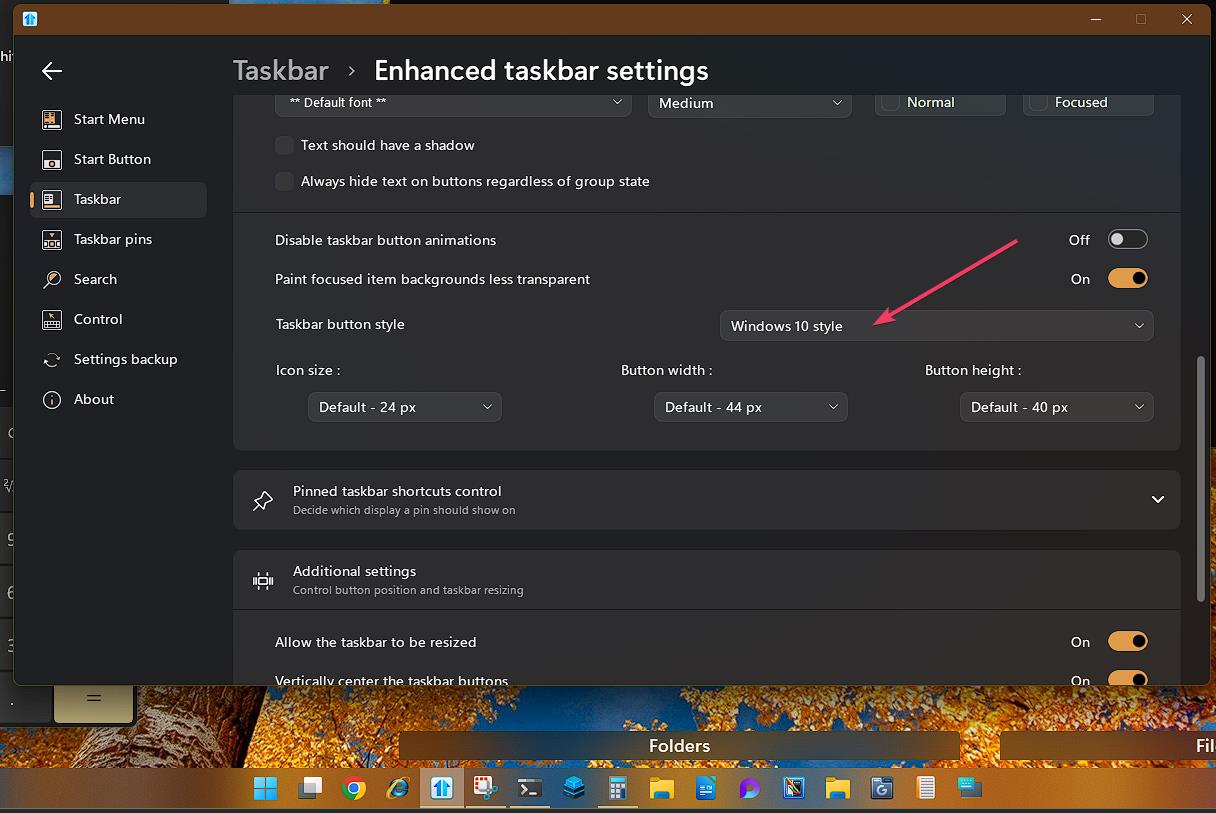
Sorry to hear you are having issues. If you change this setting to Windows 10 style taskbar button, you will a line under opened taskbar button.

Thank you.
Basj,
Stardock Community Assistant.

Reply #2 Top

Hi Basj, thanks for the quick response and suggestion! The Windows 10 style seems to make every button have a long line along the bottom, which I found still does not make the active button stand out. HOWEVER, you led me to the setting right above that: "Paint focused item backgrounds less transparent". This actually does exactly what I had in mind! So I prefer the Windows 11 style with the small line at the bottom, and now with this setting, problem solved! Start11 is definitely a must-have app for Windows. Thanks!

Reply #3 Top

Great, glad you figure that one out.

Thank you,

Basj,
Stardock Community Assistant