

Start 11 problems on Windows 11.. Taskbar is a mess
Sizing is wrong
from  Stardock Forums
Stardock Forums
I'm running v.2.11 of Start 11.
I just replaced my laptop and you can see that the taskbar is way too large. I tried to make it smaller, but it says I have to allow Start 11 to enhance the task bar.
Please see picture of my chubby task bar. The start button is centered vertically, but the regular items are all at the bottom and it looks silly.

I flip the switch to "enhance the task bar" and it resizes to the small size I specified, but.. woops. the tray area is half way off the screen. I try resizing and it doesn't matter how tall I make the task bar. It always gets cut. See picture.
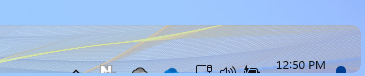
The last version I had installed had no problems so I'm hoping this is a quick bug you guys can fix?
Thanks.
Jason
