Cannot configure properly

Taskbar icons not wide

I am using Start11 on a new PC. On my old PC, whenever an app on my taskbar was running, the icon for that app was wide, with the name of the app. That made it easy to tell which icons and apps were active. But I cannot find a setting for this on Start11 on my new PC. Please help! Without this feature turned on, using Start11 isn't nearly as valuable to me as it used to be.

Moved to Start Menu product area

1,368 views 8 replies
Reply #1 Top

Hello,
Sorry to hear you are having issues. need more information:

  1. You on Windows 10 or 11? Also need its full version and OS Build number. Please use Winver.exe.
  2. Start11 full version number.
  3. Please post screenshots showing the area that you're referring.

Thank you.
Basj,
Stardock Community Assistant.

Reply #2 Top

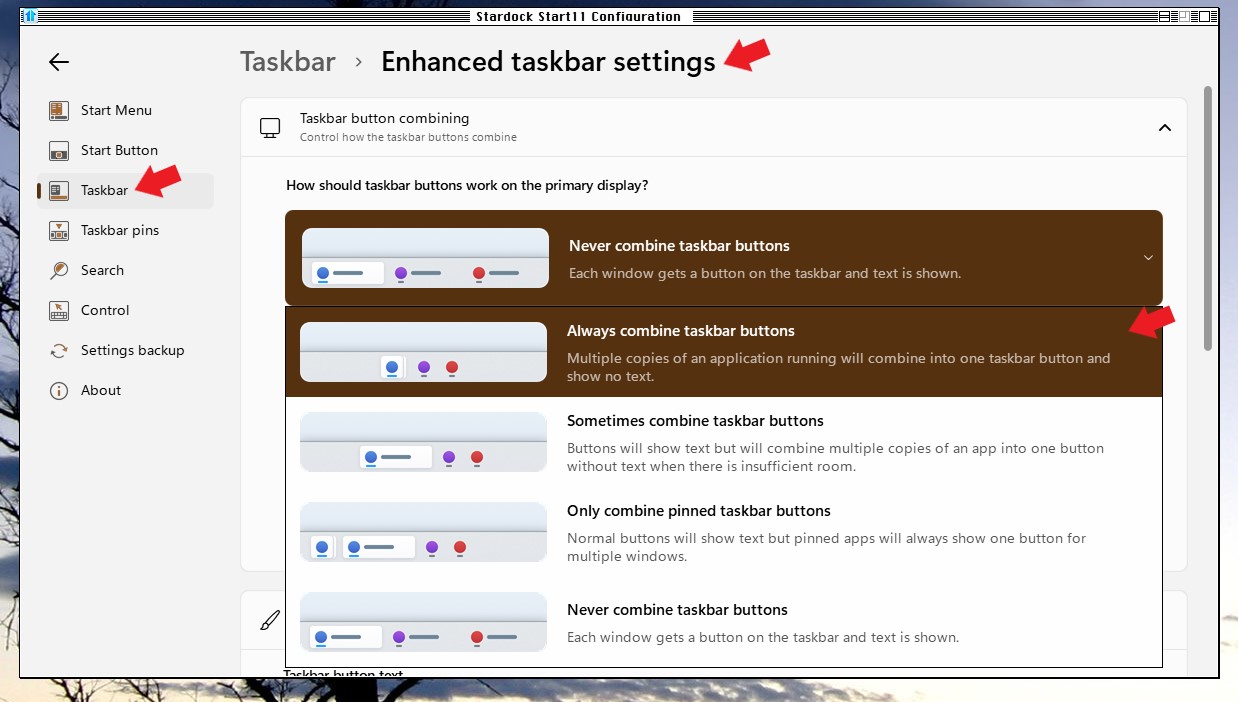
Go to taskbar in Start11 and enable enhanced taskbar.

Reply #4 Top

Basj,

Here are your answers:

  1. I am on Windows 11, version 24H2, OS Build 26100.2605.
  2. My Start11 full version number is 2.11.
  3. Here's a screenshot of my taskbar. I have several of these apps open, some with multiple files open. But they are all condensed here rather than wide, like they were on my old PC.

Reply #5 Top

On Start11 enhance taskbar setting, please try these settings, pick the one that suit you better.

Thank you,

Basj,
Stardock Community Assistant

Reply #6 Top

Basj,

I tried selecting both "Never combine taskbar buttons" and "Always combine taskbar buttons", but neither option changes anything about the icons on my taskbar. They are always small icons and always combined.

Reply #8 Top

First, please try these steps: Uninstall Start11, reboot immediately after uninstall is done (important) redownload latest version available to you in your account download page. Install it, reboot immediately again, retest and report back.

Thank you,

Basj,
Stardock Community Assistant