
Can't remove pins from taskbar (Start 11)

Right clicking on taskbar is not working to unpin icons.  I have my taskbar at the top of my screen.  Is this affecting the functionality of Start11 ?  Pinning and unpinning works fine for standard Win 11.

I've gone into personalisation and there's no option available.  I got Start11 so I could have my taskbar at the top of the screen as Win 11 doesn't provide an option for this. 

Personalisation doesn't provide any options either.

Any ideas?

Moved to Start Menu Product area.
 

1,215 views 3 replies
Reply #1 Top

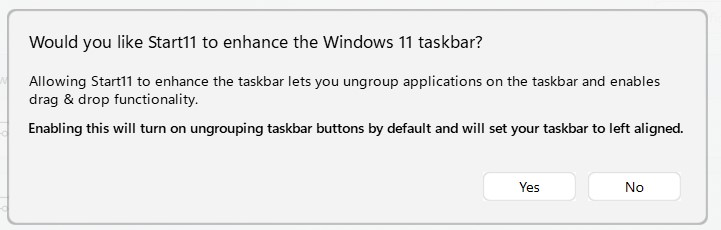
If you on Windows 11, have you tried enable the "Enhance Start11 taskbar" and try right clicking on your taskbar? If that don't work. We need more details on your system.

  1. Windows full version and OS Build number.
  2. Start11 full version number.

Thank you,

Basj,
Stardock Community Assistant

Reply #2 Top

I don't want my taskbar left aligned.  Win 11 does this on its own without the need for Start11. Win 11 will also let you unpin icons from the taskbar if on the bottom or left aligned. 

I purchased Start11 as I want my taskbar to display at top of screen which it does now but it won't let me unpin anything. I also can't close the Snipping Tool once used without closing it via Task Manager.

I'm running Win 11 Home, Version 23H2 (64 bit).  OS Build 22631.4602.

Start 11 Version 2.11.

Thanks

Sparksie.


EDITED.......UPDATE to the above:

I've gone with the  "enhance Win 11 taskbar" to see what the taskbar would do.  Yes, it has aligned it to left (as opposed to the centre) but now I'm able to remove pinned icons (it was driving me crazy not being able to do this!). 

I did think it was going to align it to the left of the display (which I didn't want) but thankfully it has stayed at the top of the screen.

Cheers

Sparksie.


Reply #3 Top

Great, glad to hear that.

Thank you,

Basj,
Stardock Community Assistant