
Start11 Taskbar Issue

Issue with Icon and Arabic Text Display in Start11

Hello Stardock Team,

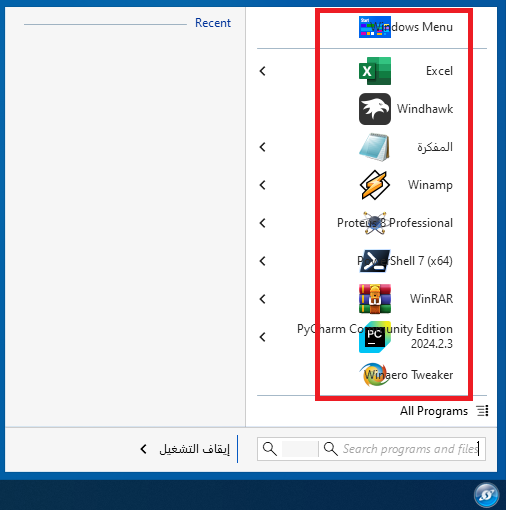
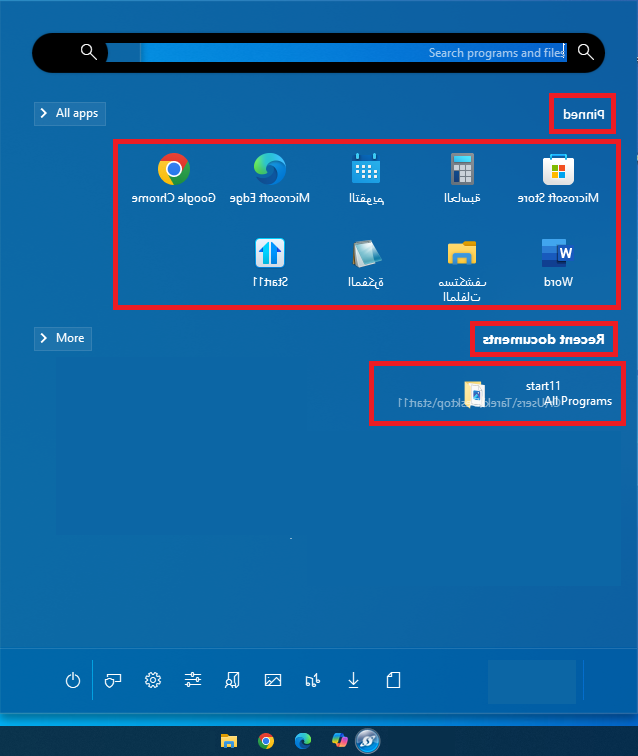
I am reaching out to report some issues I am experiencing with Start11. I have noticed that some icons do not appear in their correct positions on the taskbar or Start menu. Additionally, Arabic text occasionally displays in a mirrored form, as if viewed in a mirror, while other text displays correctly.

For context, I am using Windows 10 Pro 64-bit with Arabic set as the system interface language. I have attached a few images to illustrate these issues.

Thank you very much for your assistance.

Best regards,


1,418 views 4 replies
Reply #1 Top

Hello,
Sorry to hear you are having issues. Just to confirm something, as a test change the display language to English, restart your system, does the text appear correctly in English?

Thank you.
Basj,
Stardock Community Assistant.

Reply #2 Top

Hello Basj,


Thank you for your prompt response and guidance. I followed your instructions by switching the display language to English and restarting the system. After doing so, the issue with icons and text display in Start11 was resolved.


It appears that the problem is specific to using Arabic as the display language. Is there a potential fix or update planned to support Arabic properly?


Thank you once again for your assistance.


Best regards,

Reply #3 Top

The issue is with Right to Left (RTL) language, and from the comment from the Dev in https://forums.stardock.com/521372/get;3896607 , it look like Start11 don't support it.


Thank you,

Basj,
Stardock Community Assistant

Reply #4 Top

Hello Basj,


Thank you for clarifying the issue. I understand that Start11 currently does not support Right-to-Left (RTL) languages like Arabic.


I appreciate your assistance and the quick responses. I hope that RTL support might be considered in future updates, as it would greatly enhance the experience for users who rely on these languages.


Thank you once again for your help.


Best regards,