

Issues/Questions with double-height Taskbar
from  Stardock Forums
Stardock Forums
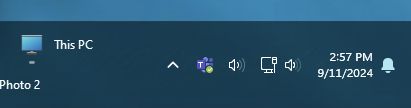
As shown in the image, I've got my Taskbar at "double height" (manually changed the height) but I can't figure out how to get the system tray icons to also stack. That's a good chunk of real-estate that is being wasted, but in my searches on this forum I've seen people with them stacked -- I just can't figure out how. Any tips would be great.
Additionally, I would love for the time to be able to either allow for a custom date format or use the Windows10 format. Specifically, in Windows 10 when you make the taskbar taller it will insert the day of the week between the time and date, making the date/time three lines. Look, sometimes the week is long and I lose track!
Using Start 11 v2.11 + Windows 11 23H2 [Version 10.0.22631.4169]
