Icons

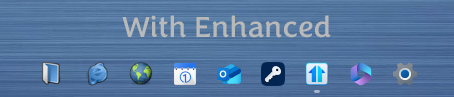
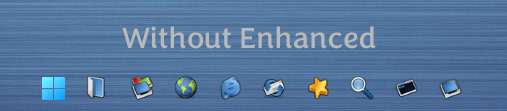
I still can't have Start11 enhance the taskbar. The icons always change back to default instead of the icons I changed them to. When I set the enhanced to off, they go back to the way I had them.

Is there a previous version I could install? I didn't have this issue before 2.0. Thanks for any info!

1,391 views 6 replies
Reply #1 Top

Hello,
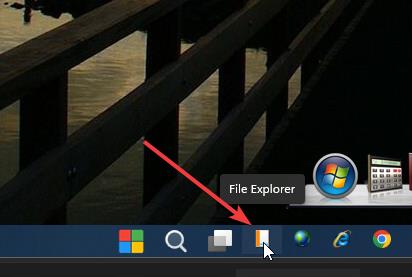
Sorry to hear you are having issues. But this is what I get on my system with Enhance taskbar setting turn on. (Refer screenshot below) Notice the Windows explore icon was change to something else and it stick. Maybe I am looking at different thing. Please provide more information.

  1. Windows full version and OS Build number. Please use Winver.exe

  2. Start11 full version number.

  3. Screenshot of icons that you changed and how you change them.

Thank you.
Basj,
Stardock Community Assistant.

Reply #2 Top

See this thread for an explanation from Neil Banfield.

https://forums.stardock.com/524310/page/1/#3912279

"When taskbar buttons are not combined the icon used is the icon provided by the window itself.  This will ignore your custom settings.  Only the combined taskbar buttons use the icon from the app executable / shortcut as there could be multiple windows for a single button so if you used the icon from the window it could be one of many choices."

"Okay, I understand the logic. This works fine for my folders with custom icons, but then I guess I have no option to use custom icons for apps. I like the settings with the Enhanced taskbar on, with "Never combine taskbar buttons," and "Always hide text on buttons regardless of group state" checked. This shows open folders with my custom icons as separate buttons instead of the File Explorer icon, which I like, but I sacrifice my custom app icons in the taskbar. The Windows 11 setting "Never" combine works the same way as Start11, so I get it."

Reply #5 Top

My custom app icons are more important to me than anything the Enhanced taskbar offers me, so I decided not to use it. I like the taskbar at the bottom with combined buttons, the Explorer icon for all folders, and I'm okay with the Windows 11 default start menu button.

You'll just have to find a compromise somewhere if you want to use your custom icons for apps in the taskbar.

I use Groupy2, so I don't really access folders in the taskbar .