
Windows Start button strange operation

New here so apologize if this has been discussed. Tried a search but possibly I am not using the right search terms.

Before the update of Start11 when I press the Windows Start Button, I would get the Start11 Modern style display. Now after the update, when I press on the start button I get a Windows start menu. If I press the start button again, then Start11 Modern style display appears. Press again and it shifts back and forth. Some times when I press the button a second time, the Modern style will flash and disappear.

It is possible that I have maybe changed something in my Windows11 setting and this is the result. I don't know. This is the window that appears.
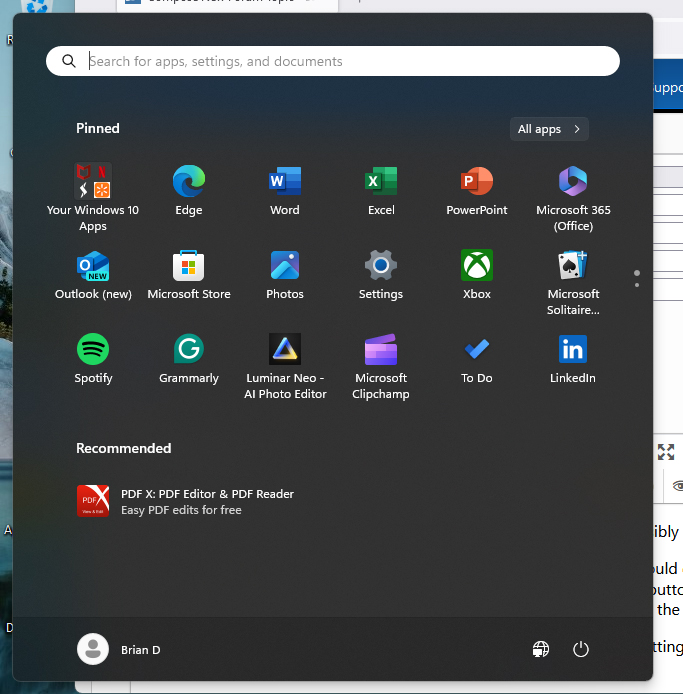
When I press the Start Button, then Start11 Modern Style will either appear, or it will flash and then shut down.

Any help will be greatly appreciated.

Thanks

794 views 3 replies
Reply #1 Top

Hello,
Sorry to hear you are having issues. Need to know more on your issue.

  1. Windows full version and OS Build number. Please use Winver.exe
  2. Start11 full version number.
  3. When you said press on Start button, its on the keyboard or mouse click on the Start button?

Thank you.
Basj,
Stardock Community Assistant.

Reply #2 Top

Hello, I solved the issue with an uninstall of Start11 and reinstall of the software. However, here is the info you requested.

1. Edition    Windows 11 Home
Version    23H2
Installed on    ‎2/‎25/‎2024
OS build    22631.4037
Experience    Windows Feature Experience Pack 1000.22700.1027.0

2. I believe it was the last version update from a few weeks ago.

3. The start button I was referencing was on the Windows taskbar. However, if I pressed the Windows key on my keyboard it seems to have worked. Very strange.

Appreciate you getting back with me and I wish I had waited until I had all the information for you.

Best Regards

Reply #3 Top

Yes, we need those information to make sure we can zero in the issue better. Not to do guess work which might lead to confusion. Anyway, great to hear you've resolved it.

Thank you,

Basj,
Stardock Community Assistant