Taskbar on second monitor

Want both monitors to have toolbar at top

Hello

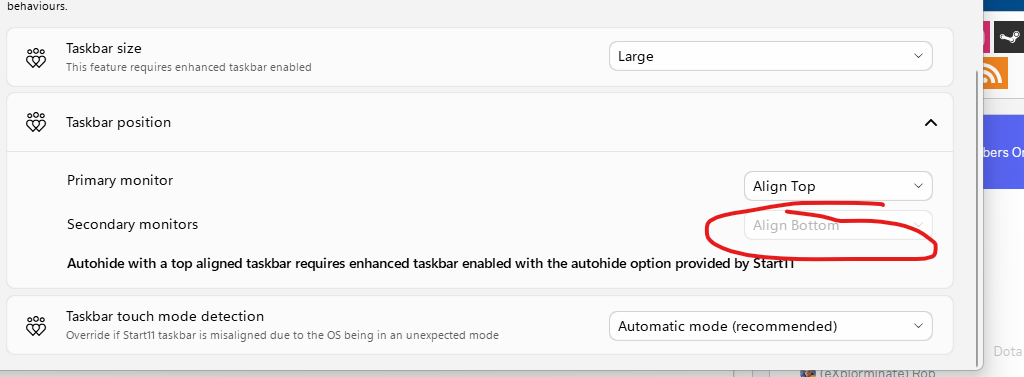
I have just downloaded Start11 and want the taskbars on both by monitors to be at the top but the option to change the 'secondary monitors' is greyed out. I can move the taskbar on the primary monitor but not the secondary one. Can you help please ?


Thanks
2,354 views 10 replies
Reply #1 Top

Hello,
Sorry to hear you are having issues. Need to know more information.

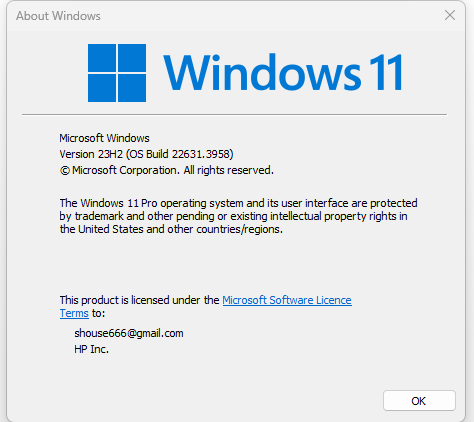
  1. Windows full version and OS build number. Use Winver.exe to get that information.
  2. Start11 version.
  3. Screenshot of the secondary monitors "greyed out" setting

Thank you.
Basj,
Stardock Community Assistant.

Reply #3 Top

This is what I see on my system. Refer screenshot below.

Thank you,

Basj,
Stardock Community Assistant

Reply #4 Top

Moving forward, we need to know more on your monitors.

  1. Resolutions on all monitors.
  2. Scale factors on all monitors. (100%,150% etc)
  3. Connection type: HDMI, DVI, Display port, USB, Docking Station.

Thank you,

Basj,
Stardock Community Assistant

Reply #6 Top

Secondary monitor on "Extend" or "Duplicate" Mode?

Thank you,

Basj,
Stardock Community Assistant

Reply #8 Top

I can not reproduce your issue on my system. Please try, uninstall Start11, reboot immediately after uninstall is done, re-download latest version from your account download page. Install it reboot again immediately after. Retest and report back.

Also, check if you have Nvidia Surround or AMD Eyefinity turn on? And, do you have displayfusion install in your system.

Thank you,

Basj,
Stardock Community Assistant

Reply #10 Top

Great, glad to hear that.

Thank you,

Basj,
Stardock Community Assistant