Start 11 Unable to remove shortcucts from quick access

On a Win 10 PC with Start 11, set to Win 7 menu:

- Touch the menu button, bottom left corner

- There are 8 (unwanted) items pinned above All Programs

- Tap on All Programs and there are total of 42 items pinned to the menu.

Initially there were some 50 items, and I was able to right click and elect "remove from this list" but the remaining 42 do not have that option.

How do I get rid of them? 


Thanks...


1,321 views 5 replies
Reply #1 Top

Hello,
Sorry to hear you are having issues.

  • 8 unwanted items most probably your most used application after my pinned shortcuts. To stop those from appearing you need turn that option off. Its in Start Menu->Configuration->Left hand side shortcuts-> "Show my most used application after my pinned shortcuts" turn this off.
  • 42 items don't have "remove from this list" option. Please post a screenshot/video grab of this one. So we can be sure on which icons/area you're referring to.

Thank you.
Basj,
Stardock Community Assistant.

Reply #3 Top

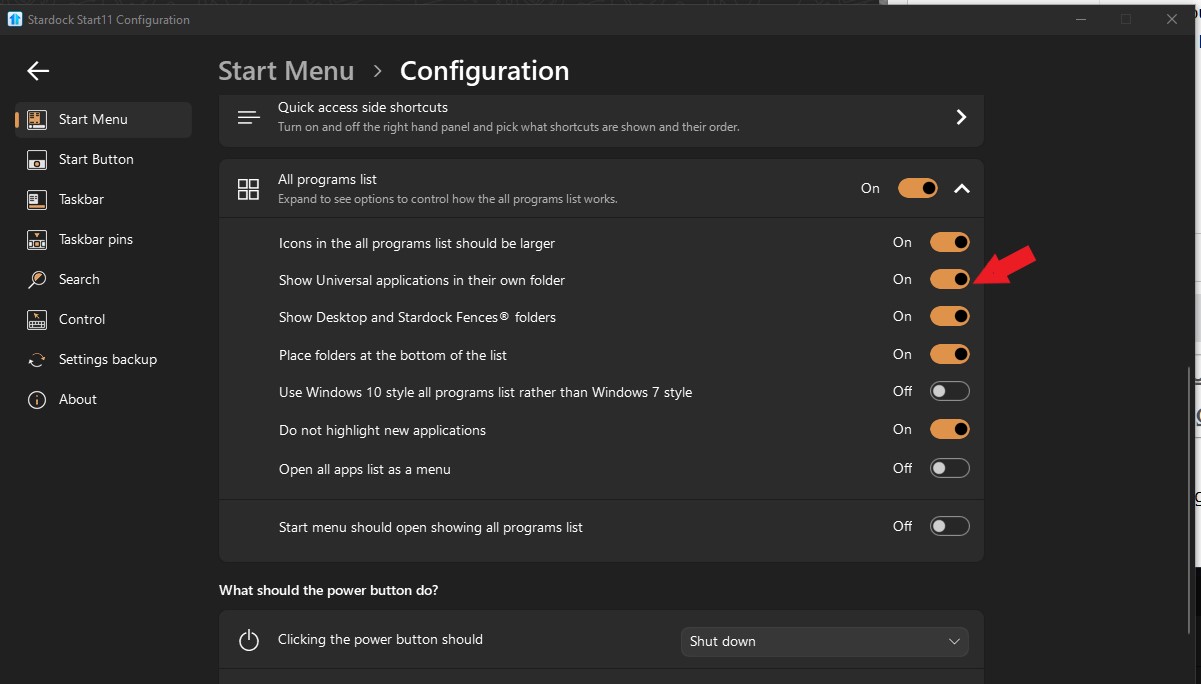
Those are installed application. I think those are Universal application type which you can uninstall it to remove it entirely. Or you can turn on this option to make all of them into one folder.

Thank you,

Basj,
Stardock Community Assistant

Reply #4 Top

Thanks - that is already unchecked.


These seem to be individual shortcuts, not folders, and I've finally tracked them down to:

 C:\Users\(USERNAME)\AppData\Roaming\Stardock\S10\Microsoft.Print3D_8wekyb3d8bbwe\App.lnk & similar.

Can they all simply be deleted from that S10 folder, without messing up Start11? 

Reply #5 Top

I can not be sure on that one. However, I have forwarded your problem/question to Stardock Support Team for their assistance. Please keep an eye on this thread for any updates. We appreciate your feedback and patience.

Basj,
Stardock Community Assistant