
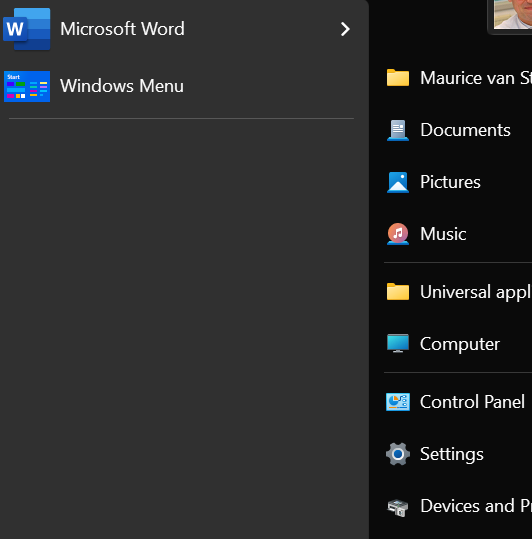
Start11v2 windows 7 style menu empty

Hi all


My first post ever - I have encountered an odd bug in Start11v2, but only on my Lenovo Yoga Pro 7i. I have another windows machine (custom) also running Start11v2 without issues. Both machines have the latest windows 11 build installed and identical installations of Stardock Object Desktop (Fences v2, Groupy v2, DeskScapes, Start11 v2). 

Without any clear trigger, the windows 7 style menu lost its application icons. Other menu styles are intact. Reinstalling Start11v2 didn't help. I really liked the Win7 style, it is much more efficient than the rest, so I would love to have it back. Suggestions?
2,476 views 9 replies
Reply #1 Top

Hello,
Sorry to hear you are having issues. Need more information.

  1. Windows 11 full build number, use Winver.exe
  2. Start11v2 version number installed.
  3. Screenshot of the area you're referring to.

Thank you.
Basj,
Stardock Community Assistant.

Reply #3 Top

I believe, those area below that line is for most used application and the top part is for your pinned item. Have you tried pinned more items? For most used application to populate you will need to turn it on. Note that sometimes it need times to start populate the most used application list.

Thank you,

Basj,
Stardock Community Assistant


Reply #4 Top

Thanks for the tip, I will try. I do note however that I have never switched on that setting you mention before, yet the menu was populated. I will check my other machine for settings and revert. Will also let you know how it goes.

Reply #5 Top

I'm seeing the same issue reported above. Fresh install on a new Windows 11 Home 23H2 / 22631.3447. Start11 2.07

I've made sure the checkbox for "Let Windows track app launches to improve Start and search results" is enabled, but no applications appear in the recent list.

Reply #6 Top

Quoting altera2015, reply 5

I'm seeing the same issue reported above. Fresh install on a new Windows 11 Home 23H2 / 22631.3447. Start11 2.07

I've made sure the checkbox for "Let Windows track app launches to improve Start and search results" is enabled, but no applications appear in the recent list.

End of altera2015's quote

Hello,
Sorry to hear you are having issues. You also on Windows 7 style? And do you have that option I mentioned above (Reply#3) enabled?

Thank you.
Basj,
Stardock Community Assistant.

Reply #8 Top

Quoting altera2015, reply 7

Yes Windows 7 style.

I had not checked that box. After checking the box now the items are back.
End of altera2015's quote

Great to hear that.

Thank you,

Basj,
Stardock Community Assistant

Reply #9 Top

Hi


Following up - the suggestion hasn't worked for me. All that shows up weeks down the road is Game Bar, which I never use. Guess I'll stick with the Win10 style for the time being.