Start11 v2 (version 2.07)

Let Start11 enhance the taskbar

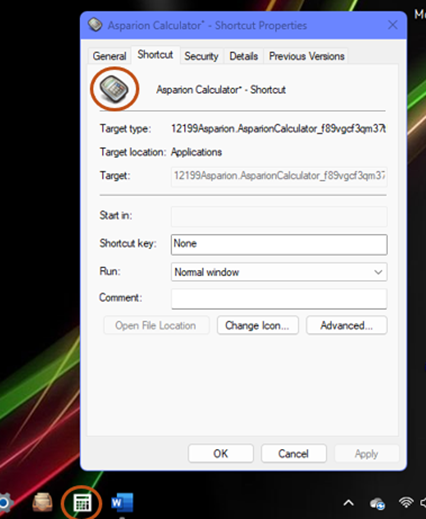
I had custom icons with Start11, but they were missing with the latest update (2.07). When I selected to let Start11 enhance the taskbar, most of the icons changed back to default, especially when the icons were centered. Once I deselected to enhance the taskbar, they went back to the custom icons. Will this be addressed with the next update? Thanks for any info. πŸ‘

2,522 views 10 replies
Reply #1 Top

Hello,
Sorry to hear you are having issues. Need to know more on your system.

  1. Windows 11 full build number. Please, use Winver.exe.
  2. Custom icons on application or something else?
  3. Post some screenshots of these icons with and without enhance mode turned on.

Thank you.
Basj,
Stardock Community Assistant.

Reply #3 Top

Hello,
This is strange, on my system its the other way around. When the Enhance taskbar turn off the icons revert to default but when I turn it on. The custom icons reappear. Refer to my short video below. Maybe the way I change my icons is different than how you did it.

Thanks
Basj,
Stardock Community Assistant.

Reply #4 Top

I changed my icons the way you did, and for some, I needed to pin them to the start menu first, then pin to taskbar. I don’t know why it would be opposite like you said. Another update could fix it?

 Thanks for looking into it. πŸ‘

Reply #5 Top

I don't think that is possible if we can not reproduce the issue. I can not really tell what application that change the icons to default icons from your screenshot alone. Can you list out what application that have issue, so that I can check if the issue only happen on that particular application.

Thank you,

Basj,
Stardock Community Assistant

Reply #7 Top

You should be aware that taskbar icons are picked one of two ways.

In combine mode the icon comes from the shortcut, but in uncombined mode it comes from the Window.  This icon is entirely under the control of the application itself and your custom settings will have no impact on this.  This is the same as it worked on Windows 10.

Reply #8 Top

Neil is correct. I have found that with the Enhanced taskbar on, even in the combined mode, certain apps will not use a custom icon.

Reply #9 Top

I tried again, but it just isn't working.

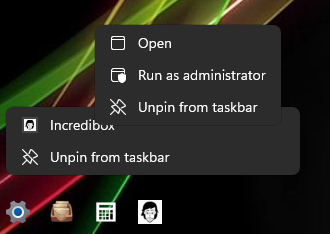
For some, Properties is not an option:

I guess, for now, I'll have to keep the enhanced off and hope that it fixes itself eventually. 😁 Thanks for your help.

Reply #10 Top

Quoting pelaird, reply 8

Neil is correct. I have found that with the Enhanced taskbar on, even in the combined mode, certain apps will not use a custom icon.
End of pelaird's quote

That's the weird thing...before the recent update, my custom icons were showing with the enhanced taskbar. πŸ€·β€β™‚οΈ