
Autohide taskbar stays hidden

affects browser windows only

I'm using Windows 11 Pro and Start 11 2.07 -- though this problem existed earlier. When I have a browser window on the screen, the autohide taskbar won't appear. When I have an app on screen and I draw the mouse cursor to the bottom of the screen, the taskbar WILL appear, as it's supposed to. I haven't found any combination of taskbar attributes that changes this. So when I need to see the autohide taskbar, I have to <Alt-Tab> to some non-browser window so it will appear. I'm stumped.

1,577 views 5 replies
Reply #1 Top

Hello,
Sorry to hear you are having issues. Need to know.

  1. Need Windows 11 full build number. Use Winver.exe
  2. Which browser? only when full screen mode or maximize state?
  3. Does pressing Start button on keyboard bring up the start panel and taskbar?
  4. You hide taskbar using Windows 11 Taskbar setting or Start11 Enhance Taskbar setting?

Thank you.
Basj,
Stardock Community Assistant.

Reply #2 Top

Thanks for your follow-up.

1. Windows 11 Pro 22631.3447.

2. Problem happens with Chrome, Edge & Brave.

3. Yes - Windows key brings up Start11 start panel & taskbar (but seems this fixes the problem until the next reboot. Hmmm!)

4. Happens with "hide taskbar" checked either in Start 11 or Windows 11.

Intriguing that just pressing the Windows key seems to fix it. I made a simple "restart Explorer.bat" file and this fixes it too - until the next reboot.

JBM

Reply #3 Top

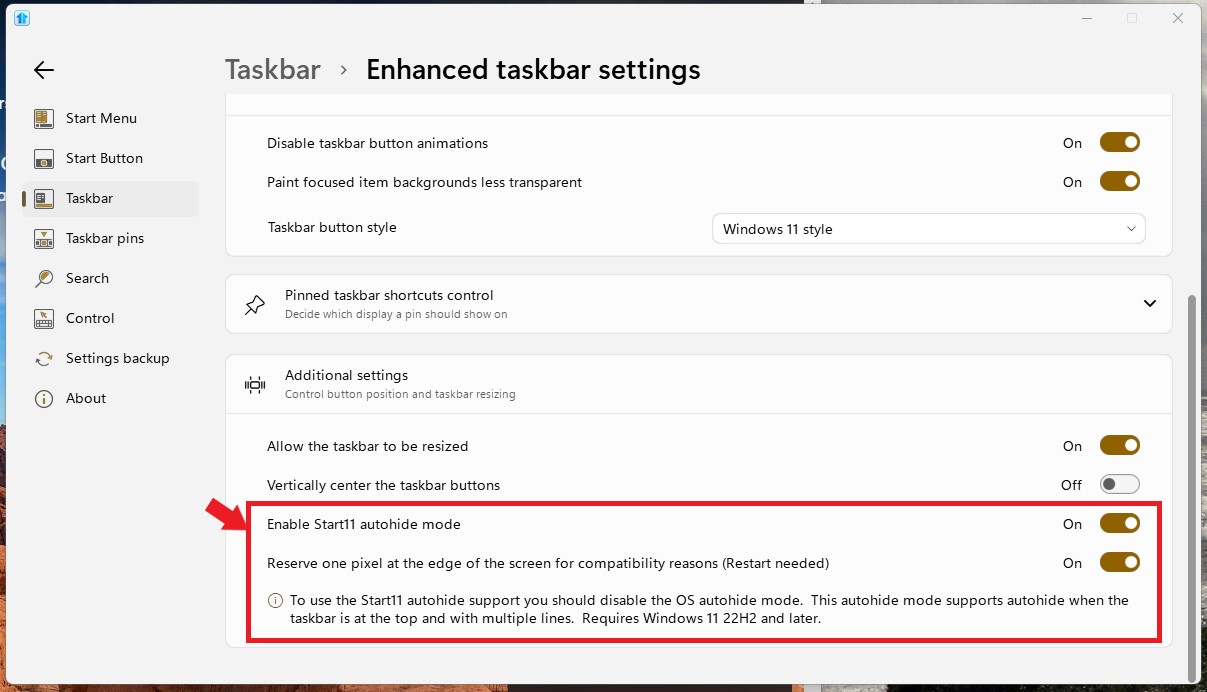
I can not reproduce your issue on my Windows 11 with the same build number. Please check your setting as shown below. Make sure the Windows 11 autohide is disable and try turning on the "Reserve one pixel at the edge......" option and see if that help with your issue.

Thank you,

Basj,
Stardock Community Assistant


Reply #4 Top

I think your earlier suggestion (just touching the Windows key after bootup) fixes the problem. Honestly, it may be an OS issue and not Start11. In either case I can live with this simple fix. Thanks again; let's leave it at that.

Reply #5 Top

Great, which ever way work best for you.

Thank you,

Basj,
Stardock Community Assistant