Regression in 2.07: Compact Modern Style, Use Windows 10 style all programs list, Icons in the all programs list should be larger
from  Stardock Forums
Stardock Forums
Hello,
The appearance of the combination of settings "Compact Modern Style", "Use Windows 10 style all programs list rather than Windows 7 style", and "Icons in the all programs list should be larger" has changed in 2.07 in comparison to the previous version; in fact, "Icons in the all programs list should be larger" no longer has any effect when the other two settings are in use.
It currently looks like:
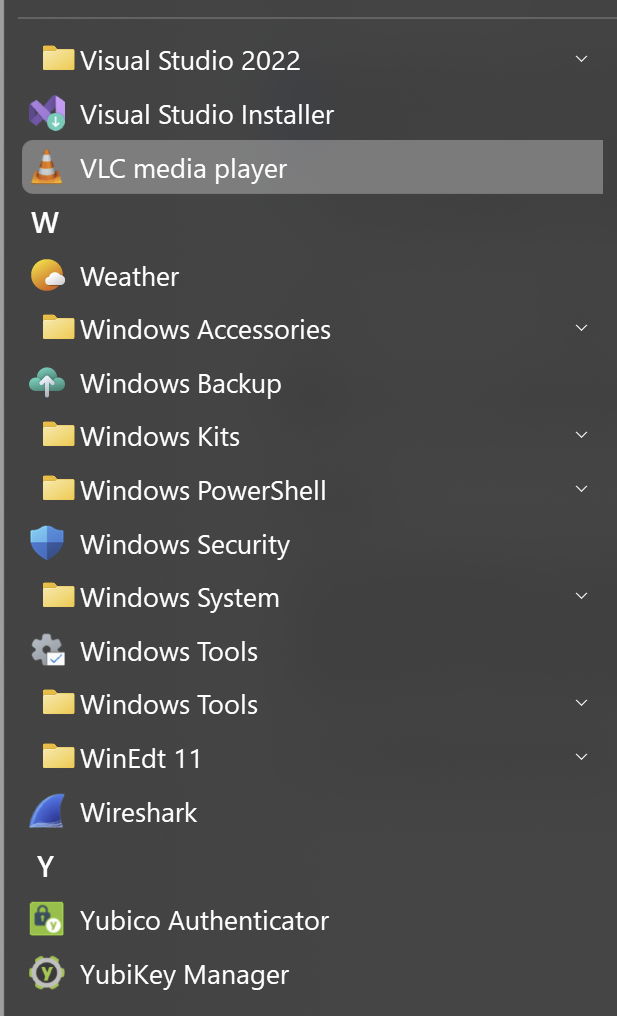
Prior to this version & using the above combination of settings, the icons were larger and had more spacing between them, very similar to the "All Apps" list of the real Windows 10 Start Menu.