Start11 Menu Style Inconsistencies

Hello,

version 2.07

The Default Windows 11 style start menu occasionally display every now and then, when I click the start button. At first I thought maybe it was a bad install and I used Revo Uninstaller to delete everything, and installed it again, unfortunately this didn’t work.


My next thought was maybe it’s just the window 7 style that doesn't work, but no matter what Star11 style I use, even with the windows 11 styles the default windows 11 plain start menu style will eventually display.


All the control settings on start11 are either “off” or “Start11 Menu”, so it’s nothing to do with input. And the problem still occurs with the “Let Start11 enhance the taskbar” setting turned both on and off.


I haven't tried to have my start menu at the side of the taskbar, but I don’t think I would want to use it in that setting. Also I haven’t tried resetting windows yet because I haven’t had the time.


I’m looking through the forums to try and find some information on it but am having little success, I’m not sure what else I can do at this point, would very much appreciate any help you can give me.


PS: On the “Let Start11 enhance the taskbar” setting turned on, the pinned app icon on the taskbar next to the start button bugs out and it looks like someone copied and pasted a quarter of whatever app icon that's next to the start button between the pinned icon and the start button.


Thanks


2,090 views 10 replies
Reply #1 Top

Hello,
Sorry to hear you are having issues. First, please try this. Uninstall Start11, reboot immediately, re-download Start11 latest version. Install it, reboot immediately again. Retest it and report back.

Thank you.
Basj,
Stardock Community Assistant.

Reply #2 Top

I followed your instructions and it still occasionally displays the default windows 11 start up menu...

Reply #3 Top

Do you have any other 3rd party application running in the background which also changing how your explorer/taskbar/start panel work?

Thank you,

Basj,
Stardock Community Assistant

Reply #4 Top

I've got no 3rd party application running in the background which changes the explorer/taskbar/start panel work.

I did have StartAllBack but I uninstalled before picking up Start11.

thanks

Reply #5 Top

Any specific steps to make the default Windows Start Menu appear instead of the Start11 Start Menu?

Thank you,

Basj,
Stardock Community Assistant

Reply #6 Top

Nope, it doesn't matter if there are other processes running or not, I just click on the start button and the windows 11 start menu will appear like 5-10% of the time.


Thanks

Reply #8 Top

Wow!

After performing a cleanboot and running start11, I can definitely confirm I have something else going on other than start11.

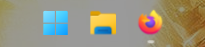
For starters my taskbar looks like this. As you can see it doesn't have the search or the unpinable apps.

Unfortunately I can't remember what else I did to windows 11 to make it like this, and after doing the cleanboot,  I am not sure I'd want to go back to all the microsoft bloatware again...

Reply #9 Top

Search box can be turn on or off via Windows taskbar settings, not sure what you mean by "unpin-able apps".

Thank you,

Basj,
Stardock Community Assistant