Stardock Start11 v1.5 Freezing Windows 11 clock

Has anyone had any issues with the clock in the system tray sporadically freezing after updating to Start11 v1.5 on Windows 11 Pro?

11th Gen Intel(R) Core(TM) i5-1145G7 @ 2.60GHz   1.50 GHz
16.0 GB (15.7 GB usable)
Windows 11 Pro 23H2 64-bit
OS Build 22631.3007
Windows Feature Experience Pack 1000.22681.1000.0
Intel Iris Xe Graphics

6,095 views 23 replies
Reply #1 Top

Hello,
Sorry to hear you are having issues. Please try this uninstall Start11, reboot immediately after uninstall finished. Download the latest version Start11v2.06.2 beta from your account page. Install it. Reboot again, soon at it finished installation. Retest it and report back.

Thanks
Basj,
Stardock Community Assistant.

Reply #2 Top

Did this resolve for you?  

My system tray clock freezes almost daily, using Start11 v2.08, and needs explorer restarted to fix it.

Reply #3 Top

Quoting Tevita, reply 2

Did this resolve for you?  

My system tray clock freezes almost daily, using Start11 v2.08, and needs explorer restarted to fix it.
End of Tevita's quote

Hello,
Sorry to hear you are having issues. Have you tried the steps I suggestion above?

Thank you,

Basj,
Stardock Community Assistant

Reply #5 Top

Quoting Tevita, reply 4

I did that a couple of hours ago and reinstalled. My system tray clock has already frozen again.
End of Tevita's quote

Moving forward, need more information on your system.

  1. Windows full version and OS Build number. You can use Winver.exe included with all Windows to get these information.
  2. Start11 full version number.
  3. Do you have any application that change how your Windows explorer and/or taskbar work? Such as ExplorerPatcher, Taskbarx etc

Thank you,

Basj,
Stardock Community Assistant

Reply #6 Top

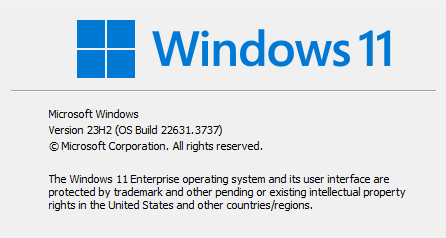
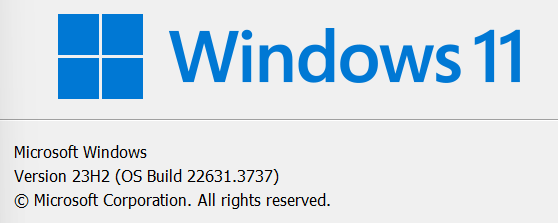
1. My Windows version is :

2. Start11 version is 2.08 and currently up to date.

3. No Taskbar/explorer additions that I'm aware of. My laptop is only a couple of months old.

As of this morning, the clock is running. So presumably while in sleep mode last night Explorer restarted or something in the process of restarting from sleep kicked it to life. But the problem still remains as far as I can tell and I expect it to stop again shortly.

Reply #9 Top

You can create a batch file for the restart explore.exe and put it on your desktop and run it when you need it. Or, you can try to figure out what is causing the clock to stop showing the correct time. If you wish, you can try the Cleanboot. Be warn, there are some risk in doing so. Please refer here: https://forums.stardock.com/505872/start11-support-faq#cleanboot. Please, read through the steps and follow it carefully. Report back.

Thank you,

Basj,
Stardock Community Assistant

Reply #10 Top

Quoting basj, reply 9

If you wish, you can try the Cleanboot. Be warn, there are some risk in doing so.
End of basj's quote

Thank you!

Reply #11 Top

This issue has been driving me crazy, and has forced me to uninstall Start11 until it gets resolved. Frozen clocks can wreak havoc on scheduling.

Reply #12 Top

Quoting TripTango, reply 11

This issue has been driving me crazy, and has forced me to uninstall Start11 until it gets resolved. Frozen clocks can wreak havoc on scheduling.
End of TripTango's quote

Hello,
Sorry to hear you are having issue and having to uninstall Start11. We can not look into the issue until we know the root cause of this issue. Look like it happen on some systems so far. What we need to know is what is common on all these effected system so that we can try to reproduce the issue and deal with it. Need to know more on your system.

  1. Windows full version and OS Build number. You can use Winver.exe included with all Windows to get these information.
  2. Start11 full version number.
  3. Do you have any application that change how your Windows explorer and/or taskbar work? Such as ExplorerPatcher, Taskbarx etc
  4. And, which suggested steps above you have try?

Thank you.
Basj,
Stardock Community Assistant.

Reply #14 Top
  1. Version 23H2, build 22631.3737
  2. I have already uninstalled Start11 so can't check directly, but it was the latest update of the original (not v2.0) Start11.
  3. Listary, Fences, PowerToys.
  4. I've tried reinstalling/rebooting as recommended above.
Reply #15 Top

Hello,
I did some searching on the net and I found this issue also happening on system without Start11. Ref:

  1. https://www.reddit.com/r/WindowsHelp/comments/1b78pdm/win11_taskbar_freezes_but_is_responding_to_clicks/
  2. https://www.reddit.com/r/WindowsHelp/comments/18i5to2/time_in_the_taskbar_gets_stuck_ever_since_the/

Need to confirm something, if you uninstall Start11, the issue stop and never come back. Or, the clock still got stuck?

Moving forward, I have forwarded your problem/question to Stardock Support Team for their assistance. Please keep an eye on this thread for any updates. We appreciate your feedback and patience.

Thank you.
Basj,
Stardock Community Assistant.

Reply #16 Top

I can't say "never", but the problem has not happened again since uninstalling Start11. However, I am going to run some tests to see if the freeze happens if I reinstall Start11 and uninstall other things.

Reply #18 Top

The issues I've seen do not fit that timeline (started well before the release of that update) or the description of problems (only my clock is freezing, not full taskbar). I can also confirm that Listary is not connected to the problem, as it just happened again with Start11 reinstalled and Listary removed.

Reply #19 Top

Yep, same with me. The rest of the taskbar seems to work fine (though I did also experience the freezing of everything once) while the clock is stopped.

Reply #20 Top

Hello Basj,

Sorry for the delayed response. I was locked out of my email for a few months (someone tried hacking, lots of trouble trying to regain access, blah blah). 

I attempted the directions you provided only I was unable to find any Beta version. V2 would not allow me to register it without purchasing a license which I wasn't going to do because of this issue at hand.

Can you point me in the right direction and if there is a Beta version I missed, can you send me the link please?

Thank you,

Robert 


Up to date and nothing else installed to modify the GUI of Windows. 

Start11 v1.5

Reply #21 Top

Hello rnurman,

Currently, there is no Beta available for Start11v1, there was one back then, but it was for Start11v2.

For all that having this issue,

Just to verify, have any of you tried the Cleanboot as I suggested above? Reply#9?

Thank you,

Basj,
Stardock Community Assistant

Reply #22 Top

> Just to verify, have any of you tried the Cleanboot as I suggested above? Reply#9?

I haven't. I'm avoiding doing anything risky as I can't afford downtime or performance issues on my laptop any time soon.

Reply #23 Top

Quoting Numbah108542, reply 22

I haven't. I'm avoiding doing anything risky as I can't afford downtime or performance issues on my laptop any time soon.
End of Numbah108542's quote

Understandable, but we can not narrow down the issue until we could reproduce the issue our-self. Next suggestion is testing on Windows Sand box: https://forums.stardock.com/505872/start11-support-faq#windowssandbox. This should not be risky at all to your main system. 

Thank you,

Basj,
Stardock Community Assistant