
Start11 V2 Issue with folders on taskbar

Hello! I've noticed my Start11 v2 Layout is breaking my folders flow. When I click any application it comes to top, or, if it's already active, gets minimized. It doesn't happens to folders. The only way I have to navigate thru folders is hovering the icon and selecting which one I want to.

Is there any setting to fix that?
3,963 views 4 replies
Reply #1 Top

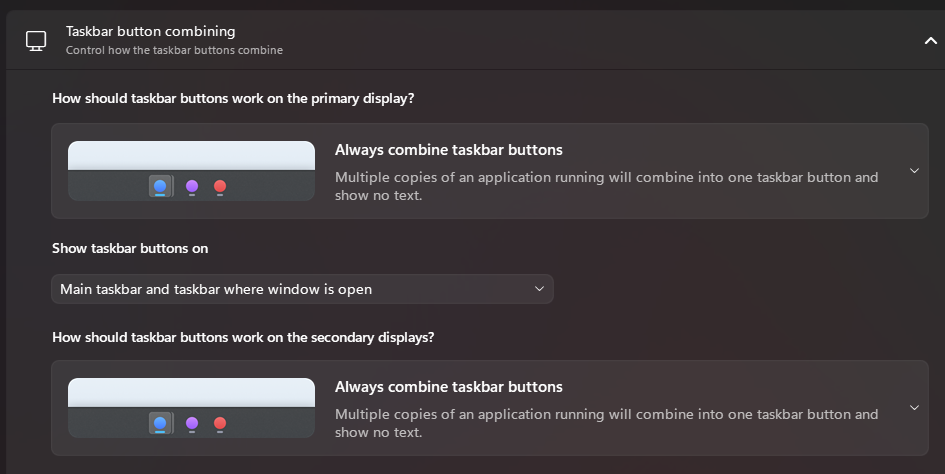
It sounds like your taskbar is set to combine some windows.

If you open start 11 settings and go to taskbar and then configure enhanced taskbar you can set the combine mode using the first section.

Reply #3 Top

When in combine mode you can have multiple windows for a single taskbar button.

So your folders all share a single button which is why clicking on it will not minimize or restore windows as it would have to do so for all your windows of that type.  Instead you get the mini preview window popup to pick a window.

This is exactly how it works without Start11 too.

You can set it to not combine windows and even hide the taskbar button text if you wish which would then give you a 1 to 1 link between buttons and window whilst still keeping small buttons on the taskbar.

Reply #4 Top

Based on Windows 11 default flow: If I have multiple windows of the same application it does combine, hovering the icon allows me to select one to bring up, clicking the icon while none is on top brings all to top, clicking the icon while one of the windows is active minimize all the windows. Is there any way to achieve the same result using enhanced taskbar  (without the rectangular applications on tkb)