

Taskbar Pins - Pin Folder Menu

Ording of folders

Is it possible to manually order a folder popup menu?

I have a folder that contains several folder shortcuts I want pinned, but I also have a few application shortcuts that should be shown too.  I want to be able to move the app shortcuts down below my folder ones.  Is this possible?
1,573 views 4 replies
Reply #1 Top

Hello,
Sorry to hear you are having issues. But, you're referring to which Stardock product? Start10, Start11v1, Startv2, etc? And, post screenshots so we understand which area you are referring to.

Thanks
Basj,
Stardock Community Assistant.

Reply #2 Top

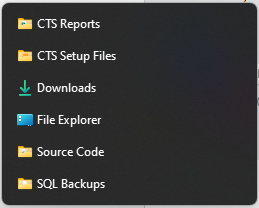
I'm referring to Start11 v2.  I pinned a popup folder to my taskbar and would like to be able to rearrange the shortcuts/folders manually.

So in the screenshot, I would like to manually place the "File Explorer and Downloads folder at the bottom of the list vs having it automatically sort alphabetically.

Reply #3 Top

Hello,
I believe, that is not possible currently. However, I have forwarded your request to the Stardock Support Team for their review and recommendations. Please keep an eye on this thread for any updates. We really do appreciate your feedback, Thanks

Basj,
Stardock Community Assistant.

Reply #4 Top

Assuming this is a new folder you created with shortcuts to the files and folders inside. You could rename the shortcuts in this folder to appear in the order you like. Perhaps an underscore at the beginning of the folder names you want at the top.