Persistent Issue with Start10 and Windows 11 Upgrade
Unable to Upgrade to Windows 11 Due to Start10 Compatibility Issue
 Stardock Forums
Hello Stardock Support and Community,
I'm reaching out for help with a persistent issue related to Start10 and upgrading to Windows 11. Despite Windows reminding me daily that my PC meets the minimum requirements for Windows 11, my upgrade attempts are halted by an alert indicating a need for the latest version of Start10. Following the prompt to "Learn More" directs me to a Microsoft support link detailing a compatibility hold due to certain start replacement apps.
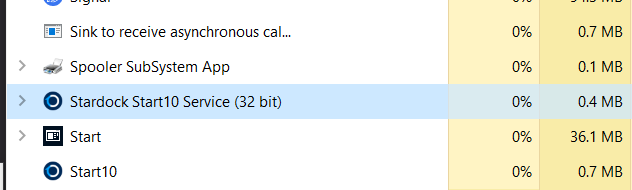
Efforts to resolve this issue included uninstalling Start10, manually removing its files from my hard drive, and clearing related entries from the registry. However, these steps have not mitigated the upgrade barrier. Each attempt to install Windows 11 results in the same error, and subsequent restarts prompt an alert stating, "This product is not activated on this computer. Would you like to uninstall this product?”
This leaves me in a loop where I cannot upgrade to Windows 11 due to the Start10 error, and I cannot resolve the error as suggested because I am unable to complete the upgrade. It's my understanding that upgrading to Start11 as a solution is not applicable since I am currently on Windows 10.
I purchased Start10 via Steam on September 24, 2020. I can provide further details about my purchase if necessary.
I am seeking guidance on how to proceed with either successfully removing Start10 to facilitate the Windows 11 upgrade or any alternative solutions that might be available. Your assistance in this matter would be greatly appreciated.
Thank you for your time and help.
Here is a link to screen grabs related to this problem: https://imgur.com/a/J7yRgdP
Here are the tech specs of my PC:
Host Name: DESKTOP-4CMKOSH
OS Name: Microsoft Windows 10 Home
OS Version: 10.0.19045 N/A Build 19045
OS Manufacturer: Microsoft Corporation
OS Configuration: Standalone Workstation
OS Build Type: Multiprocessor Free
Registered Owner: Owner
Registered Organization:
Product ID: 00326-10000-00000-AA259
Original Install Date: 3/25/2021, 7:17:56 AM
System Boot Time: 1/27/2024, 7:58:23 PM
System Manufacturer: System manufacturer
System Model: System Product Name
System Type: x64-based PC
Processor(s): 1 Processor(s) Installed.
[01]: AMD64 Family 25 Model 33 Stepping 2 AuthenticAMD ~3701 Mhz
BIOS Version: American Megatrends Inc. 4408, 10/28/2022
Windows Directory: C:\WINDOWS
System Directory: C:\WINDOWS\system32
Boot Device: \Device\HarddiskVolume4
Motherboard: (updated Dec 16 2023) ASUS Tuf Gaming X570-Plus
Processor: (updated Dec 16 2023) AMD Ryzen 9 5900x 4.8GHz 12 core 24 thread processor
Memory: G.Skill Ripjaws V 32GB 2 x 16GB DDR4-3200 PC4-25600 CL16 Dual Channel Desktop Memory Kit
System Locale: en-us;English (United States)
Input Locale: en-us;English (United States)
Time Zone: (UTC-08:00) Pacific Time (US & Canada)
Total Physical Memory: 32,671 MB
Available Physical Memory: 16,624 MB
Virtual Memory: Max Size: 54,175 MB
Virtual Memory: Available: 28,796 MB
Virtual Memory: In Use: 25,379 MB
Page File Location(s): C:\pagefile.sys
Domain: WORKGROUP
Logon Server: \\DESKTOP-4CMKOSH
Hotfix(s): 32 Hotfix(s) Installed.
[01]: KB5033918
[02]: KB5027122
[03]: KB4562830
[04]: KB4580325
[05]: KB5003791
[06]: KB5011048
[07]: KB5012170
[08]: KB5015684
[09]: KB5008575
[10]: KB5033372
[11]: KB5006753
[12]: KB5007273
[13]: KB5011352
[14]: KB5011651
[15]: KB5014032
[16]: KB5014035
[17]: KB5014671
[18]: KB5015895
[19]: KB5016705
[20]: KB5018506
[21]: KB5020372
[22]: KB5022924
[23]: KB5023794
[24]: KB5025315
[25]: KB5026879
[26]: KB5028318
[27]: KB5028380
[28]: KB5029709
[29]: KB5031539
[30]: KB5032392
[31]: KB5032907
[32]: KB5005699
Network Card(s): 8 NIC(s) Installed.
[01]: TAP-Windows Adapter V9
Connection Name: Local Area Connection 2
Status: Media disconnected
[02]: ExpressVPN Wintun Driver
Connection Name: Local Area Connection
Status: Media disconnected
[03]: ExpressVPN TAP Adapter
Connection Name: Ethernet 3
Status: Media disconnected
[04]: TAP-NordVPN Windows Adapter V9
Connection Name: Ethernet 4
Status: Media disconnected
[05]: TAP-Windows Adapter V9
Connection Name: Local Area Connection 3
Status: Media disconnected
[06]: Intel(R) Wireless-AC 9260 160MHz
Connection Name: Wi-Fi 2
Status: Media disconnected
[07]: Realtek Gaming GbE Family Controller
Connection Name: Ethernet 5
DHCP Enabled: Yes
DHCP Server: 10.0.0.1
IP address(es)
[01]: 10.0.0.68
[02]: fe80::91ec:3025:c3c:6573
[03]: 2601:1c2:700:bfa0:adbe:765:eb58:c30
[04]: 2601:1c2:700:bfa0:e88f:9459:bef5:9436
[05]: 2601:1c2:700:bfa0::5917
[08]: Bluetooth Device (Personal Area Network)
Connection Name: Bluetooth Network Connection 2
Status: Media disconnected
Hyper-V Requirements: VM Monitor Mode Extensions: Yes
Virtualization Enabled In Firmware: No
Second Level Address Translation: Yes
Data Execution Prevention Available: Yes