
Start 11 Config.

When setting up  Start 8 and Start 10

, to add folders to the start popup, all you had to do was select Show as link for Pictures, Music, etc. folders.

I installed Start 11 and I have not been able to find a way to add something as simple as the Downloads folder.

1,615 views 5 replies
Reply #1 Top

Hello,
Sorry to hear you are having issues. But, need to be more specific please. Which Start11 style you're referring / using? And if its Windows 7/Modern style, add to which area on the Start panel? Left or right side?

Thanks
Basj,
Stardock Community Assistant.

Reply #2 Top

I'm using the Windows 7 style. I wanted to add to the right side. I figured out how to add to the top left side, but I would prefer them on the right side, if possible.

Thanks


Reply #3 Top

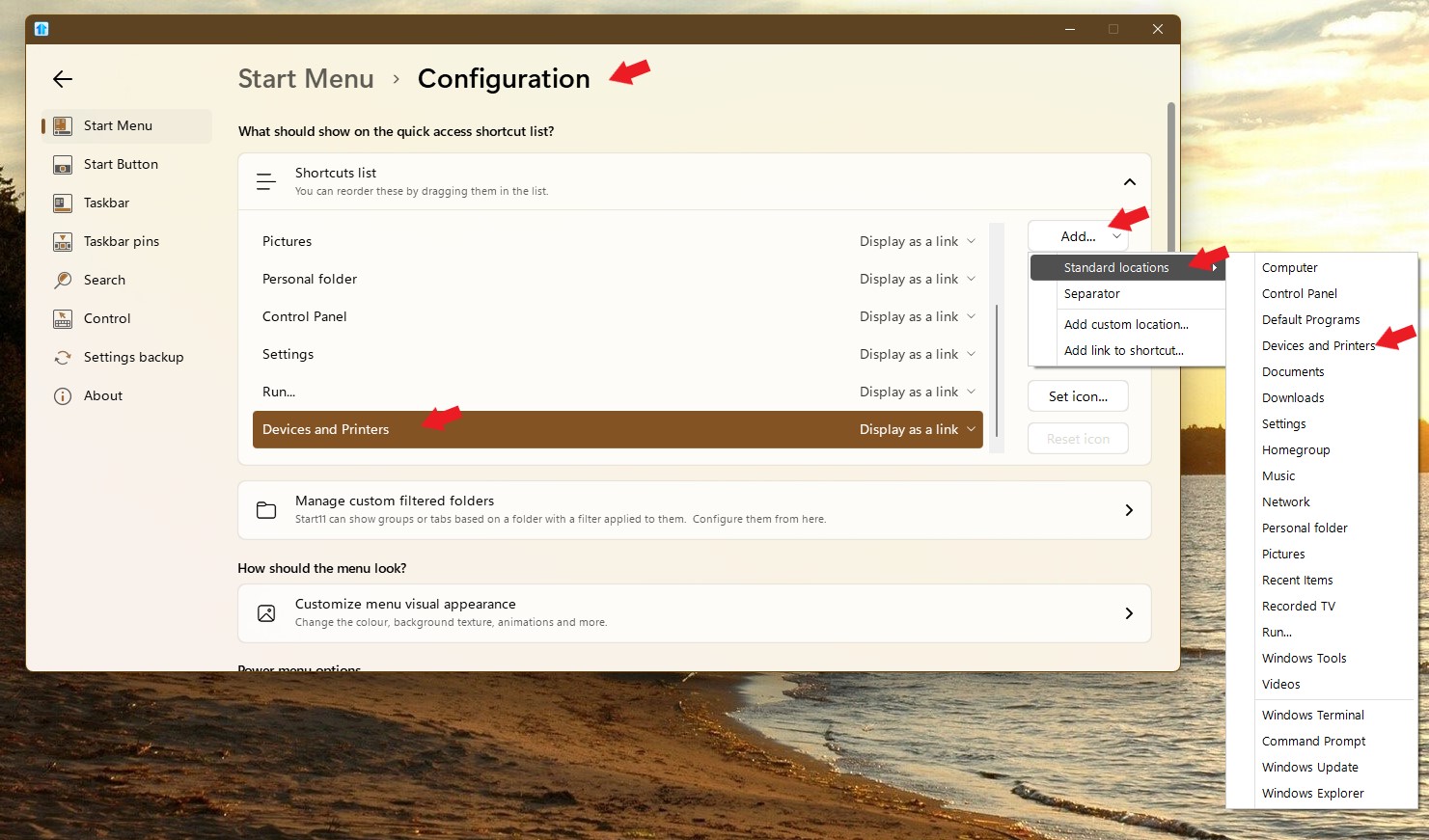
If you wanted to added the shortcut list on the right side of Windows 7, please use this section. In the screenshot below it is showing how to add "Devices and Printers"

Thank you,

Basj,
Stardock Community Assistant

Reply #5 Top

It will be easy once you get used to things in there.

Thank you,

Basj,
Stardock Community Assistant