start11 only displays multiple application windows when the icon is hovered over

Hello.  So, I have start11 installed on my machine, and I am loving it....for the most part.  There is one little nitpick that I found that I would love to see resolved in a future release of the software.  This is only applicable if you configure start11 to always combine taskbar buttons.  Right now, if you have an application with multiple open windows (lets say windows explorer for the purposes of this explanation), the only way to actually display the multiple open instances is for you to hover the mouse cursor over the windows explorer taskbar button.  This is done in the vanilla taskbar, true, but the vanilla taskbar buttons, unlike the start11 taskbar buttons, also display the open window instances when you click on the taskbar button.  To help illustrate what I am talking about, please see the below screen recording where I demonstrate the behavior of start11:

And compare that to how the native taskbar buttons are supposed to work:

Let me know if you have questions

2,314 views 6 replies
Reply #1 Top

Hello,
Sorry to hear you are having issues. But, I can not seem to reproduce your issue. On my system, the popup preview windows appear immediately when my mouse hover the taskbar button. So I can't actually click on the taskbar button to make the popup preview to show up, since its already appear. The popup preview show up instantly as show on my video I posted below. Its for something else, but, as you can see what I mean. And, the show up speed at the same speed if I have a Windows maximize or not.

Might need to know more on your system.

  1. Windows 10 or 11? and its full version number. Use Winver.exe
  2. Start11 version number.
  3. Is the issue appear on any application?

Thanks
Basj,
Stardock Community Assistant.

Reply #2 Top

Or, how about this.  I found another way to perfectly demonstrate the problem so that you will be able to see the problem.  Open two windows explorer windows with taskbar icons merged using start11.  Now, slowly, but repeatedly, click the windows explorer taskbar icon.  At first, yes, the mouse hover will result in the windows being displayed, but keep clicking and the windows will disappear and will not come back up until I move the mouse off the taskbar icon and hover over it again.  See below video:


You see how unresponsive the windows taskbar is using start11?!?!  See the problem now?  Able to replicate it just fine, I hope!!?!?  This is, once again, not how the windows 10 taskbar behaves by default.  This is what is supposed to happen when you perform the same process on vanilla windows 10:


See how much more responsive the taskbar was using vanilla windows 10?  See how that was the far superior experience?!  IS the problem clear now?  Are you going to keep treating me like a fool who doesn't know what he is talking about, or are you going to start making your product the best version of itself it can be?  Please, let me know.  Whether or not I remain a customer depends on it.

Reply #3 Top

I really wish I can reproduce your issue on my system. But, it just don't show up on my system. Please refer to my video below.

However, I have forwarded your problem/question to Stardock Support Team for their assistance. Please keep an eye on this thread for any updates. We appreciate your feedback and patience.

Basj,
Stardock Community Assistant

Reply #4 Top

I have just tried this here and like basj it works absolutely perfectly which isn't much help to you I know, but suggests something is interfering with it.

Would you be able to let us know the version of Start11, version of Windows 11 and information on what else is running on your computer which might interfere with it.  Also how many monitors do you have, what is their layout (if > 1) and what scaling factor are your monitors using?

Reply #6 Top

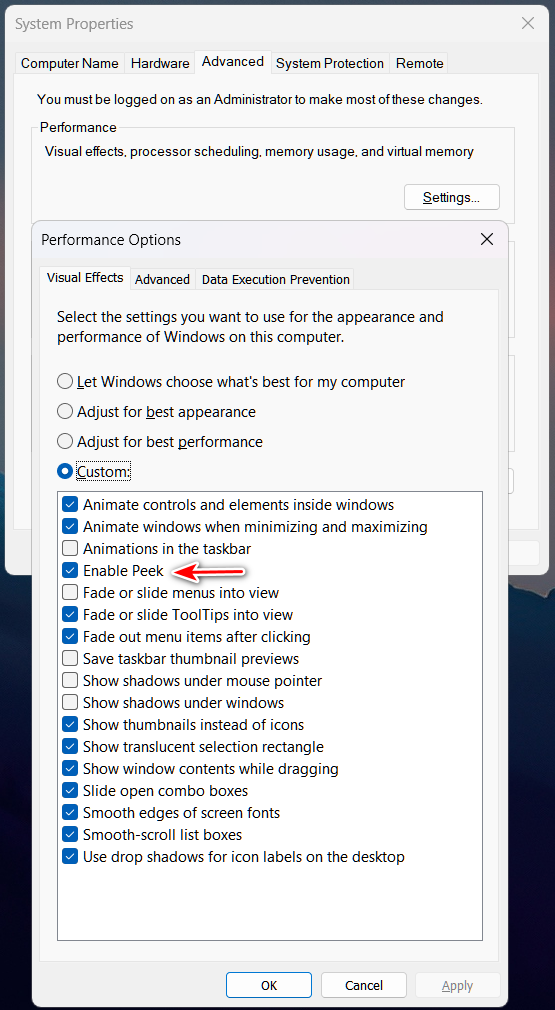
I'm not really following your explanation very well, but are you by chance referring to "Peek?"