
Start11 V2 Pinned Taskbar Folder Icon Size
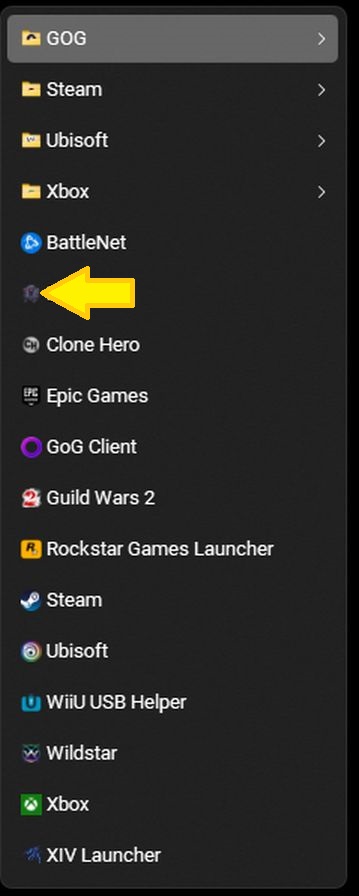
I pinned a folder to the taskbar and can change the font size, but I can't find an option anywhere to change the icon size.
Stardock will be closed for the week starting on Monday, June 29th and we will be returning on Monday, July 6th. We will be monitoring support tickets and forums during this time but expect delays in responses during this time.
I pinned a folder to the taskbar and can change the font size, but I can't find an option anywhere to change the icon size.
Hello,
Sorry to hear you are having issues. Which Start11v2 Start menu style you're using?
Thanks
Basj,
Stardock Community Assistant.
I believe the icon size in jump lists is controlled by Windows. I could be wrong, but I don't think you can change the icon size in jump lists.
How large are you wanting the icons to be?
I'm currently using the Modern Style Start Menu. I'd like the icons to be a little larger, but not huge. If Windows controls the jump list icon size, then that's ok. I just wanted to make sure there wasn't a setting I was missing in Start11. Thanks for the replies.
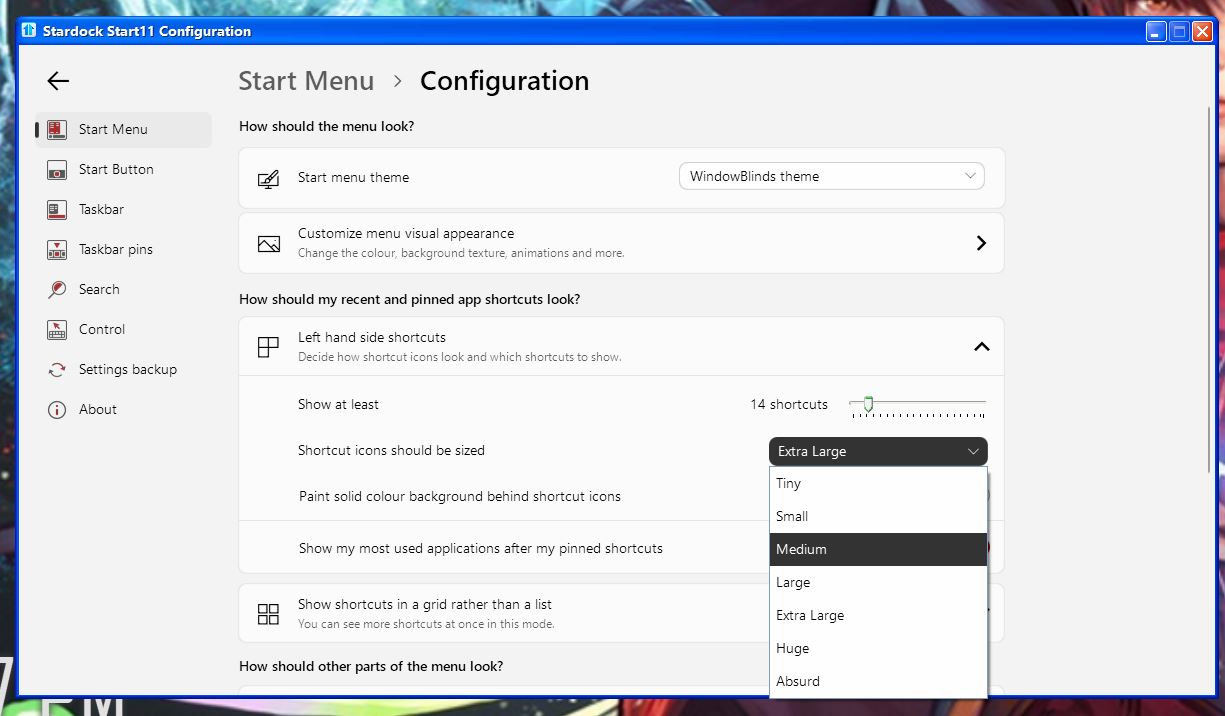
I think you are looking for this Setting.

Thank you,
Basj,
Stardock Community Assistant
Welcome Guest! Please take the time to register with us.