

Start11 2.03 - potential scaling issue and startmenu/task corruption across multiple monitors
 Stardock Forums
My laptop has 125% scaling on the internal 2560x1600 display, and has an external monitor connected with a resolution of 3440x1440 with no scaling with the desktop extended to the external display.
I have Start11 2.03 running in Windows 10 style with Start11 enhanced taskbar.
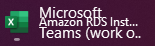
Sometimes, some text or icons from the start menu overlay items on the taskbar or items in the application list in the start menu. Scrolling through all apps on one screen, then scrolling through on the other screen seems to most reliably trigger it. When this happens, most commonly the text and items that are overlaying elements on the non-scaled screen show up as larger text/icons, and when it happens on the scaled screen, they show up as smaller text/icons.
I'm not sure if this is purely a multi-monitor issue or whether it's a problem because one of the monitors has scaling active, which at least seems to highlight that the overlayed content 'comes from' the other screen. I also wasn't experiencing this with my previous laptop where scaling was not active, but, it was used with the same external monitor.
I've not been able to reproduce it with Enhanced Taskbar disabled.
Examples:
.
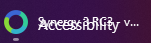

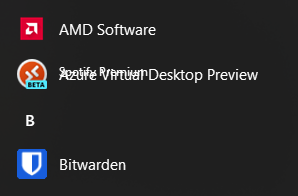
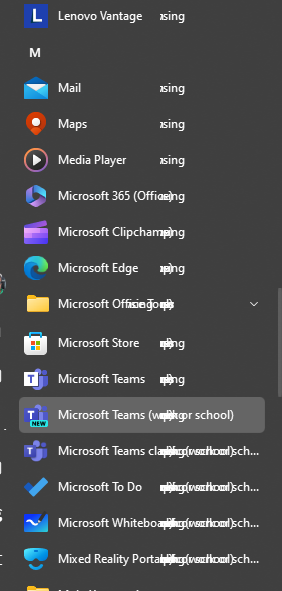
Edit to add Windows info:
Edition Windows 11 Pro
Version 23H2
OS build 22631.3007
Experience Windows Feature Experience Pack 1000.22681.1000.0
